At some point, I found myself in the role of a teacher at one of the Ukrainian universities. I had never worked in this role before, and it turned out to be a great experience for many reasons. One of them is that you actually learn a lot yourself when you have to explain things to others.
Below is the content from my first lecture, and I hope you can find something interesting here. I’m going to continue with the other lectures, so subscribe if you don’t want to miss something that might be relevant to you.
I assume you have some basic knowledge going in:
- You can write code in at least one programming language
- You work with Git and GitHub
- You have a basic understanding of GitHub Actions (or even no experience with it at all – that’s fine)
- You have some general awareness of security concepts
Now, let’s get to it.
If you’ve ever pushed code and waited for a green checkmark, you’ve used CI/CD. But have you thought about what happens when that pipeline gets compromised?
We’ll start from the basics – what CI/CD actually is, how pipelines work, and why they’ve become one of the most attractive targets for attackers. Then we’ll get into threat modeling, real-world breaches, and the frameworks designed to prevent them.
CI/CD – What It Actually Means
CI/CD stands for Continuous Integration and Continuous Delivery (or Deployment). At its core, it’s a set of practices that let development teams ship code changes more frequently and more reliably by automating the build, test, and deployment process.
Let’s break it down.
Continuous Integration means developers frequently merge their code into a shared repository – ideally at least daily. Each commit triggers an automated build and test run. If something breaks, you find out in minutes, not weeks. Martin Fowler defined it well back in 2006: integrate often, test automatically, fix failures immediately.
Continuous Delivery extends this by making sure your code is always in a deployable state. Everything up to production deployment is automated, but that final push still requires a human to press the button. The business decides when to release. Jez Humble wrote the book on this.
Continuous Deployment goes one step further – every change that passes all tests gets deployed to production automatically. No human gate at all. This requires serious confidence in your test suite.
The key difference between Delivery and Deployment is that one decision point: does a human approve the production release, or does it happen automatically?
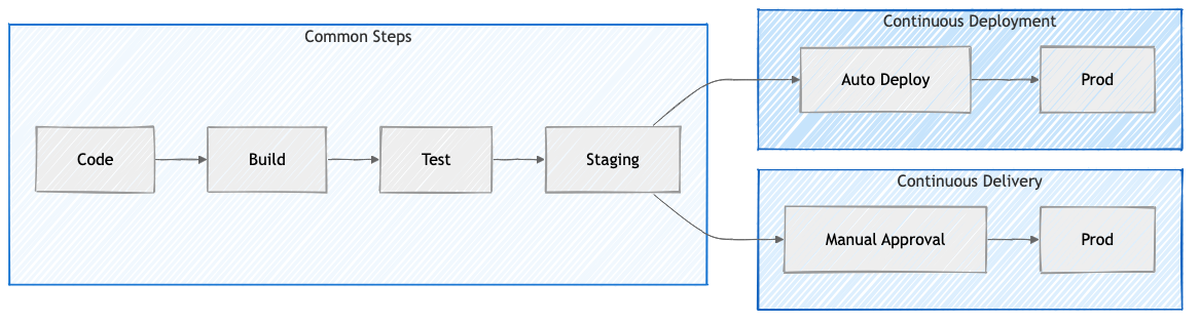
Continuous Delivery adds a manual approval before production. Continuous Deployment removes it entirely.
Why This Matters – The Feedback Loop
Think about the traditional approach. A developer writes some buggy code, moves on to other tasks, and weeks later someone discovers the bug. By then, the context is gone. Fixing it becomes an archaeological dig through code that’s had more changes piled on top.
With CI/CD, you push code, the build fails minutes later, and you still remember exactly what you were doing. The fix is usually straightforward because nothing else has been built on top of your mistake yet.
This is why Jez Humble says “if it hurts, do it more frequently, and bring the pain forward.” Frequent, small deployments are boring – and boring deployments are good deployments. (From Continuous Delivery.)
The Data Backs This Up
The DORA research program (now part of Google Cloud) has been studying engineering team performance for years. They classify teams into four tiers based on four metrics:
- Deployment Frequency – how often you ship
- Lead Time for Changes – how long from commit to production
- Mean Time to Recovery – how fast you bounce back from failures
- Change Failure Rate – how often deployments cause problems
The gap between elite and low performers is not incremental – it’s orders of magnitude:
- Deploy Frequency – elite teams ship on demand (multiple times per day), low performers ship monthly or less
- Lead Time – elite teams go from commit to production in under a day, low performers take 1–6 months
- Time to Recovery – elite teams recover in under an hour, low performers need a week or more
- Change Failure Rate – elite teams fail 0–15% of the time, low performers hit 46–60%
Here’s the interesting part: elite teams are better at both speed and stability. The old assumption that you can either move fast or be careful turns out to be a false tradeoff. Teams that deploy frequently also tend to have lower failure rates. If you want to dig deeper, read Forsgren, Humble & Kim’s Accelerate or the DORA ROI report.
A Brief History
CI wasn’t always the norm. Grady Booch coined the term in 1991, but it really took off when Kent Beck and Martin Fowler baked it into Extreme Programming around 2000. CruiseControl (2001) was the first dedicated CI server, followed by Hudson (2004), which later forked into Jenkins after Oracle’s acquisition of Sun.
The 2010s brought cloud-based CI – Travis CI, GitLab CI, CircleCI. Then GitHub Actions launched in 2018, and it changed the game by putting CI/CD directly inside the platform where most open-source code already lives.
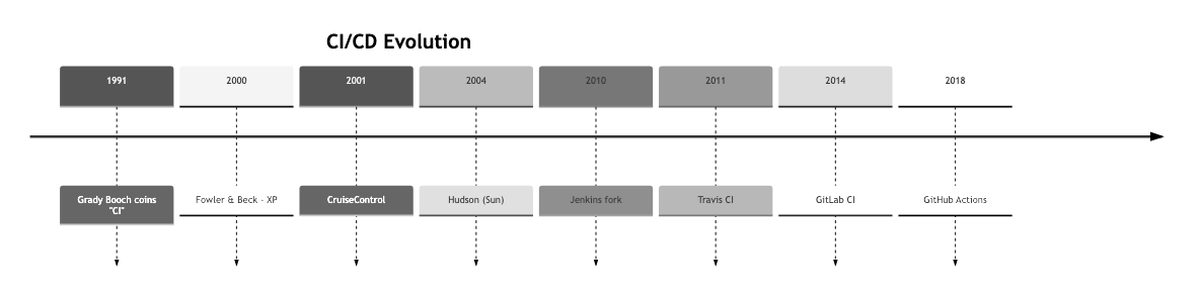
From Grady Booch coining the term (1991) to GitHub Actions going GA (2019) – almost 30 years of evolution.
Git Branching Strategies
Before we talk about pipelines, we need to talk about how code gets organized. Three strategies dominate:
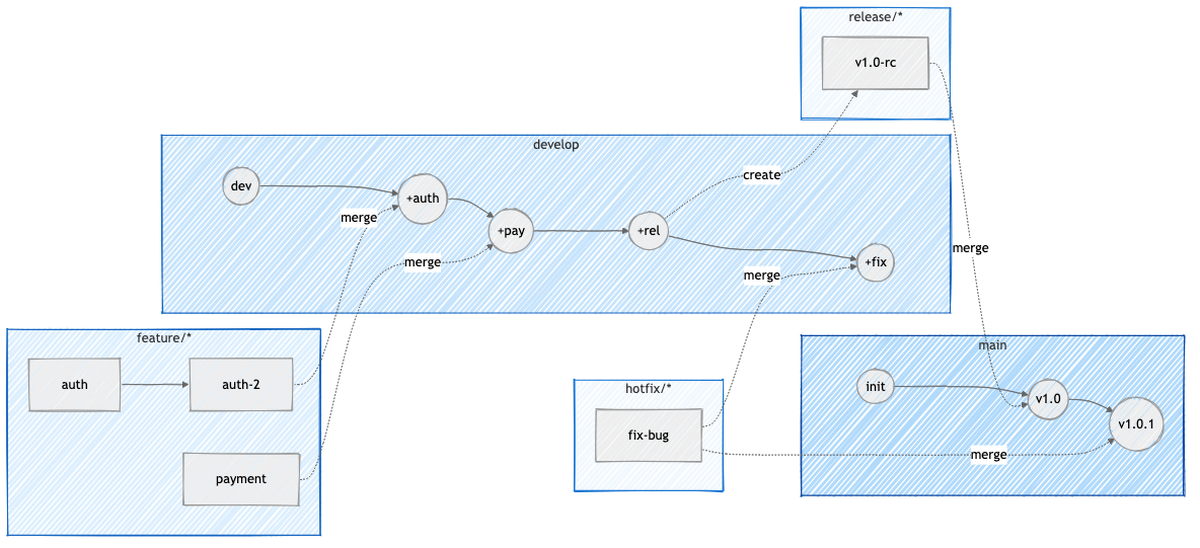
Git Flow (Vincent Driessen, 2010) uses multiple long-lived branches: main for production, develop for integration, plus temporary feature/*, release/*, and hotfix/* branches. It works well for scheduled releases and projects that maintain multiple versions in production, but many teams find it overkill.
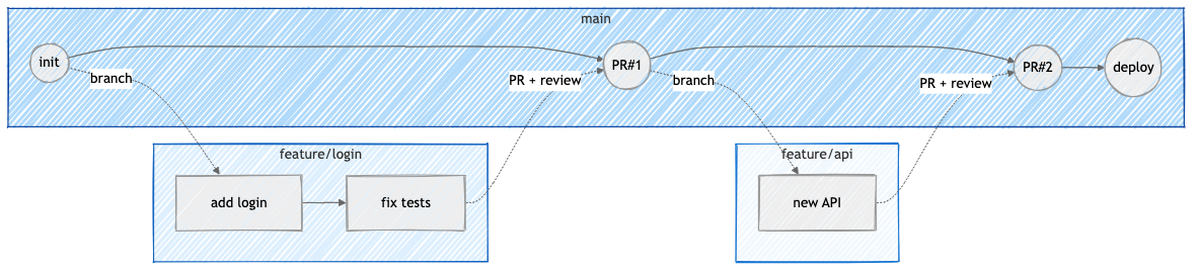
GitHub Flow simplifies everything to one long-lived branch (main) and short-lived feature branches. You branch off main, open a PR, get a code review, merge, and deploy. That’s it. Best for web apps and teams doing continuous deployment.
Trunk-Based Development takes it even further – developers commit directly to main (or use very short-lived branches that last hours, not days). Incomplete features hide behind feature flags. This requires a strong CI setup and fast rollback capabilities, but it enables the fastest iteration.
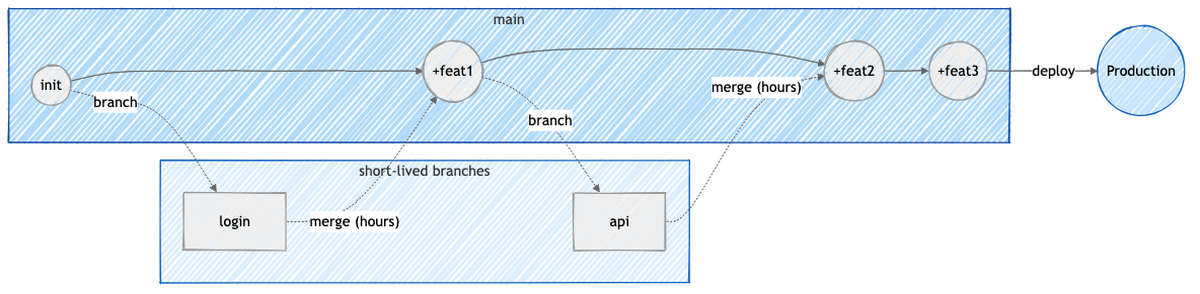
Git Flow has the most ceremony, Trunk-Based the least. Pick based on your team’s release cadence.
The tradeoff between GitHub Flow and Trunk-Based comes down to where you put your quality gate. GitHub Flow uses PRs as gates before code reaches main. Trunk-Based allows incomplete (but flagged) code in main and relies on CI and monitoring instead.
GitHub Actions – How Pipelines Work
A CI/CD pipeline is an automated sequence of steps that code goes through from commit to deployment: build, test, package, scan, deploy.

Each stage gates the next – failure stops the pipeline (fail fast). The entire pipeline is defined as code (YAML) and version-controlled alongside your application.
In GitHub Actions, these are called “workflows” – YAML files that live in .github/workflows/ in your repository. When an event happens (push, pull request, schedule, manual trigger), GitHub picks up the workflow, puts jobs in a queue, and dispatches them to runners.
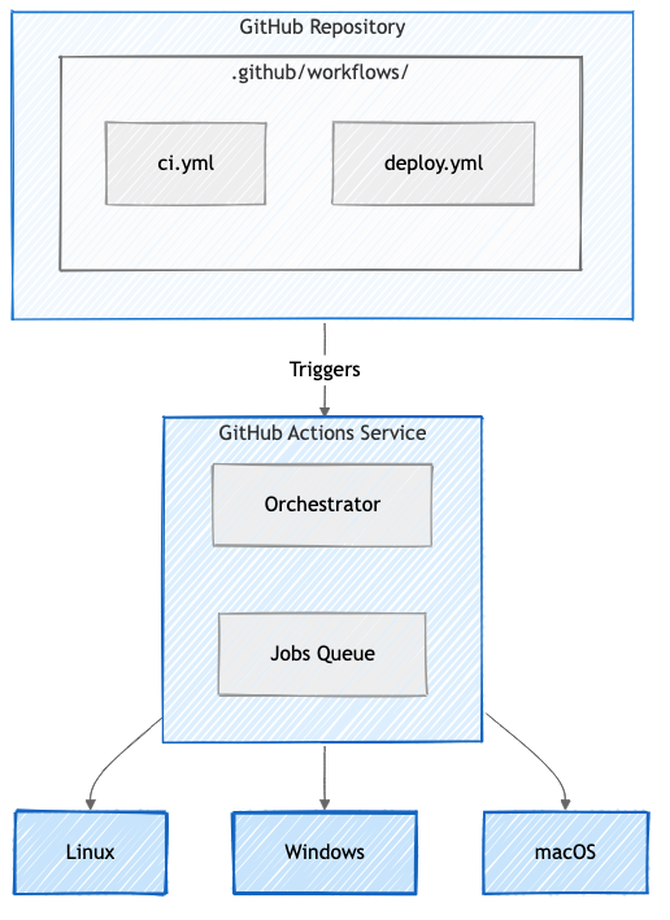
Workflows live in your repo. GitHub’s orchestrator picks them up and dispatches jobs to runners.
A basic workflow looks like this:
name: CI Pipeline

on:
  push:
    branches: [main]
  pull_request:
    branches: [main]

jobs:
  build:
    runs-on: ubuntu-latest
    steps:
      - uses: actions/checkout@v4
      - uses: actions/setup-node@v4
        with:
          node-version: '20'
      - run: npm ci
      - run: npm test
The key concepts:
- Workflow – the whole automated process, defined in YAML (docs)
- Job – a set of steps that run on the same runner
- Step – an individual task (a shell command or a reusable action)
- Action – a reusable unit from the marketplace (like
actions/checkout) - Runner – the machine that executes everything
Jobs can depend on each other using needs, so you can build DAGs of steps: lint first, then test, then build only if both pass.
Runners
Runners are the machines where jobs actually execute. GitHub offers hosted runners (Ubuntu, Windows, macOS) that give you a fresh VM for each job with zero setup. You can also set up self-hosted runners on your own infrastructure for full control, private network access, or custom hardware like GPUs.
The security tradeoff matters here: GitHub-hosted runners are ephemeral and clean, but self-hosted runners persist between jobs. If you’re not careful with cleanup, secrets and artifacts from one job can leak to the next.
Artifacts and Caching
Artifacts are files produced during a pipeline run – binaries, test reports, packages. You upload them with actions/upload-artifact and download them in downstream jobs with actions/download-artifact. Default retention is 90 days.
Caching is different from artifacts. Cache stores things like node_modules/ to speed up future builds, but it can be evicted and isn’t downloadable. Artifacts are the actual outputs you want to keep.
Matrix Builds
Matrix builds let you test across multiple versions and platforms at once:
strategy:
  matrix:
    os: [ubuntu-latest, windows-latest, macos-latest]
    node-version: [18, 20, 22]
    exclude:
      - os: macos-latest
        node-version: 18
This spins up 8 parallel jobs (3×3 minus one exclusion), each testing a different combination.
Why CI/CD Systems Are Targets
Now we get to the interesting part.
CI/CD pipelines have direct access to source code, secrets, cloud credentials, and production environments. They run with elevated permissions. They connect your source control, container registries, and cloud infrastructure. And they typically get less monitoring than production systems.
Compromise a CI/CD pipeline and you compromise everything it touches.
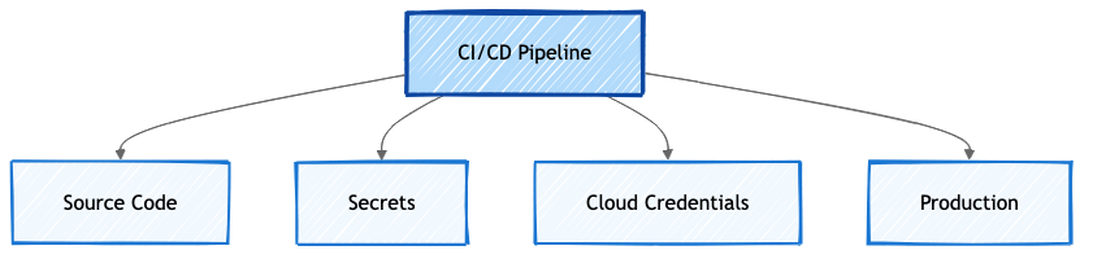
A CI/CD pipeline sits at the intersection of everything valuable in your organization.
Security Foundations
Before we look at specific attacks, let’s cover the fundamentals.
The CIA Triad
Every security discussion starts here: Confidentiality (secrets don’t leak), Integrity (code doesn’t get tampered with), and Availability (builds keep running). In CI/CD terms:
- Confidentiality violation – secrets leaked in build logs
- Integrity violation – malicious code injected into artifacts
- Availability violation – build runners taken offline
Shift-Left Security
The idea is simple: move security checks earlier in the development lifecycle. Don’t wait until a security team reviews your code right before release. Instead, run SAST in your IDE, scan dependencies on every push, do threat modeling during design. (OWASP DevSecOps Guideline)
Defects found in production cost roughly 100x more to fix than those caught during requirements. The earlier you catch a problem, the cheaper it is.
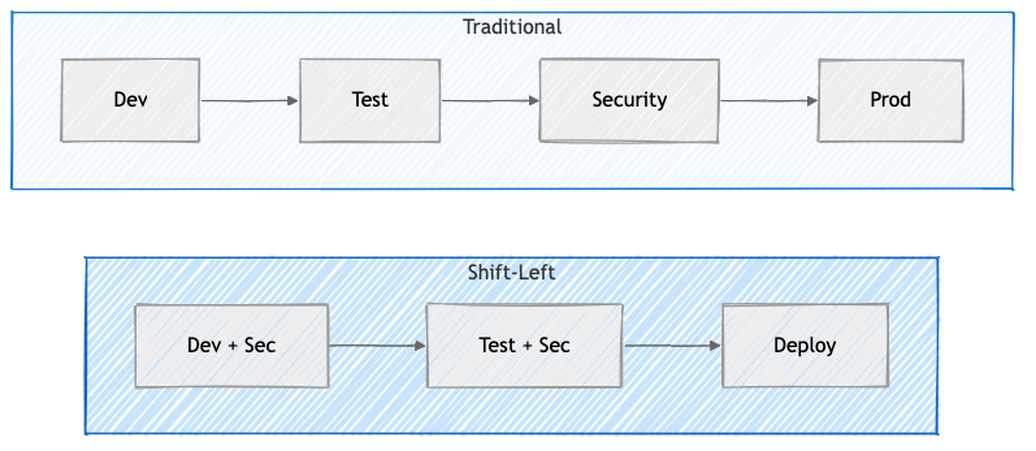
Traditional security is a gate at the end. Shift-Left makes it part of every phase.
Defense in Depth
No single security control is 100% effective. So you layer them: access control, code review, automated scanning, secret management, environment isolation, monitoring. If an attacker gets past one layer, they still face the next one. (SANS whitepaper)

Secure Development Lifecycle (SDL)
Microsoft’s SDL bakes security into each phase: security requirements, threat modeling during design, secure coding standards, security testing during verification, and security review before release. The key insight is that threat modeling happens in the design phase – before code is written – because that’s the most cost-effective time to find and fix security issues.
Threat Modeling for CI/CD
Threat modeling is a structured approach to finding security problems before attackers do. (OWASP Threat Modeling, Microsoft Threat Modeling)
For CI/CD, you:
- Identify assets – source code, secrets, artifacts, infrastructure
- Identify threats – who might attack and how (using frameworks like STRIDE)
- Find vulnerabilities – weak points in your pipeline
- Prioritize risks – which threats are most likely and most damaging (using DREAD scoring)
- Define mitigations – what controls reduce the risk
STRIDE
Microsoft’s STRIDE (1999) categorizes threats into six types:
- Spoofing – stolen service account triggers builds
- Tampering – malicious code injected via compromised account
- Repudiation – no audit logs for who deployed what
- Information Disclosure – API keys visible in build logs
- Denial of Service – flooding the build queue
- Elevation of Privilege – pipeline bug bypasses approval gates
DREAD
DREAD gives you a quantitative way to prioritize threats by scoring Damage, Reproducibility, Exploitability, Affected users, and Discoverability on a 1-10 scale. Average the five scores and you get a risk level: 12-15 is critical (fix now), 8-11 is high (this sprint), 5-7 is medium (next release), 1-4 is low (accept or defer).
OWASP Top 10 CI/CD Security Risks
The OWASP Top 10 CI/CD Security Risks (published October 2022) is based on real-world breaches and attack patterns:
- Insufficient Flow Control – missing approval gates and branch protection
- Inadequate IAM – overly permissive access
- Dependency Chain Abuse – poisoned packages
- Poisoned Pipeline Execution – attacker-modified workflow files
- Insufficient PBAC – pipeline-based access control gaps
- Insufficient Credential Hygiene – leaked or overly broad secrets
- Insecure Configuration – misconfigured CI/CD settings
- Ungoverned 3rd-Party Services – unvetted external integrations
- Improper Artifact Integrity – unsigned or unverified artifacts
- Insufficient Logging – not enough visibility into what’s happening
Let’s look at some real attacks that map to these risks.
Real-World Attacks
SolarWinds (2020) – Artifact Integrity
Russian APT actors (SVR/Cozy Bear) compromised SolarWinds’ build system. They planted malware called SUNSPOT that monitored the build process and injected a backdoor (SUNBURST) during compilation. The malicious code was never in the source repository – it was added in-memory during the build. The trojanized updates shipped to 18,000+ organizations, including the US Treasury, Commerce Department, and Homeland Security. (CrowdStrike analysis, CISA Advisory)
This is the textbook supply chain attack: compromise the build, not the source.

Codecov (2021) – Credential Hygiene
Attackers modified Codecov’s bash uploader script to exfiltrate environment variables – including CI secrets and credentials – from every project that used it. Thousands of organizations had their CI/CD secrets stolen. The attack was only detected when someone noticed a hash mismatch. (Codecov security update)
Dependency Confusion (2021)
Security researcher Alex Birsan published internal package names to public npm/PyPI registries. Because many package managers check public registries first, companies like Amazon, Zillow, Lyft, and Slack automatically pulled the attacker’s packages instead of their own internal ones. (Birsan’s writeup)
ua-parser-js (2021) – Dependency Chain Abuse
A package with 9 million weekly npm downloads got hijacked. The attacker published versions containing cryptominers. The same month, the coa and rc packages (9M + 14M downloads) were also hijacked to steal credentials. (GitHub Advisory for ua-parser-js, coa advisory)
PHP Repository Backdoor (2021) – Flow Control
Attackers pushed malicious code directly to PHP’s main branch, bypassing code review entirely. (PHP internals post) Homebrew had a similar issue where researchers exploited auto-merge rule validation flaws. (Homebrew disclosure)
Supply Chain Security Frameworks
After incidents like SolarWinds, Log4Shell, and Codecov, the industry realized we needed systematic approaches to supply chain security. Attacks on the software supply chain grew 742% between 2019 and 2022. Two frameworks emerged from the OpenSSF:
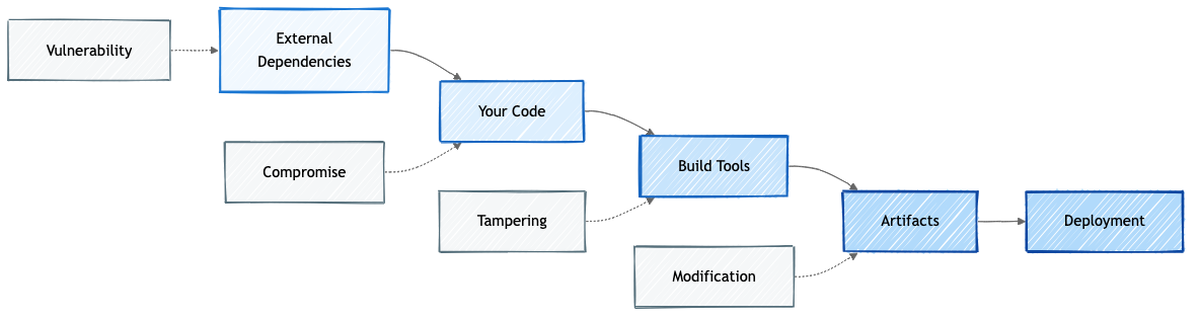
Every link in the chain – from dependencies to deployment – is a potential attack point.
SLSA – Supply-chain Levels for Software Artifacts
SLSA (pronounced “salsa”) answers one question: was this artifact built from the source it claims, by the process it claims, without tampering?
It defines three levels:
- Level 1 – provenance exists, but can be self-generated by the developer
- Level 2 – provenance generated by a hosted build platform like GitHub Actions or Cloud Build (not a developer laptop)
- Level 3 – provenance generated by an isolated builder, where the build job can’t tamper with the attestation
The core concept is provenance – a cryptographically signed document that records how, where, and from what source an artifact was built. It creates an unbroken chain: source -> build -> artifact.
Without provenance, you can see code in a repository and a package in a registry, but you can’t prove the package was actually built from that code.
How Provenance Works
A SLSA provenance attestation uses the in-toto format and records:
- builder – which CI platform produced it (GitHub Actions runner ID, bound to OIDC)
- invocation.configSource – the source repo, exact commit SHA, and workflow file
- subject – the output artifact name and cryptographic hash
At SLSA Level 3, the provenance job runs in a separate VM from the build job. The build job outputs the artifact and its hash. The provenance job independently records what was produced. The build job has no access to signing keys, so it can’t forge the attestation. The slsa-github-generator implements this as a reusable workflow.
Real-world example: OpenFGA uses SLSA Level 3 provenance for every release – you can download their .intoto.jsonl attestation files and verify them yourself.
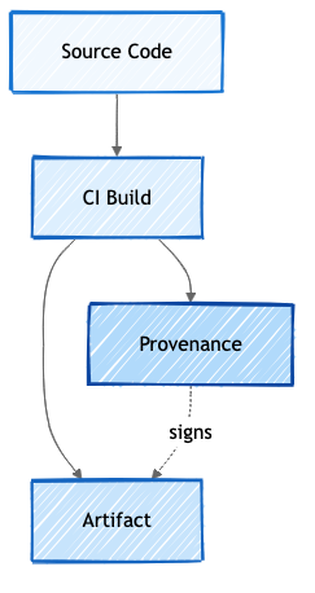
Provenance creates a cryptographic link between source, build, and artifact.
Sigstore – Keyless Signing
Traditional code signing has a problem: you need a long-lived PGP/GPG key. That key has to be stored somewhere, rotated periodically, and if it leaks, anyone can sign anything as you.
Sigstore takes a different approach: ephemeral keys that exist for seconds, not years.
Here’s how it works in GitHub Actions:
- Workflow starts and gets an OIDC token from GitHub
- The token goes to Fulcio (a Certificate Authority) which issues a short-lived certificate (~10 minutes), bound to the workflow identity
- The provenance is signed with this ephemeral key
- The signature is recorded in Rekor (an append-only transparency log)
- The key is destroyed
Even after the certificate expires, the signature remains valid because Rekor recorded it. The append-only structure means tampering is detectable. And there’s no long-lived key to steal.
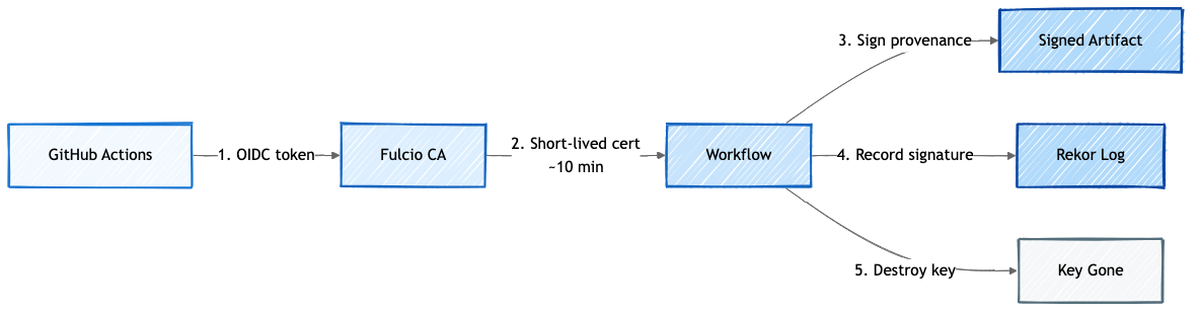
The key lives for seconds. The proof lives forever in Rekor.
Verification
You can verify provenance using several tools:
# Using cosign
cosign verify-blob-attestation \
  --bundle artifact.intoto.jsonl \
  --certificate-oidc-issuer https://token.actions.githubusercontent.com \
  --certificate-identity-regexp "github.com/slsa-framework/slsa-github-generator" \
  artifact.tar.gz

# Using the purpose-built SLSA verifier
slsa-verifier verify-artifact artifact.tar.gz \
  --provenance-path artifact.intoto.jsonl \
  --source-uri github.com/org/repo \
  --source-tag v1.0.0
S2C2F – Secure Supply Chain Consumption Framework
If SLSA is about producing trustworthy artifacts, S2C2F (originally from Microsoft, now at OpenSSF) is about consuming open-source safely. (S2C2F specification, Microsoft guide)
It defines eight practices across four maturity levels:
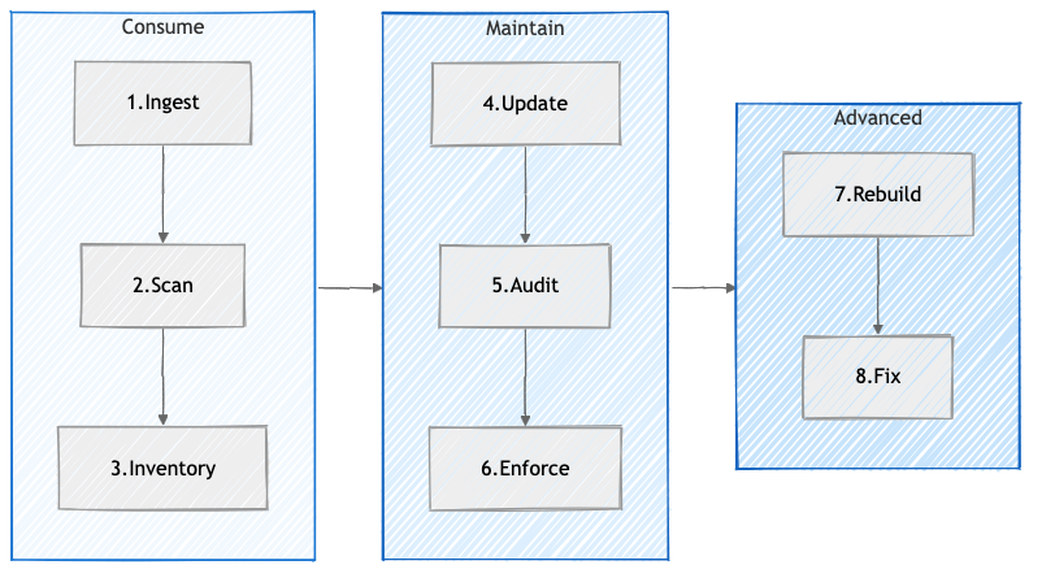
Consume (L1):
- Ingest – cache dependencies in internal repos so upstream removals don’t break your builds
- Scan – detect vulnerabilities and malware
- Inventory – maintain SBOMs, know where every OSS component is deployed
Maintain (L2-L3):
- Update – automated patching, 72-hour target for critical CVEs
- Audit – verify chain-of-custody from original source
- Enforce – policy as code, allow-lists, curated feeds only
Advanced (L4):
- Rebuild – rebuild from source in trusted environments
- Fix – emergency private patching + upstream contribution
Each practice maps directly to real attacks:
- left-pad removal (2016) – Ingest: internal cache prevents upstream removal from breaking your builds
- event-stream hijack (2018) – Scan + Enforce: malware detection and curated feeds would have caught the compromised package
- SolarWinds (2020) – Rebuild: rebuilding from source in a trusted environment exposes build-time tampering
- Codecov (2021) – Audit: verifying integrity of consumed artifacts would have detected the modified uploader script
- Log4Shell (2021) – Inventory + Update: know where it’s deployed, patch within 72 hours
- ua-parser-js (2021) – Enforce: allow-list policy blocks unauthorized versions from being installed
L4 is explicitly called “aspirational” – the cost is high and it only makes sense for the most critical dependencies of the most critical projects.
Key Takeaways
If you take away just a few things from this article:
- Your CI/CD pipeline is a production system. It has access to source code, secrets, cloud credentials, and deployment targets. Treat it with the same rigor you’d treat any server facing the internet. If someone compromises your pipeline, they don’t need to compromise anything else.
- Speed and security are not opposites. DORA data shows that elite teams deploy faster and have fewer failures. CI/CD done right gives you both – but only if security is baked in, not bolted on at the end.
- Supply chain attacks are the new normal. SolarWinds, Codecov, Log4Shell, ua-parser-js – these aren’t edge cases anymore. 80-90% of your codebase is open-source dependencies you didn’t write. Knowing what you’re running (SBOM), where it came from (provenance), and whether it’s been tampered with (signatures) isn’t optional.
- Provenance closes the trust gap. Without it, you can see code in a repository and a package in a registry, but you can’t prove one came from the other. SLSA provenance + Sigstore keyless signing give you cryptographic proof of the source -> build -> artifact chain, with no long-lived keys to steal.
- Start with the basics. You don’t need SLSA Level 3 on day one. Enable branch protection. Turn on Dependabot. Don’t put secrets in plain text. Scan your dependencies. These aren’t hard, and they stop most attacks. The fancy stuff comes later.
What’s Next
In Part 2, we’ll get into the practical side: GitHub Actions security hardening, secrets management, action pinning, OIDC for cloud deployments, and how to set up branch protection rules that actually work. We’ll also cover some of the attacks that specifically target GitHub Actions workflows – like poisoned pipeline execution through modified workflow files in pull requests.
If you found this useful, follow along – Part 2 gets much more hands-on.
References
- Martin Fowler – Continuous Integration (2006)
- Jez Humble – Continuous Delivery
- DORA Research
- Forsgren, Humble & Kim – Accelerate (2018)
- GitHub Actions Documentation
- OWASP Top 10 CI/CD Security Risks
- OWASP DevSecOps Guideline
- Microsoft SDL
- SLSA Specification v1.0
- Sigstore
- S2C2F Framework
- OpenSSF
- Sonatype – State of the Software Supply Chain
- CrowdStrike – SUNSPOT Analysis
- Codecov Security Update
- Alex Birsan – Dependency Confusion