When you log into an application protected by Keycloak, it doesn’t just verify your credentials and forget about you—it creates a network of session objects that track who you are, which applications you’ve accessed, and how long you’ve been active. Understanding these sessions is important for anyone building secure applications or troubleshooting authentication issues.
This guide covers Keycloak’s session management—from the temporary authentication sessions created during login, to the long-lived offline sessions that enable mobile apps to work without constant re-authentication. We’ll examine the source code, understand the data structures, and see how all these pieces fit together to provide single sign-on across your applications.
Session Types Overview
Before looking at the details, let’s establish a mental model of how Keycloak organizes sessions. Think of it as a hierarchy: when you start logging in, Keycloak creates temporary Authentication Sessions to track your progress through the login flow. Once you successfully authenticate, these transform into a User Session that represents your overall login to Keycloak. Then, as you access different applications, each one gets its own Client Session attached to your user session.
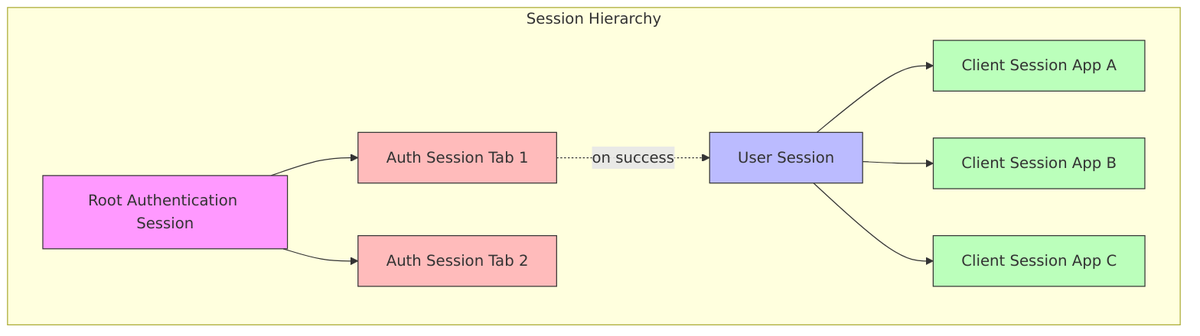
This hierarchy is the foundation of Keycloak’s single sign-on (SSO) capability. Because your user session is separate from individual client sessions, you only need to authenticate once—Keycloak then creates client sessions automatically as you access different applications. Let’s explore each type in detail.
User Session
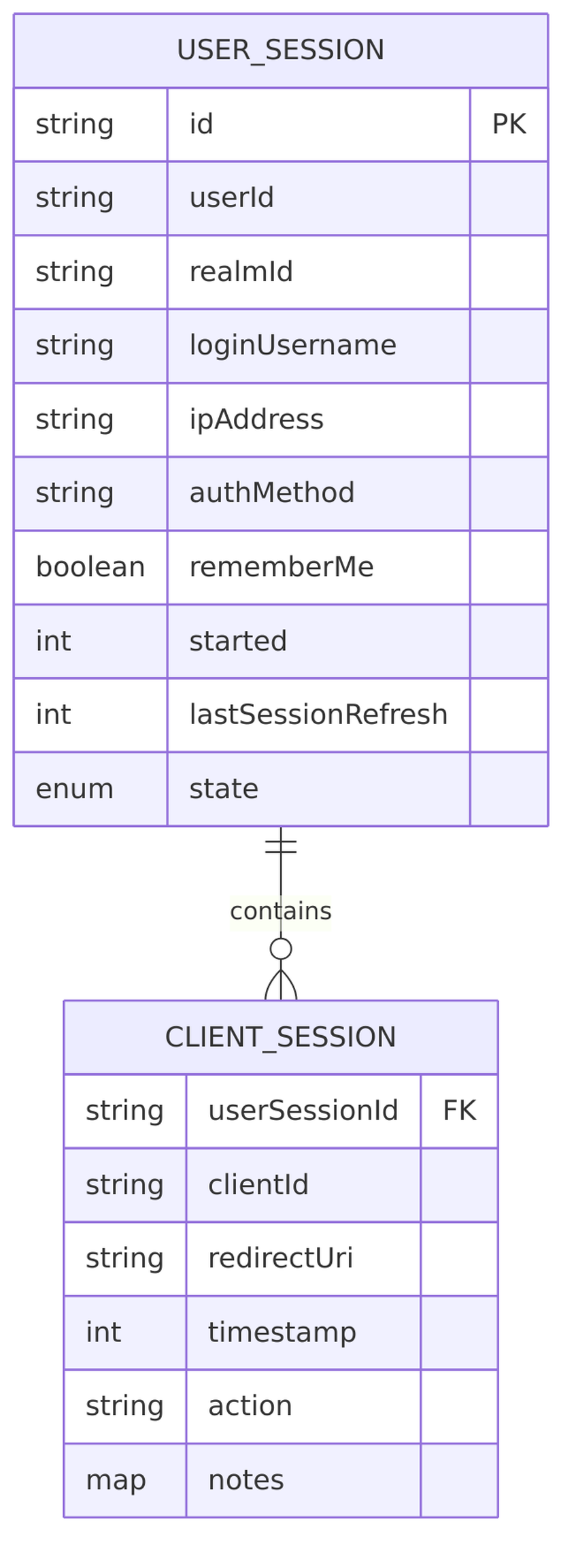
The User Session is the heart of Keycloak’s authentication model. It represents your overall login to Keycloak itself (the Identity Provider), not to any specific application. When you enter your credentials and successfully authenticate, Keycloak creates exactly one user session for your browser.
Key characteristics:
- One per browser login – Created when user authenticates to Keycloak
- Contains user identity (
userId,loginUsername) - Login metadata (
ipAddress,authMethod,rememberMe) - Timestamps (
started,lastSessionRefresh) - Session state (
LOGGED_IN,LOGGING_OUT,LOGGED_OUT,LOGGED_OUT_UNCONFIRMED) - Broker info for federated identity (
brokerSessionId,brokerUserId) - Parent container – holds references to all client sessions
Source files:
UserSessionModel.java– Main interfaceUserSessionProvider.java– Session provider interface
Client Session
While the user session tracks who you are, client sessions track which applications you’ve accessed. Every time you visit a new application protected by Keycloak, a new client session is created and attached to your existing user session. This is what enables the “single” in single sign-on—the user session proves you’re authenticated, so Keycloak can issue tokens for new applications without asking for credentials again.
Key characteristics:
- One per application – Created when user accesses a specific client/app
- Which client (
clientId) - Protocol-specific data (
redirectUri,action) - Token metadata (refresh token reuse tracking)
- Client-specific notes and timestamps
- Child of user session – always attached to a parent user session
Source files:
AuthenticatedClientSessionModel.java– Client session interface
Session Relationship Diagram
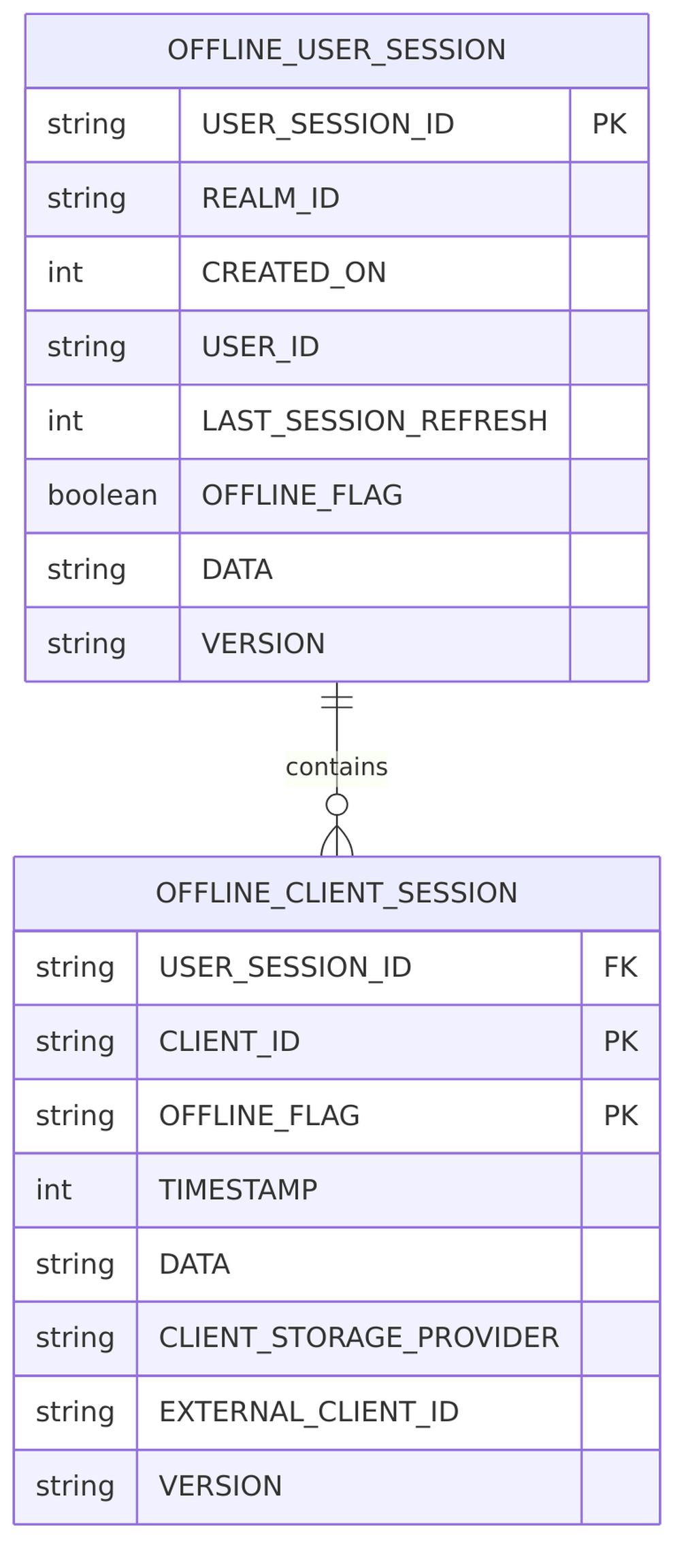
The relationship between user sessions and client sessions follows a parent-child pattern. This entity relationship diagram shows how they connect in the database:
Authentication Sessions
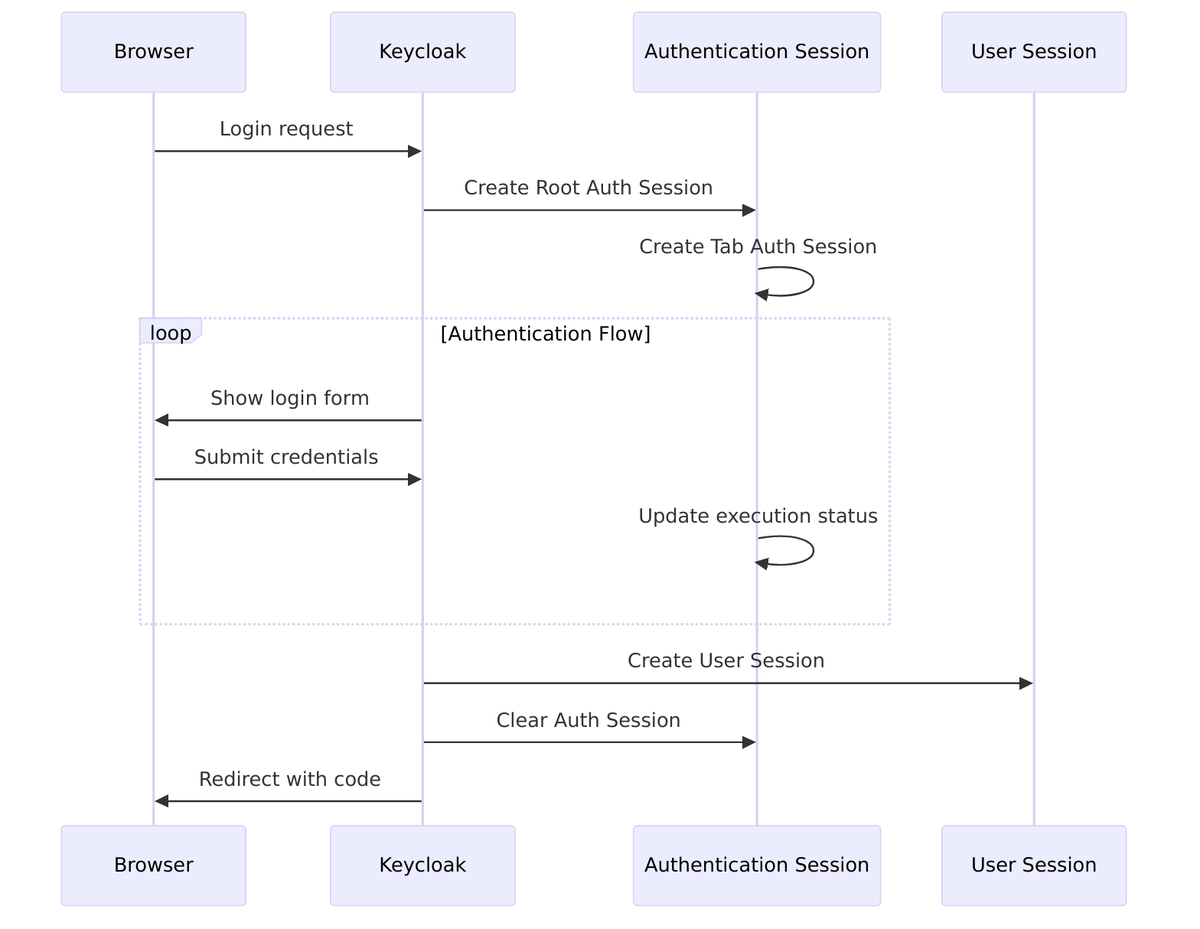
Before we have a user session, we have authentication sessions. These are temporary, transient sessions that exist only during the login process. They track your progress through potentially complex authentication flows—maybe you’ve entered your password but still need to complete MFA, or you’re halfway through a social login redirect.
Keycloak handles multiple browser tabs by giving each tab its own authentication session (identified by a “tab ID”), but they all share a common “root” authentication session tied to your browser. This prevents confusion when you have the login page open in multiple tabs.
- Temporary sessions during the login flow (before authentication completes)
- Has a
RootAuthenticationSessionModelparent representing the browser - Uses tab IDs to handle multi-tab browsing
- Cleared after successful login
Source files:
AuthenticationSessionModel.java– Auth session interfaceRootAuthenticationSessionModel.java– Root auth session
Offline Sessions
So far, we’ve discussed sessions that live for hours—maybe a workday. But what about mobile apps that need to stay logged in for weeks? Or background services that refresh data overnight? That’s where offline sessions come in.
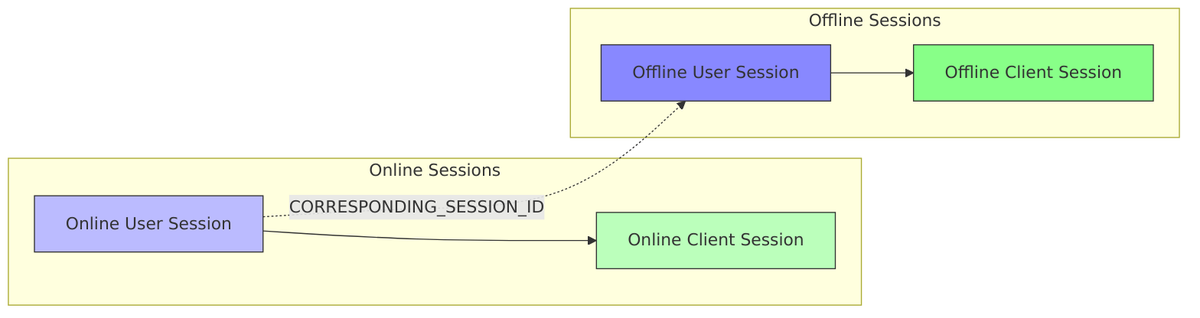
When a client requests the offline_access scope, Keycloak creates a parallel set of sessions with much longer lifespans. These offline sessions survive regular logout and can last for days or weeks. They’re stored persistently in the database, ensuring they survive server restarts.
- Created when offline tokens are requested (
offline_accessscope) - Have longer lifespans than online sessions
- Linked to online sessions via
CORRESPONDING_SESSION_IDnote
Source files:
OfflineUserSessionModel.java– Offline session interface
Storage Architecture
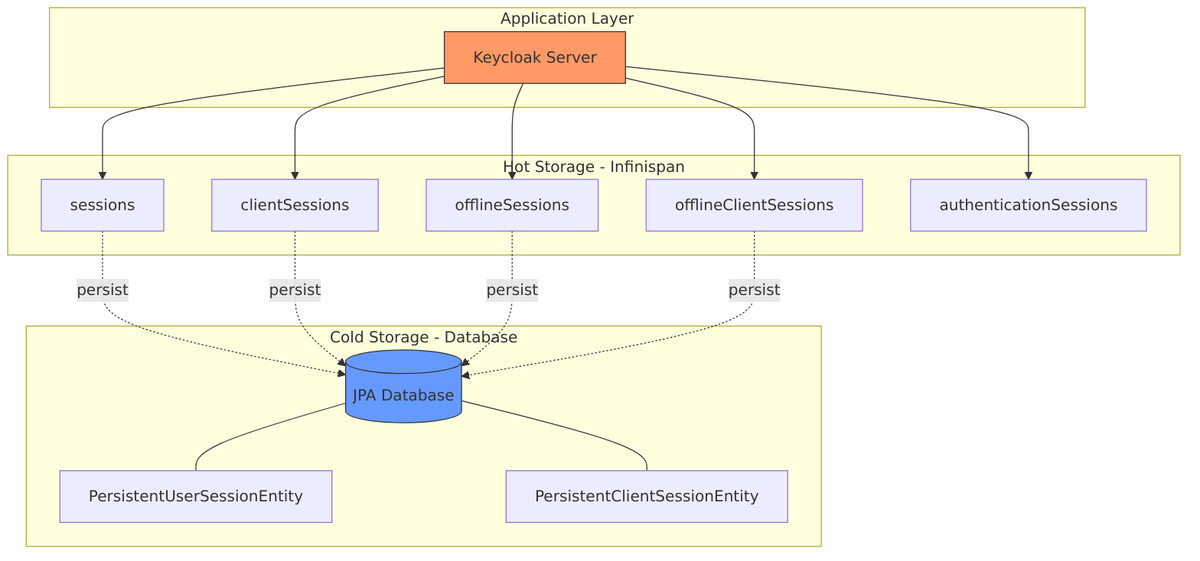
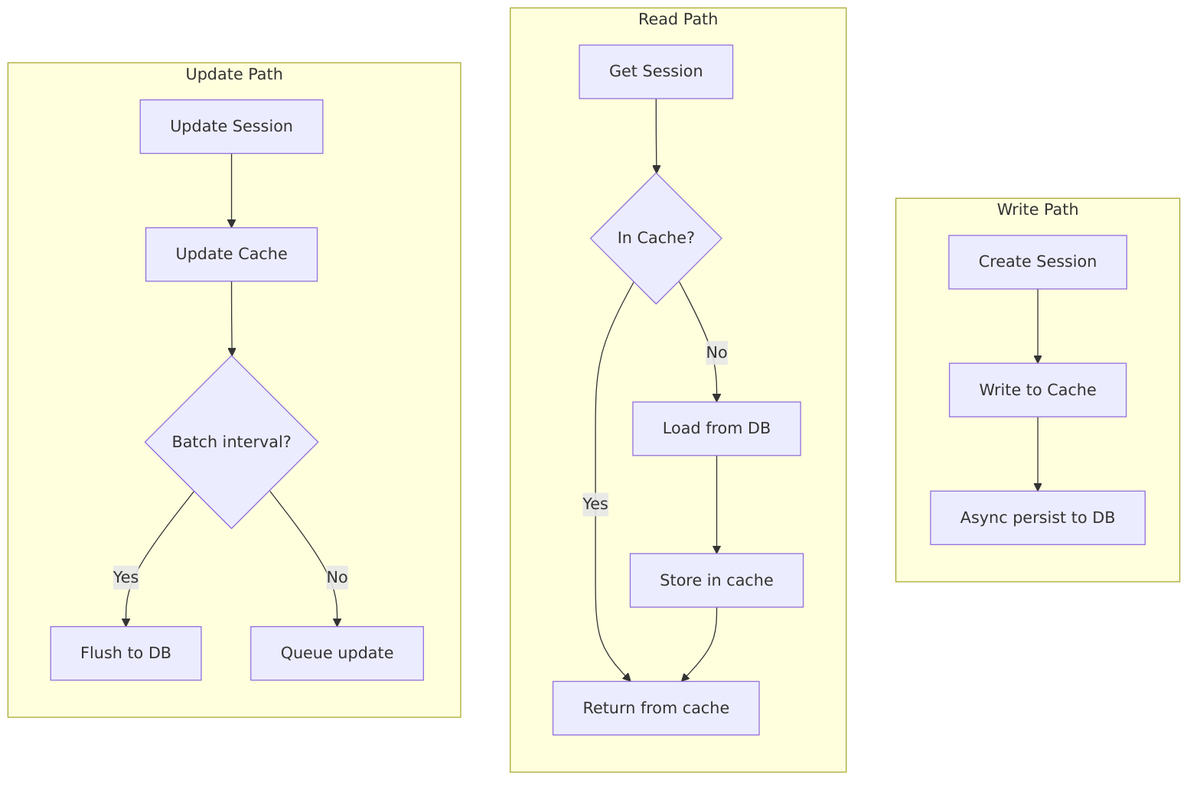
Now that we understand what sessions exist, let’s look at where they’re stored. Keycloak uses a two-tier architecture: a fast distributed cache (Infinispan) for active sessions, and a persistent database for durability.
Frequently accessed sessions are kept in the cache, while the complete set is stored in the database. When a session is needed, Keycloak first checks the cache—only querying the database if necessary.
Infinispan Cache (Primary/Hot Storage)
Infinispan serves as the primary storage for active sessions. It’s a distributed cache, meaning session data is replicated across Keycloak nodes in a cluster. This provides both speed (no database roundtrip for most operations) and resilience (if one node fails, sessions aren’t lost).
Cache names (defined in InfinispanConnectionProvider.java):
| Cache | Constant | Purpose |
|---|---|---|
sessions |
USER_SESSION_CACHE_NAME |
Online user sessions |
clientSessions |
CLIENT_SESSION_CACHE_NAME |
Online client sessions |
offlineSessions |
OFFLINE_USER_SESSION_CACHE_NAME |
Offline user sessions |
offlineClientSessions |
OFFLINE_CLIENT_SESSION_CACHE_NAME |
Offline client sessions |
authenticationSessions |
AUTHENTICATION_SESSIONS_CACHE_NAME |
Authentication flow sessions |
Source files:
InfinispanConnectionProvider.java– Cache configurationInfinispanUserSessionProvider.java– Session provider implementation
JPA Database (Persistent Storage)
While Infinispan handles the hot path, the database provides durability. Offline sessions are always persisted, and online sessions can be persisted too for recovery after restarts. The database schema stores sessions as JSON blobs, allowing flexible storage of session notes and metadata.
Source files:
JpaUserSessionPersisterProvider.java– JPA persistence providerPersistentUserSessionEntity.java– User session entityPersistentClientSessionEntity.java– Client session entity
Realm Session Settings
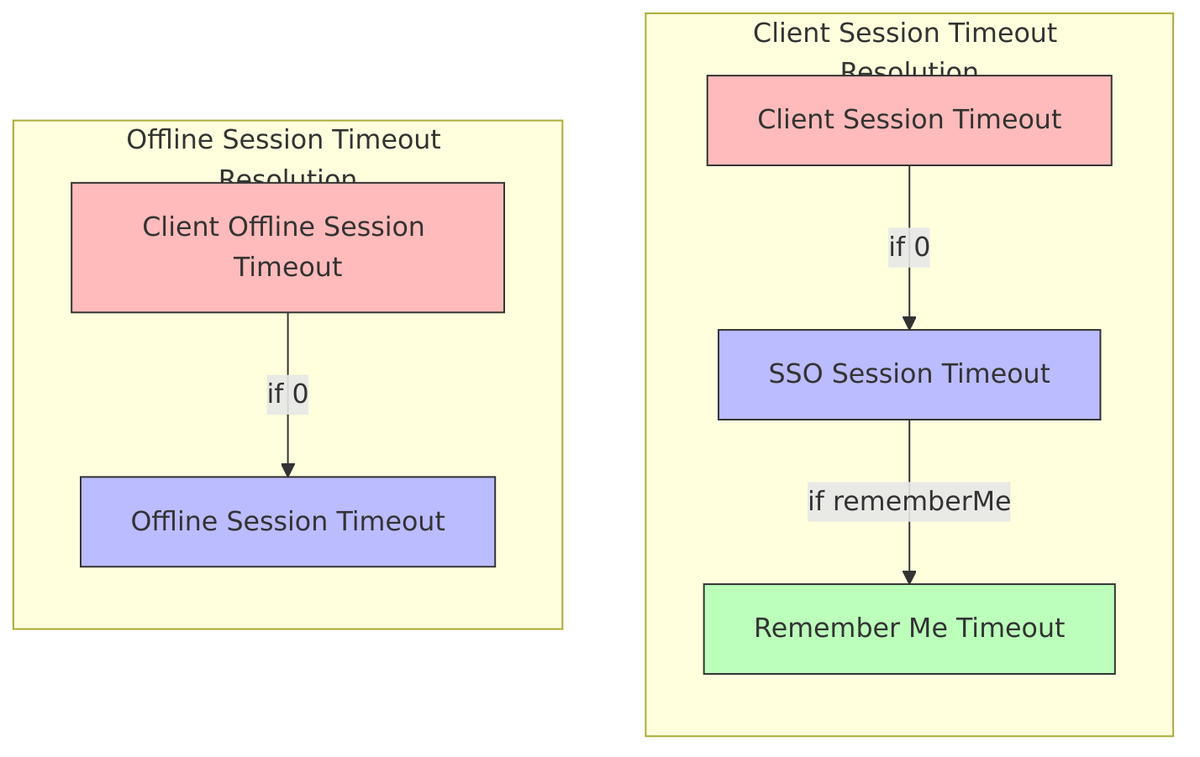
Keycloak provides fine-grained control over session lifetimes through realm-level settings. These settings form a hierarchy where client-specific settings can override realm defaults, and “remember me” sessions can have different timeouts than regular ones.
Timeout Hierarchy
Understanding this hierarchy is essential for configuring session behavior correctly. Client session timeouts fall back to SSO session timeouts if not explicitly set, and remember-me sessions have their own separate configuration:
SSO Session Settings (User Sessions)
These settings control how long user sessions remain valid. The idle timeout expires sessions after inactivity, while the max lifespan provides an absolute limit regardless of activity.
Defined in RealmModel.java:
| Setting | Method | Default |
|---|---|---|
| SSO Session Idle Timeout | getSsoSessionIdleTimeout() |
1800s (30 min) |
| SSO Session Max Lifespan | getSsoSessionMaxLifespan() |
36000s (10 hours) |
| SSO Idle Timeout (Remember Me) | getSsoSessionIdleTimeoutRememberMe() |
Falls back to regular |
| SSO Max Lifespan (Remember Me) | getSsoSessionMaxLifespanRememberMe() |
Falls back to regular |
Offline Session Settings
Offline sessions typically have much longer timeouts since they’re designed for scenarios like mobile apps that need persistent access.
Defined in RealmModel.java:
| Setting | Method | Default |
|---|---|---|
| Offline Session Idle Timeout | getOfflineSessionIdleTimeout() |
2592000s (30 days) |
| Offline Session Max Lifespan Enabled | isOfflineSessionMaxLifespanEnabled() |
false |
| Offline Session Max Lifespan | getOfflineSessionMaxLifespan() |
5184000s (60 days) |
Client Session Settings
Individual clients can have their own timeout settings that override the realm defaults. When set to 0, they inherit from the realm-level SSO settings.
Defined in RealmModel.java:
| Setting | Method | Default |
|---|---|---|
| Client Session Idle Timeout | getClientSessionIdleTimeout() |
0 (uses SSO idle) |
| Client Session Max Lifespan | getClientSessionMaxLifespan() |
0 (uses SSO max) |
| Client Offline Session Idle Timeout | getClientOfflineSessionIdleTimeout() |
0 (uses offline idle) |
| Client Offline Session Max Lifespan | getClientOfflineSessionMaxLifespan() |
0 (uses offline max) |
Related files:
RealmAttributes.java– Attribute constants
Session Expiration
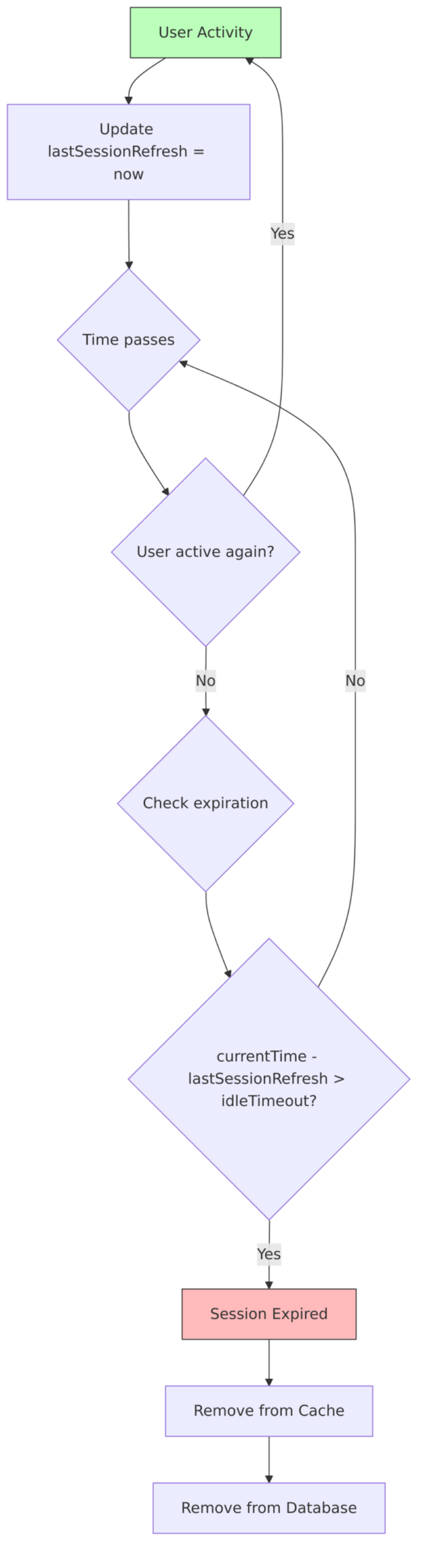
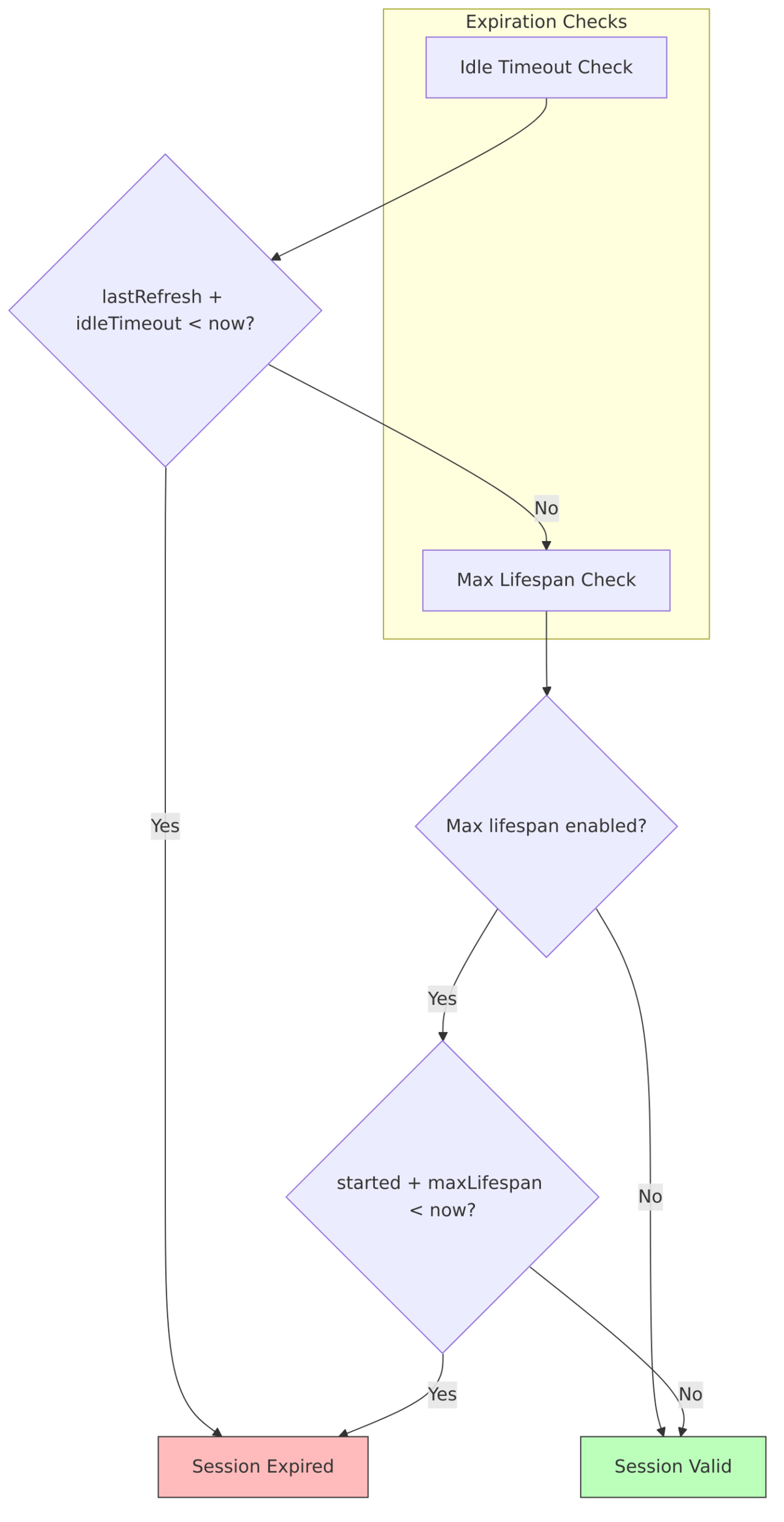
Sessions don’t live forever—they expire based on either inactivity (idle timeout) or absolute time limits (max lifespan). Understanding how this works helps when troubleshooting “mysterious” logouts.
How lastSessionRefresh Works
The lastSessionRefresh field is the key to idle timeout calculations. Every time you do something active—refresh a token, access a new application—this timestamp gets updated. When the difference between now and lastSessionRefresh exceeds the idle timeout, your session expires.
- Initial value: Set when user session is created
- Updated on activity: When a user performs an action (e.g., refreshes a token)
- Batch update:
updateLastSessionRefreshes()updates multiple sessions at once - Used for expiration: Sessions filtered by comparing
lastSessionRefreshwith idle timeout
Source files:
SessionExpirationUtils.java– Expiration calculation utilitiesSessionTimeouts.java– Cache timeout utilities
Expiration Flow
Here’s what happens during the expiration check:
Session State Machine
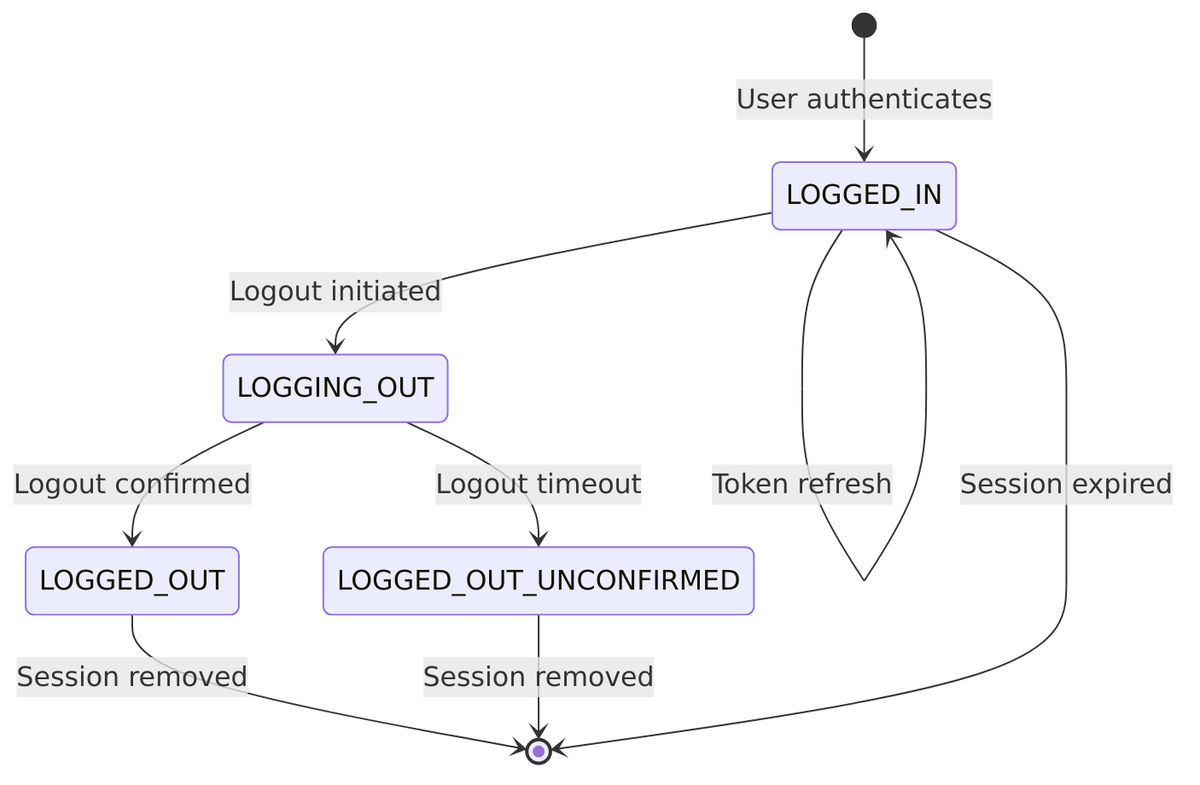
Sessions don’t just exist or not exist—they have states that track the logout process. This is important because logout can involve notifying multiple client applications, which takes time.
User Session vs Client Session: Key Differences
This comparison table summarizes the fundamental differences between these two session types:
| Aspect | User Session | Client Session |
|---|---|---|
| Purpose | Who logged in | Which app they accessed |
| Cardinality | One per login | Multiple per login (one per app) |
| Entity relationship | Parent entity | Child entity (references user session) |
| Refresh tracking | lastSessionRefresh |
Own timestamp |
| Key structure | Simple (userSessionId, offline) |
Composite (userSessionId, clientId, ...) |
| Removal cascade | Cascades down to client sessions | May cascade up for offline sessions |
Cascade Behavior
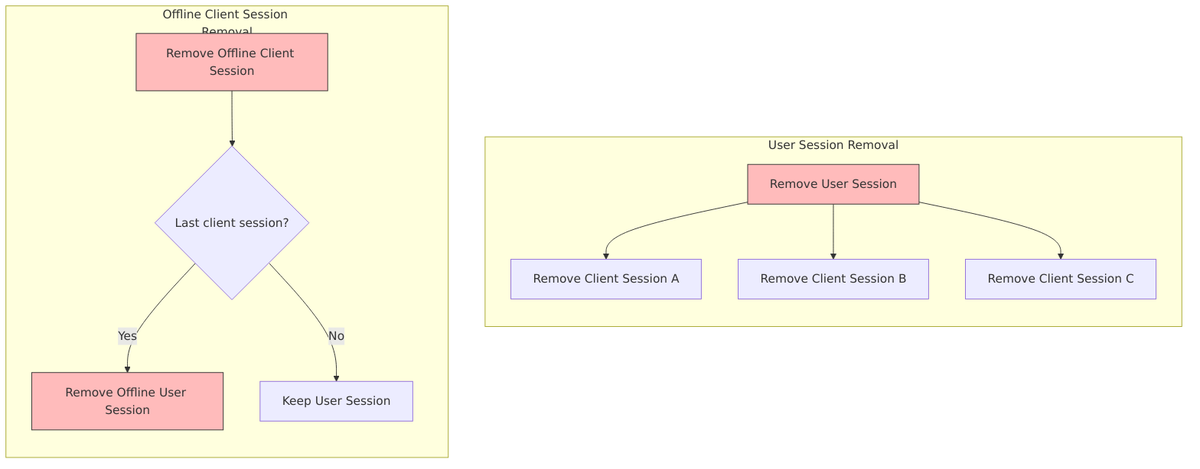
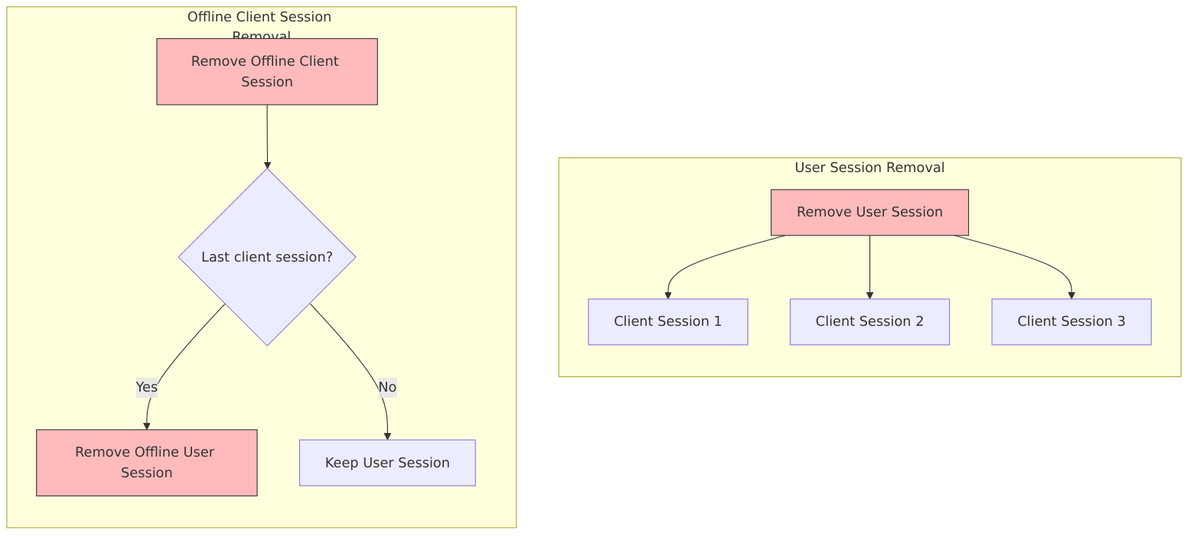
When sessions are removed, the cascade behavior differs between online and offline scenarios. For online sessions, removing the user session automatically removes all client sessions. For offline sessions, removing the last client session for a particular client can trigger removal of the offline user session.
Session Lifecycle
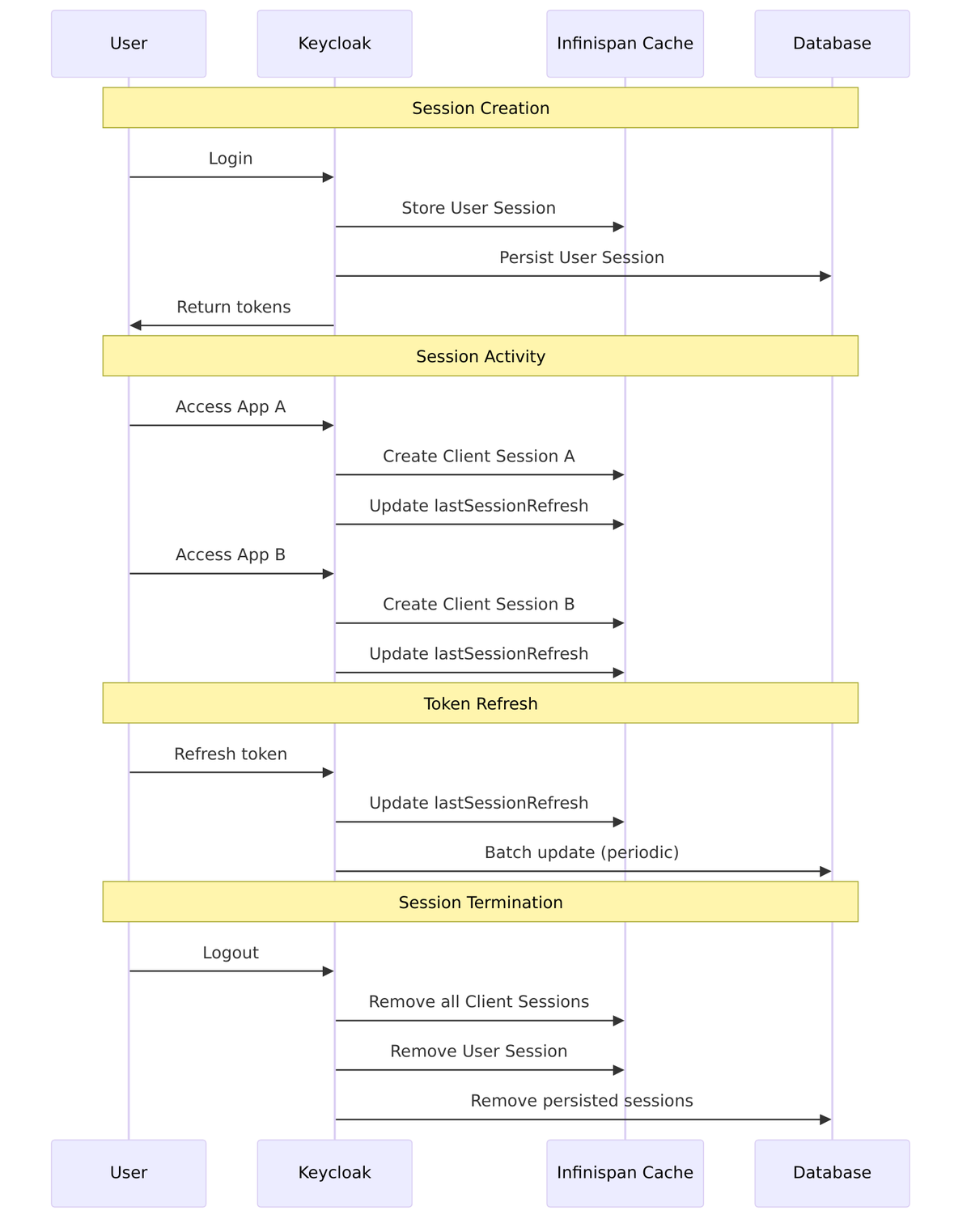
Let’s trace through a complete session lifecycle, from initial login through activity and finally logout. This shows how all the pieces we’ve discussed fit together in practice:
Disabling offline_access for Specific Clients
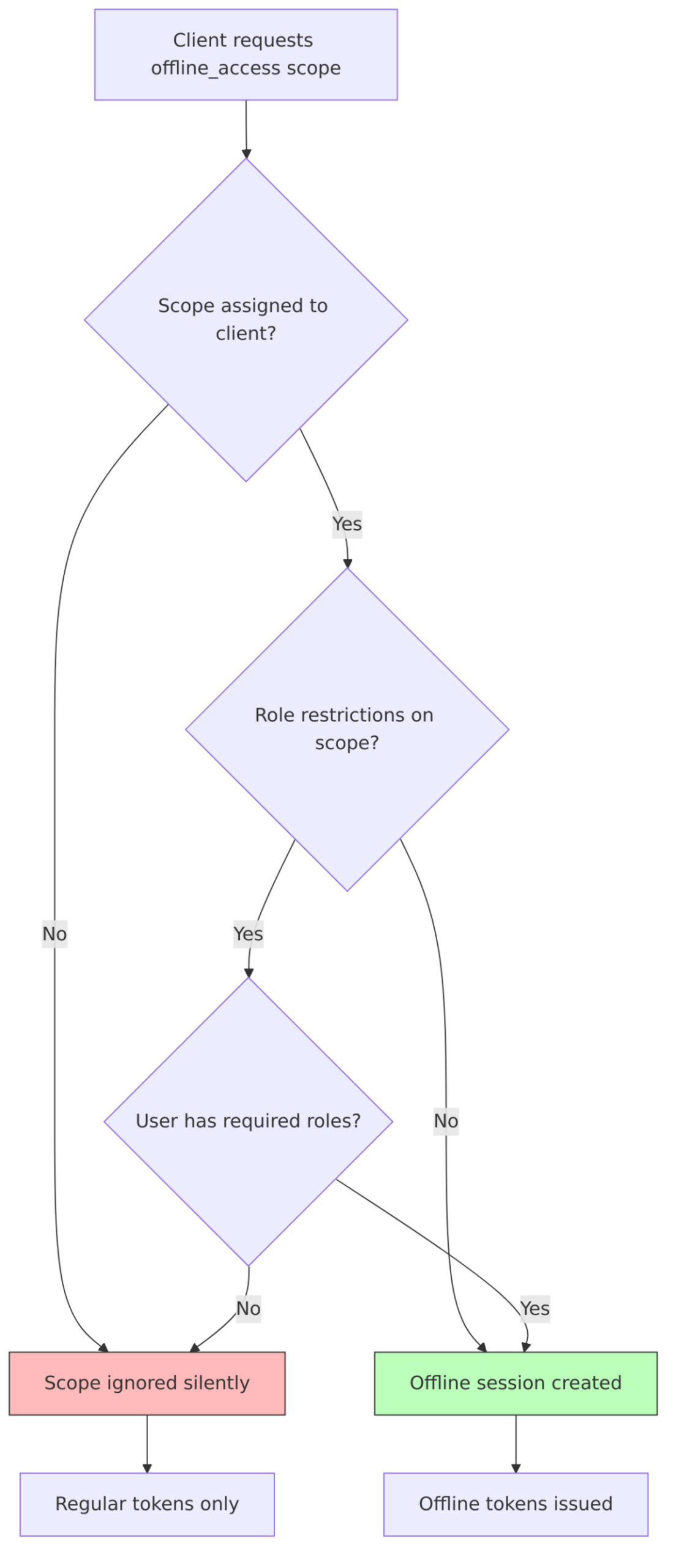
Not every application should have the ability to request offline tokens. A web application that users access daily probably doesn’t need month-long offline sessions, while a mobile app might. Keycloak provides several ways to control this.
Option 1: Remove from Client’s Optional Scopes (Recommended)
The cleanest approach is to simply remove the offline_access scope from clients that shouldn’t have it:
- Go to Clients ? Select your client
- Go to Client scopes tab
- Find
offline_accessin Assigned optional client scopes - Remove it
Option 2: Role-Based Restriction
For more nuanced control, you can require specific roles to request offline access:
- Go to Client scopes ?
offline_access - Go to Scope tab
- Assign specific roles that are required
- Only users with those roles can request offline tokens
Option 3: Remove from Realm Default Optional Scopes
To disable offline access realm-wide by default:
- Go to Realm settings ? Client scopes tab
- Remove
offline_accessfrom Default Optional Client Scopes
Offline Access Control Flow
This diagram shows how Keycloak decides whether to grant offline access:
Related Source Files Summary
For quick reference, here’s a consolidated list of the key source files we’ve discussed:
| Component | File | Line |
|---|---|---|
| User Session Model | UserSessionModel.java |
L32 |
| Client Session Model | AuthenticatedClientSessionModel.java |
L29 |
| User Session Provider | UserSessionProvider.java |
L32 |
| Auth Session Model | AuthenticationSessionModel.java |
L32 |
| Root Auth Session | RootAuthenticationSessionModel.java |
L31 |
| Offline Session Model | OfflineUserSessionModel.java |
L25 |
| Infinispan Provider | InfinispanUserSessionProvider.java |
L91 |
| Cache Configuration | InfinispanConnectionProvider.java |
L48 |
| JPA Persister | JpaUserSessionPersisterProvider.java |
L67 |
| User Session Entity | PersistentUserSessionEntity.java |
L108 |
| Client Session Entity | PersistentClientSessionEntity.java |
L60 |
| Session Expiration Utils | SessionExpirationUtils.java |
L32 |
| Session Timeouts | SessionTimeouts.java |
L36 |
| Realm Model | RealmModel.java |
L214 |
Authentication Sessions (Details)
This section covers authentication sessions—the temporary sessions that manage the login flow. Understanding these is important if you’re customizing authentication flows or debugging login issues.
What is an Authentication Session?
An Authentication Session is a short-lived, transient session that tracks the state of an in-progress authentication. It exists from the moment a user initiates login until authentication completes (success or failure). It stores the progress through potentially complex authentication flows.
“Represents the state of the authentication. If the login is requested from different tabs of same browser, every browser tab has it’s own state of the authentication.”
—AuthenticationSessionModel.java:25-31
Key characteristics:
- Transient: Not persisted to database, only in distributed cache
- Short-lived: Expires after ~30 minutes (configurable)
- Per-tab: Each browser tab has its own authentication state
- Cleared on completion: Removed after successful authentication
Two-Level Architecture
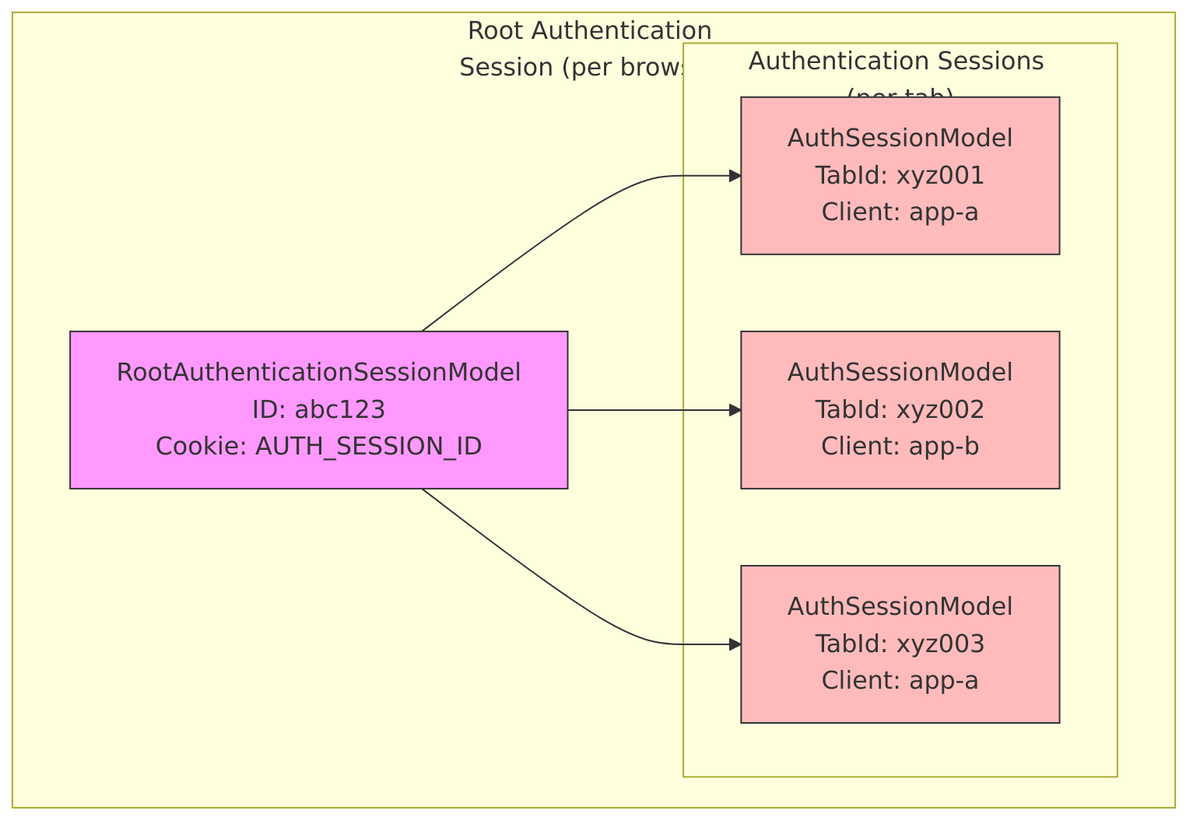
Authentication sessions use a two-level architecture to handle the complexity of modern browser behavior. At the top level, a Root Authentication Session represents your browser. Underneath it, individual Authentication Sessions represent each browser tab where you might be logging in.
| Level | Interface | Purpose |
|---|---|---|
| Root | RootAuthenticationSessionModel |
Represents browser session, contains all tabs |
| Tab | AuthenticationSessionModel |
Per-tab authentication state |
Tab ID Concept
Each browser tab gets a unique TabId – a Base64Url encoded random identifier (8 bytes ? 10-11 characters). This allows Keycloak to track multiple concurrent login attempts from the same browser without confusion.
Generation:
// From RootAuthenticationSessionAdapter.java:127
String tabId = Base64Url.encode(SecretGenerator.getInstance().randomBytes(8));
Compound ID Format: rootSessionId.tabId.clientUUID
- Used for cluster-wide lookups and cross-datacenter synchronization
- Parsed by
AuthenticationSessionCompoundId
Multi-Tab Handling
Here’s what happens when you have the login page open in multiple tabs:
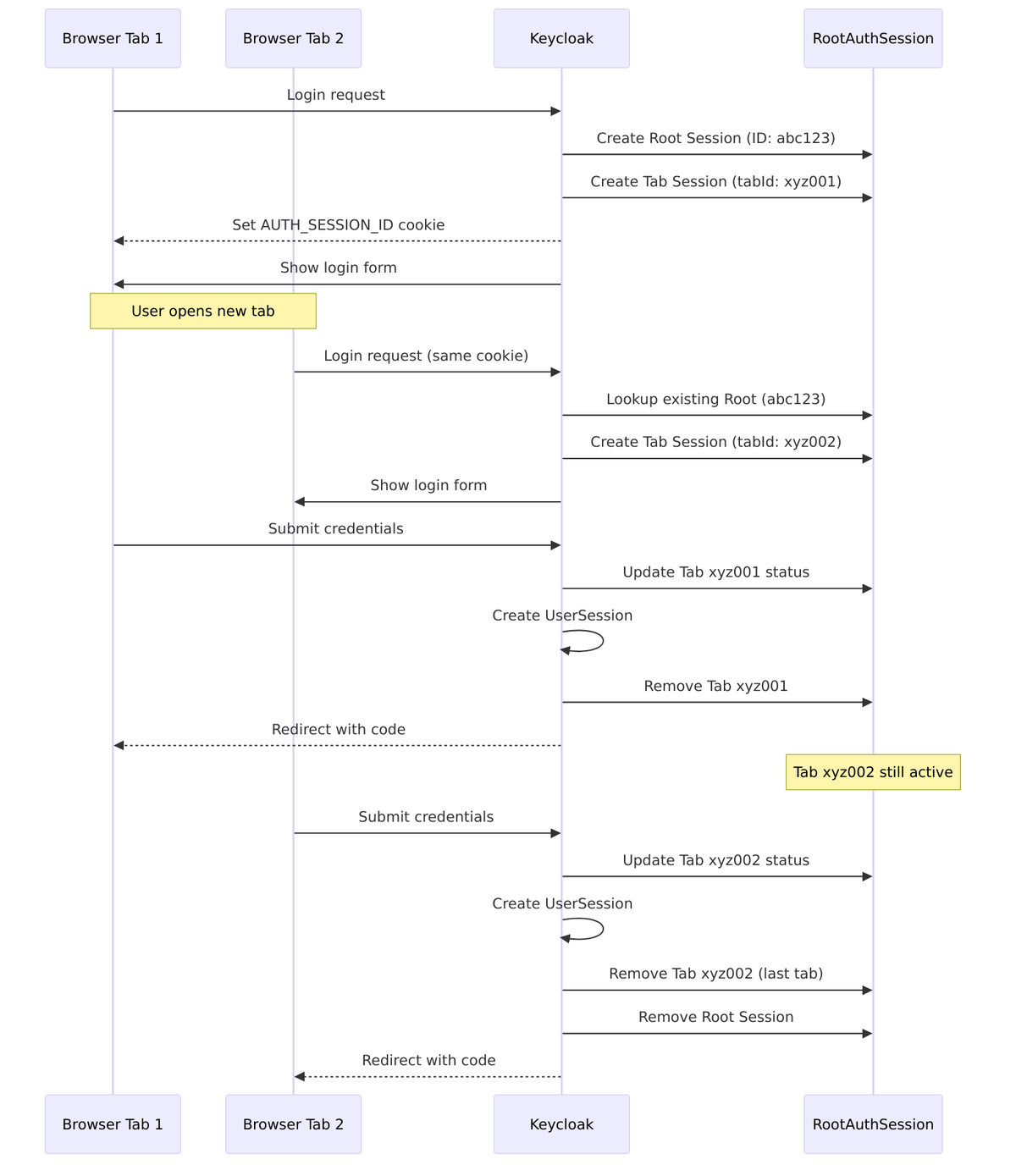
Tab Limit: Maximum 300 concurrent tabs per root session (configurable)
- When limit reached, oldest tab is automatically removed
- Configuration:
InfinispanAuthenticationSessionProviderFactory:72
Authentication Session Lifecycle
An authentication session goes through several states as the user progresses through login:
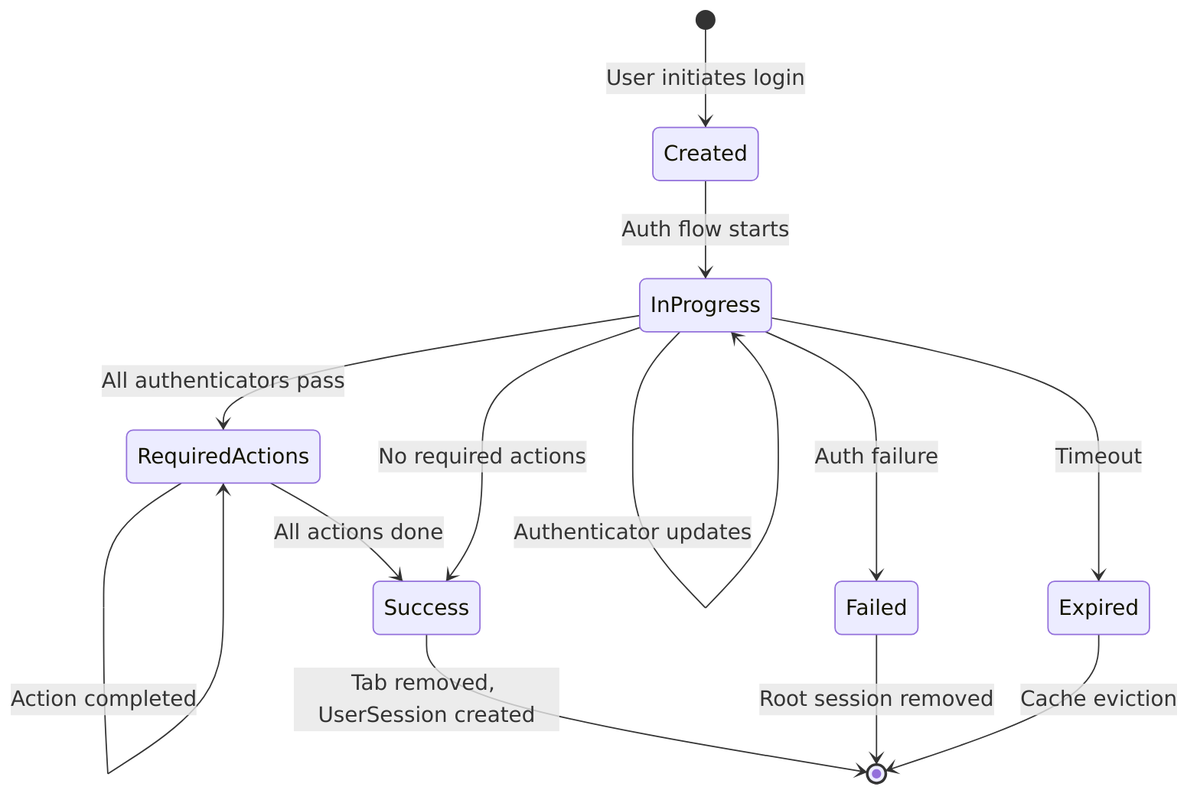
Lifespan Calculation:
// From SessionExpiration.java:27-36
int lifespan = Math.max(
    realm.getAccessCodeLifespanLogin(),      // Default: 30 min
    Math.max(
        realm.getAccessCodeLifespanUserAction(), // Default: 5 min
        realm.getAccessCodeLifespan()            // Default: 1 min
    )
);
Data Stored in Authentication Session
Authentication sessions store various types of data to track login progress.
Execution Status
Each authenticator in your flow gets a status that tracks its outcome:

| Status | Meaning |
|---|---|
SUCCESS |
Authenticator completed successfully |
FAILED |
Authentication failed |
CHALLENGED |
User prompted for input (form displayed) |
ATTEMPTED |
User attempted but didn’t complete |
SKIPPED |
Authenticator skipped (conditional) |
SETUP_REQUIRED |
Credential setup needed |
EVALUATED_TRUE/FALSE |
Conditional evaluator result |
Three Types of Notes
Authentication sessions maintain three separate note collections, each with different lifecycles:
| Note Type | Cleared On Restart | Purpose | Example |
|---|---|---|---|
| Auth Notes | ? Yes | Temporary flow state | ACR level, forced flag |
| Client Notes | ? No | Protocol-specific data | OIDC nonce, scope, SAML assertions |
| User Session Notes | Transferred | Data for final UserSession | Max age, ACR claim |
// Auth Notes - cleared when auth restarts
authSession.setAuthNote("acr", "gold");
authSession.getAuthNote("acr");

// Client Notes - persist through restarts
authSession.setClientNote(OIDCLoginProtocol.NONCE_PARAM, nonce);

// User Session Notes - transferred to UserSession on success
authSession.setUserSessionNote("custom_claim", "value");
Required Actions
The session tracks which required actions the user must complete:
authSession.addRequiredAction("UPDATE_PASSWORD");
authSession.addRequiredAction("CONFIGURE_TOTP");
Set<string> actions = authSession.getRequiredActions();
authSession.removeRequiredAction("UPDATE_PASSWORD");
Key Interfaces and Methods
AuthenticationSessionModel
| Method | Purpose |
|---|---|
getTabId() |
Get unique tab identifier |
getParentSession() |
Get RootAuthenticationSessionModel |
getExecutionStatus() |
Get Map |
setExecutionStatus(authenticator, status) |
Update authenticator result |
getAuthenticatedUser() |
Get partially authenticated user |
setAuthenticatedUser(user) |
Set user after credential validation |
getAuthNote(name) / setAuthNote(name, value) |
Temporary flow data |
getClientNote(name) / setClientNote(name, value) |
Protocol-specific data |
getUserSessionNotes() |
Notes to transfer to UserSession |
getRequiredActions() |
Pending required actions |
getClientScopes() |
Requested OAuth scopes |
RootAuthenticationSessionModel
| Method | Purpose |
|---|---|
getId() |
Root session identifier |
getTimestamp() |
Last activity time |
getAuthenticationSessions() |
Map |
getAuthenticationSession(client, tabId) |
Get specific tab |
createAuthenticationSession(client) |
Create new tab |
removeAuthenticationSessionByTabId(tabId) |
Remove tab |
restartSession(realm) |
Clear all tabs |
Storage Implementation
Authentication sessions live only in the Infinispan distributed cache—they’re never persisted to the database. Since they’re short-lived, regenerating them from a cookie is straightforward.
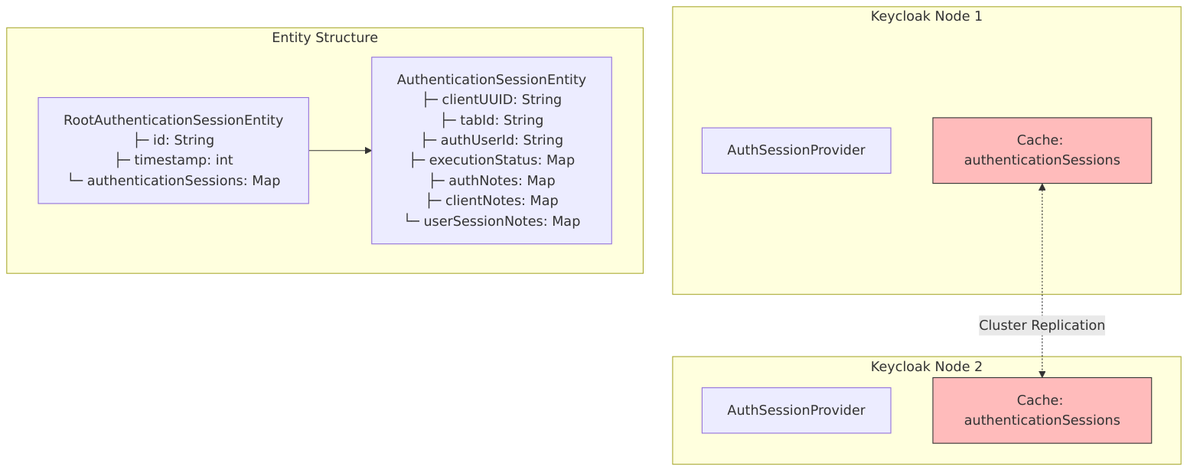
Cache Configuration:
| Setting | Value |
|---|---|
| Cache Name | authenticationSessions |
| Max Entries | 10,000 (default) |
| Lifespan | Calculated per realm (typically 30 min) |
| Max Idle | Immortal (-1) |
| Distribution | Distributed/replicated |
Implementation Classes:
| Class | Purpose |
|---|---|
InfinispanAuthenticationSessionProvider |
Main provider |
RootAuthenticationSessionAdapter |
Root session adapter |
AuthenticationSessionAdapter |
Tab session adapter |
RootAuthenticationSessionEntity |
Cache entity (root) |
AuthenticationSessionEntity |
Cache entity (tab) |
AuthSession vs UserSession Comparison
Knowing when you’re dealing with an authentication session versus a user session is useful for debugging:
| Aspect | Authentication Session | User Session |
|---|---|---|
| Purpose | Manage login flow state | Represent authenticated user |
| Lifespan | Short (~30 min) | Long (hours/days) |
| Scope | Per browser tab | Per user login |
| Persistence | Cache only | Cache + Database |
| User | Partially authenticated (may be null) | Fully authenticated |
| Cleared | On auth completion | On logout |
| Children | None | Client Sessions |
| Cookie | AUTH_SESSION_ID |
KEYCLOAK_SESSION |
Transition to User Session
When authentication succeeds, data flows from the authentication session to the newly created user session:
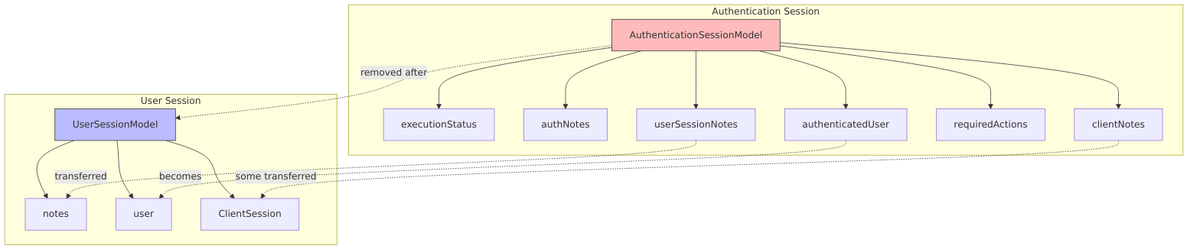
Transfer happens in:
Configuration Options
| Property | Default | Description |
|---|---|---|
authSessionsLimit |
300 | Max tabs per root session |
accessCodeLifespanLogin |
1800 (30 min) | Auth session lifespan |
accessCodeLifespanUserAction |
300 (5 min) | Required action lifespan |
accessCodeLifespan |
60 (1 min) | Access code lifespan |
Related Source Files
| Component | File |
|---|---|
| Auth Session Model | AuthenticationSessionModel.java |
| Root Auth Session | RootAuthenticationSessionModel.java |
| Auth Session Provider | AuthenticationSessionProvider.java |
| Compound ID | AuthenticationSessionCompoundId.java |
| Session Manager | AuthenticationSessionManager.java |
| Auth Processor | AuthenticationProcessor.java |
| Infinispan Provider | InfinispanAuthenticationSessionProvider.java |
| Root Adapter | RootAuthenticationSessionAdapter.java |
| Session Expiration | SessionExpiration.java |
| Session Timeouts | SessionTimeouts.java |
Session Cookies (Details)
Cookies tie browser sessions to Keycloak’s server-side session objects. Without them, Keycloak couldn’t remember who you are between requests. This section documents all session-related cookies based on source code analysis.
Cookie Definitions
All cookies are defined in CookieType.java. Let’s examine each one and understand its role.
Active Cookies
| Cookie Name | Constant | Purpose | Default Max Age |
|---|---|---|---|
AUTH_SESSION_ID |
AUTH_SESSION_ID |
Authentication session identifier with route info | Session (-1) |
KC_AUTH_SESSION_HASH |
AUTH_SESSION_ID_HASH |
SHA256 hash of auth session ID for JS detection | 60 seconds |
KC_RESTART |
AUTH_RESTART |
Allows restarting login flow after client timeout | Session (-1) |
KC_STATE_CHECKER |
AUTH_DETACHED |
Internal state for detached info/error pages | Access code lifespan |
KEYCLOAK_IDENTITY |
IDENTITY |
User identity/SSO cookie with access token claims | SSO Max or Remember-Me |
KEYCLOAK_SESSION |
SESSION |
SHA256 hash of session ID for iframe checks | SSO Max or Remember-Me |
KEYCLOAK_REMEMBER_ME |
LOGIN_HINT |
Username for remember-me functionality | 1 year (31536000s) |
KEYCLOAK_LOCALE |
LOCALE |
User’s locale preference | Session (-1) |
WELCOME_STATE_CHECKER |
WELCOME_CSRF |
CSRF protection for welcome page | 300 seconds |
Legacy Cookies (Auto-Expired)
These cookies are automatically expired on startup for backward compatibility cleanup:
AUTH_SESSION_ID_LEGACYKEYCLOAK_IDENTITY_LEGACYKEYCLOAK_SESSION_LEGACY
Cookie Security Scopes
Keycloak assigns each cookie to a security scope that determines its SameSite and HttpOnly attributes. This is defined in CookieScope.java:

| Scope | SameSite | HttpOnly | Use Case |
|---|---|---|---|
INTERNAL |
Strict | true | Internal-only cookies, strict same-site protection |
INTERNAL_JS |
Strict | false | Internal cookies accessible from JavaScript |
FEDERATION |
None | true | Cross-origin capable (federation/IdP scenarios) |
FEDERATION_JS |
None | false | Cross-origin with JavaScript access (iframe detection) |
Secure Flag Logic:
- If SameSite=None and context is HTTP (not HTTPS), automatically downgrade to SameSite=Lax
- Secure flag is always set to match the request context (HTTP/HTTPS)
Cookie Attributes Summary
| Cookie | Path | SameSite | HttpOnly | Secure | Max Age |
|---|---|---|---|---|---|
AUTH_SESSION_ID |
/realms/{realm}/ |
None* | Yes | Context | Session |
KC_AUTH_SESSION_HASH |
/realms/{realm}/ |
None* | No | Context | 60s |
KC_RESTART |
/realms/{realm}/ |
None* | Yes | Context | Session |
KC_STATE_CHECKER |
/realms/{realm}/ |
Strict | Yes | Context | Variable |
KEYCLOAK_IDENTITY |
/realms/{realm}/ |
None* | Yes | Context | Variable |
KEYCLOAK_SESSION |
/realms/{realm}/ |
None* | No | Context | Variable |
KEYCLOAK_REMEMBER_ME |
/realms/{realm}/ |
None* | Yes | Context | 1 year |
KEYCLOAK_LOCALE |
/realms/{realm}/ |
None* | Yes | Context | Session |
WELCOME_STATE_CHECKER |
Request path | Strict | Yes | Context | 300s |
* Downgraded to Lax if not in secure (HTTPS) context
Cookie Details by Purpose
1. AUTH_SESSION_ID – Authentication Session Cookie
This cookie tracks the in-progress authentication session. It’s signed to prevent tampering and includes routing information for clustered deployments.
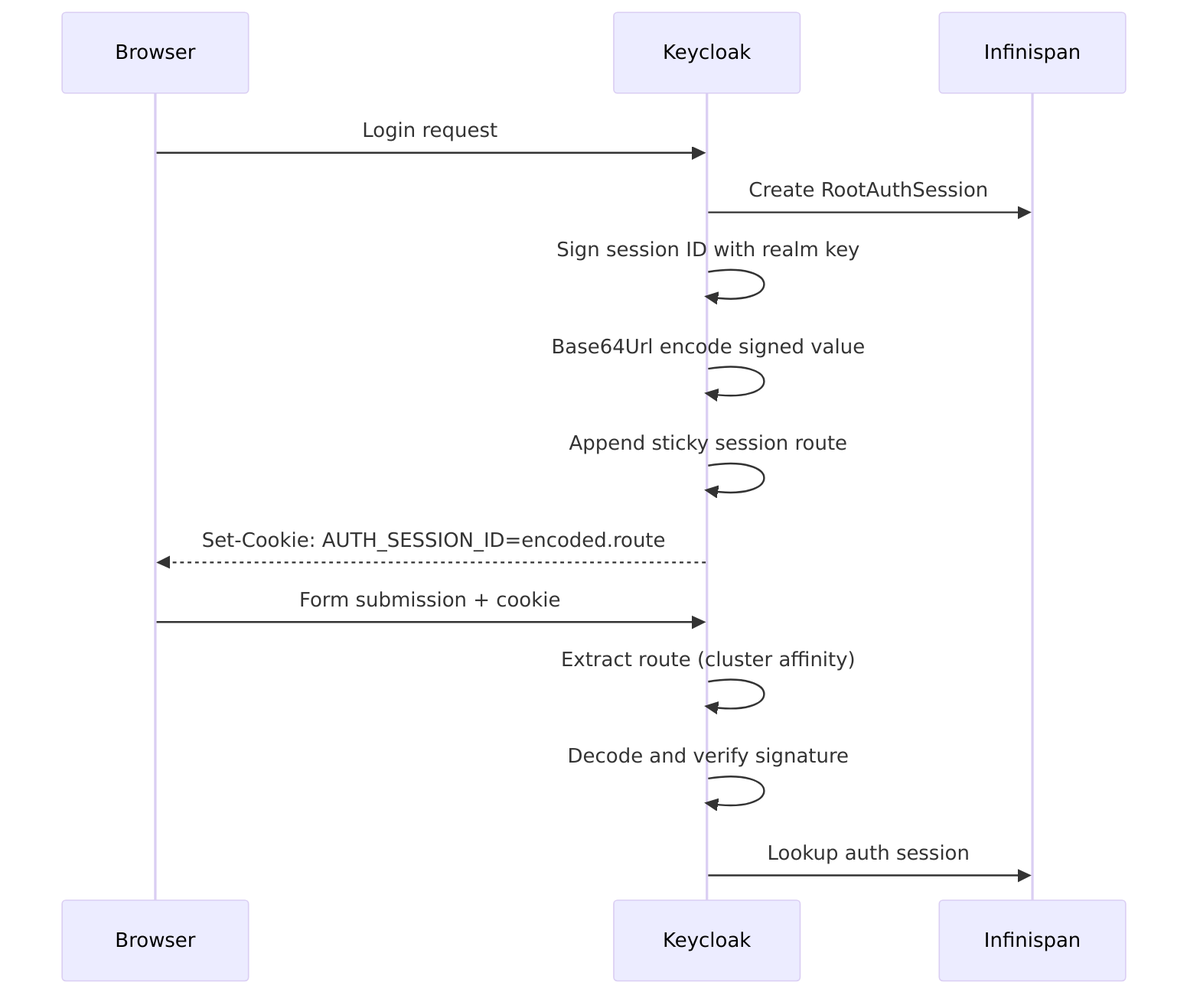
Encoding Process (AuthenticationSessionManager.java:108-116):
// 1. Sign with INTERNAL signature algorithm
String signature = signatureProvider.sign(authSessionId.getBytes());
String signedValue = authSessionId + "." + Base64Url.encode(signature);

// 2. Base64Url encode the signed value
String encoded = Base64Url.encode(signedValue);

// 3. Add sticky session route for cluster affinity
String withRoute = stickyEncoder.encodeSessionId(encoded, authSessionId);
// Result: "NWUxNjFlMDAt...signature.node1"
Cookie Format:
Without route: base64(sessionId.signature)
With route:    base64(sessionId.signature).node1
Lifecycle:
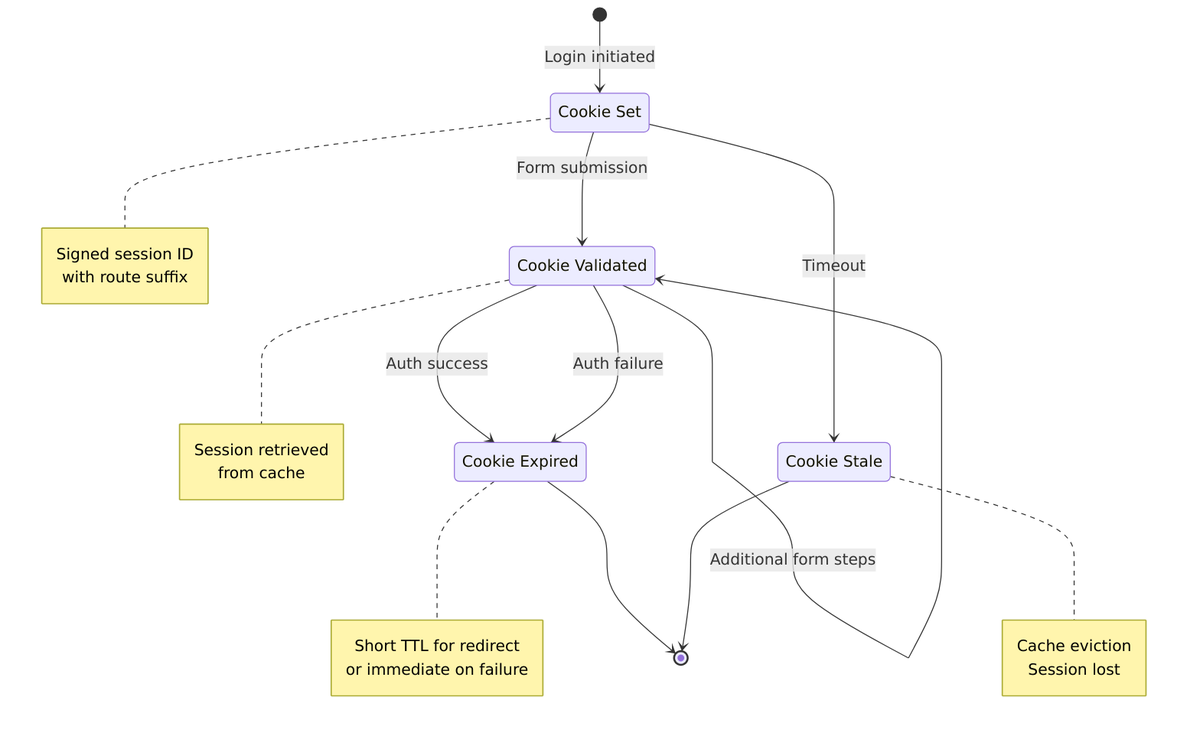
2. KC_AUTH_SESSION_HASH – JavaScript Session Detection
This short-lived hash enables JavaScript-based session detection in iframes.
Purpose:
- Allows JavaScript to detect if authentication session exists
- Used for silent authentication checks in iframes
- Short TTL (60 seconds) prevents stale detection
Value: SHA256(authSessionId) ? Base64Url encoded (no padding)
// From AuthenticationSessionManager.java:121-127
String hash = HashUtils.sha256(authSessionId);
String encoded = Base64Url.encode(hash);
cookieProvider.set(CookieType.AUTH_SESSION_ID_HASH, encoded);
3. KEYCLOAK_IDENTITY – User Identity Cookie (SSO Cookie)
This is the primary SSO cookie. It contains a JWT with user identity information, allowing Keycloak to recognize you without re-authentication.
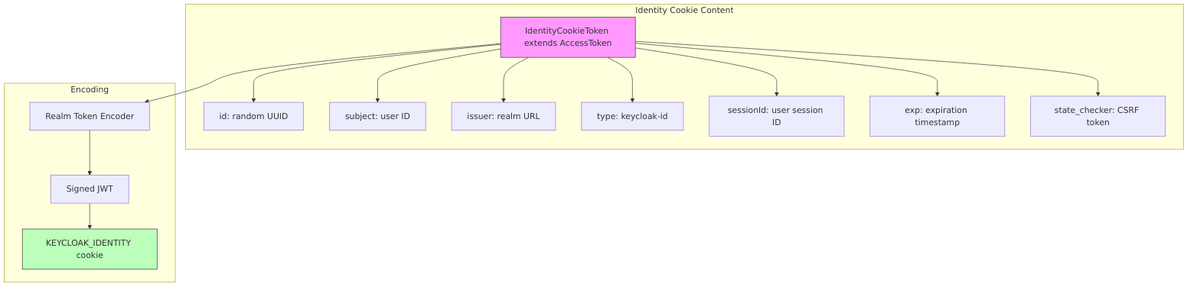
Token Structure (IdentityCookieToken.java):
public class IdentityCookieToken extends AccessToken {
    // Inherits from AccessToken but with:
    // - type = "keycloak-id" (not "Bearer")
    // - Contains session binding info
    // - state_checker for CSRF protection
}
Creation (AuthenticationManager.java:822-859):
IdentityCookieToken token = new IdentityCookieToken();
token.id(KeycloakModelUtils.generateId());
token.issuedNow();
token.subject(user.getId());
token.issuer(Urls.realmIssuer(uriInfo.getBaseUri(), realm.getName()));
token.type(TOKEN_TYPE_KEYCLOAK_ID);
token.exp(expiration);  // Based on SSO max or remember-me lifespan

// Add CSRF protection
token.setSessionState(userSession.getId());
token.setStateChecker(Base64Url.encode(SecretGenerator.randomBytes()));
Max Age Calculation:
if (rememberMe && realm.getSsoSessionMaxLifespanRememberMe() > 0) {
    maxAge = realm.getSsoSessionMaxLifespanRememberMe();
} else {
    maxAge = realm.getSsoSessionMaxLifespan();
}
4. KEYCLOAK_SESSION – Session Hash Cookie
This cookie enables OIDC session management through iframe-based session checks.
Purpose:
- OIDC session management spec compliance
- Allows
check_session_iframeto detect session changes - Intentionally NOT HttpOnly (JavaScript accessible)
Value: SHA256(userSessionId) ? URL encoded
Usage in check_session_iframe:
// Browser periodically calls check_session_iframe
// Iframe reads KEYCLOAK_SESSION cookie
// Compares with OP iframe session state
// Posts 'changed' or 'unchanged' to RP
5. KC_RESTART – Login Restart Cookie
This cookie handles a common scenario: what happens when your authentication session expires because you took too long to log in?
The Problem KC_RESTART Solves
When a user starts login but takes too long (reading terms of service, phone call, coffee break), the authentication session expires in Infinispan cache (default 30 minutes). Without KC_RESTART, the user would see an error and be sent back to the application to start over.
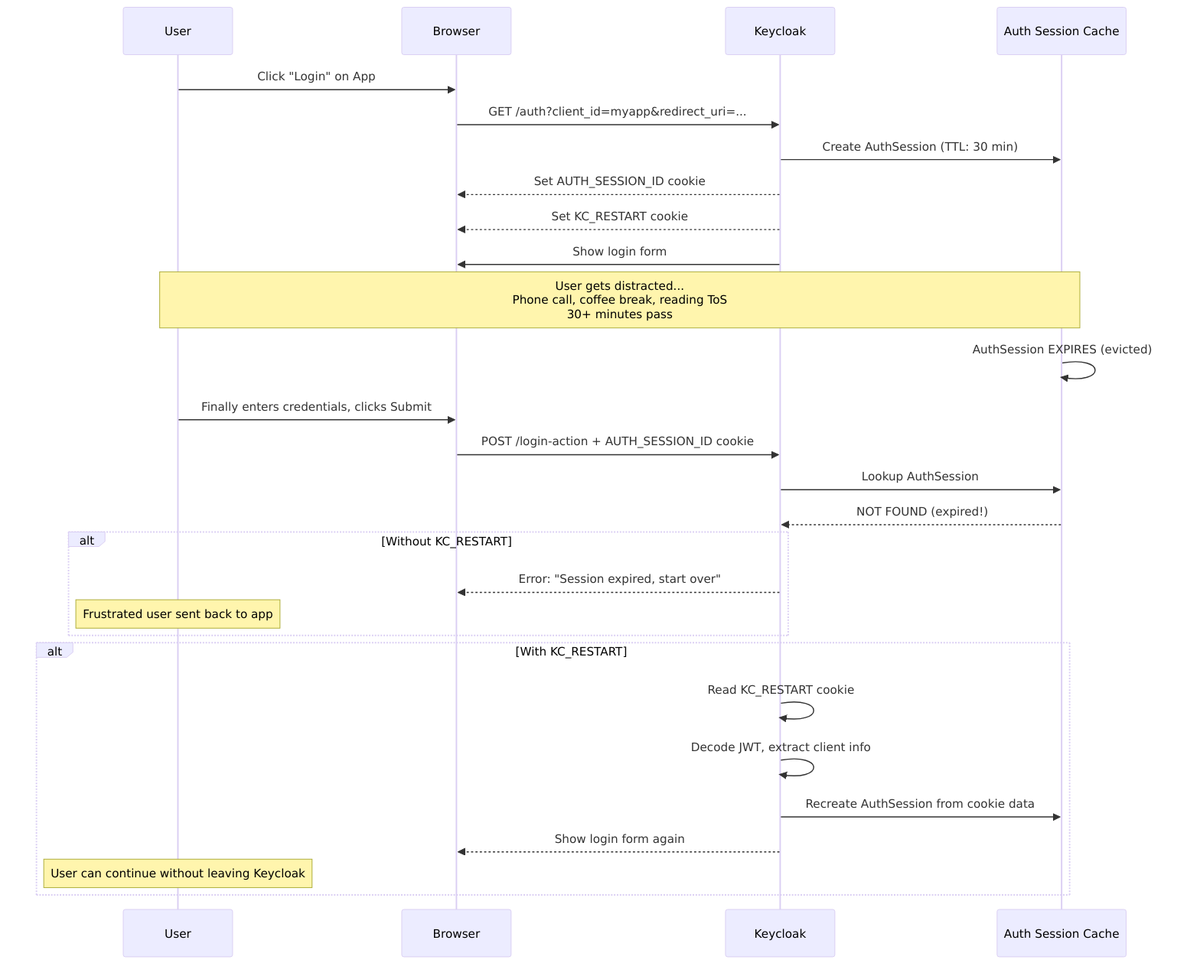
Content Structure
From RestartLoginCookie.java:
{
    "cid": "my-client-app",           // Client ID - which app initiated login
    "pty": "openid-connect",          // Protocol type
    "ruri": "https://myapp.com/cb",   // Redirect URI - where to go after auth
    "act": "authenticate",            // Action being performed
    "notes": {                        // Client notes (protocol state)
        "scope": "openid profile",
        "nonce": "abc123",
        "state": "xyz789"
    }
}
Encoding
- Serialize to JSON
- Encode as JWT with
TokenCategory.INTERNAL - Encrypt with JWE (direct encryption + signature using realm keys)
The cookie is encrypted (not just signed) because it contains potentially sensitive protocol state like OIDC nonce and state parameters.
Why Not Just Extend Auth Session TTL?
| Approach | Problem |
|---|---|
| Longer auth session TTL | Wastes cache memory for abandoned sessions |
| Keep auth session forever | Security risk, resource exhaustion |
| KC_RESTART cookie | Stateless recovery – no server resources needed |
The cookie approach is stateless – the server doesn’t need to keep the session alive, but can recreate it on-demand from the cookie data.
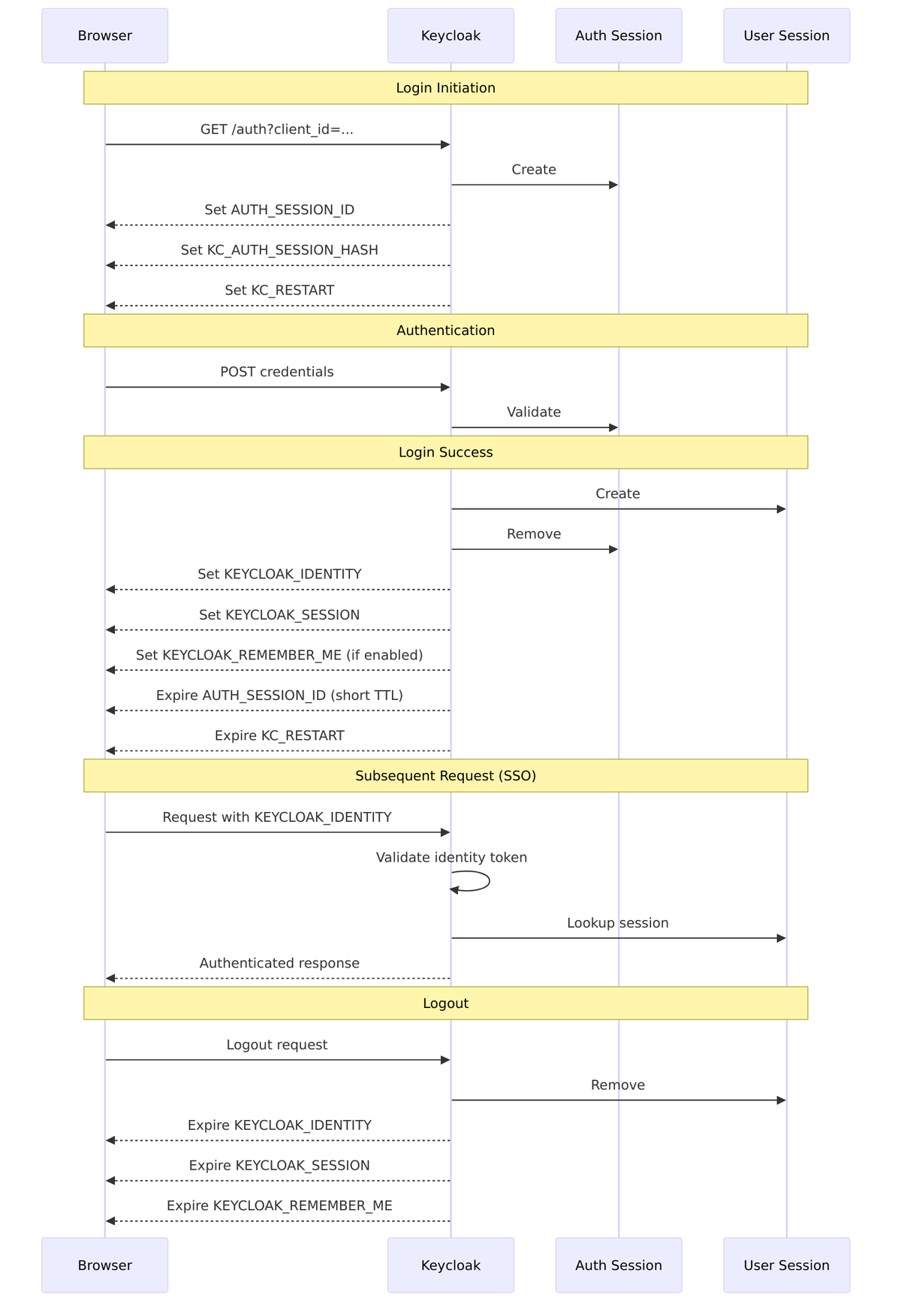
Cookie Lifecycle Flow
Here’s the complete flow showing how cookies are set, used, and expired during a typical login session:
Sticky Session Routing
For clustered deployments, Keycloak uses cookie-based routing to maintain session affinity, ensuring requests go to the node that has the session in its local cache.
Interface: StickySessionEncoderProvider.java
interface StickySessionEncoderProvider {
    // Encode session ID with route info
    String encodeSessionId(String message, String sessionId);

    // Decode and extract route
    SessionIdAndRoute decodeSessionIdAndRoute(String encodedSessionId);

    // Get route for session
    String sessionIdRoute(String sessionId);

    // Check if route should be attached
    boolean shouldAttachRoute();
}
Route Format:
Cookie value:    base64(sessionId.signature).node1
                                              ?
                                         Route suffix
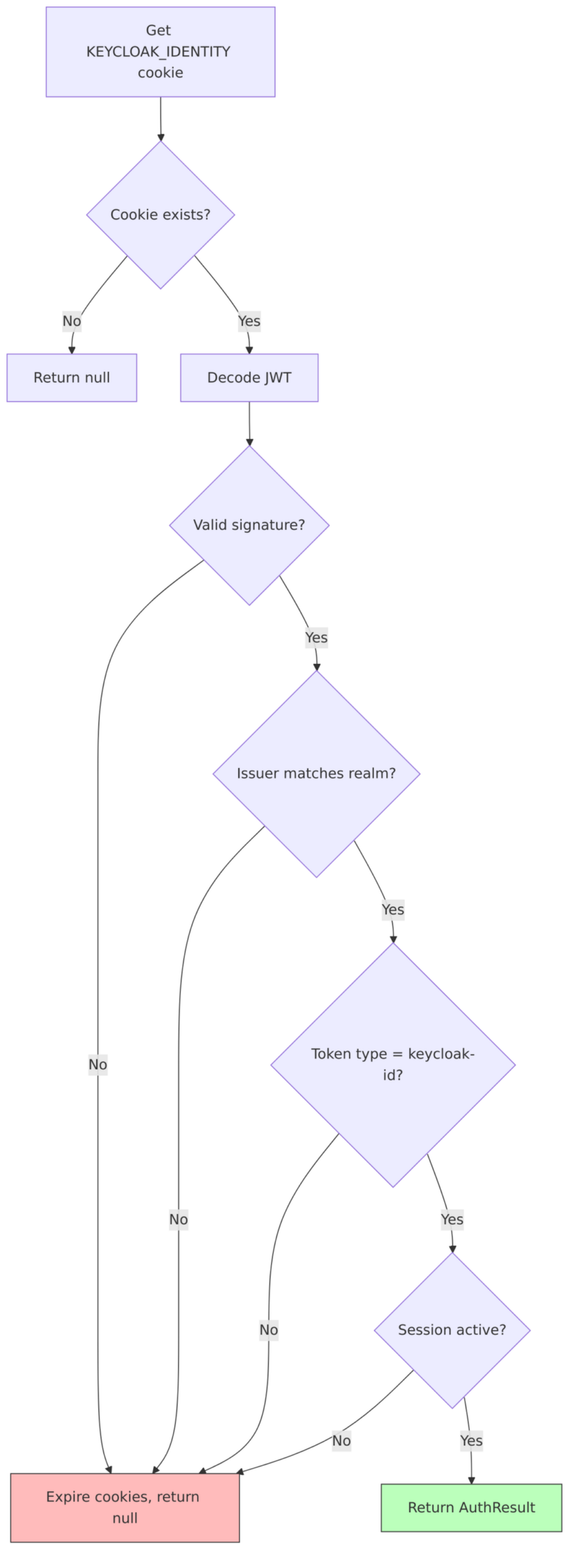
Cookie Validation
Identity Cookie Validation (AuthenticationManager.java:909-919):
Non-Secure Context Warning
When cookies are set in HTTP (non-HTTPS) context, Keycloak logs a warning (DefaultCookieProvider.java:76-100):
"Non-secure context detected; cookies are not secured,
and will not be available in cross-origin POST requests."
Behavior changes in HTTP:
- SameSite=None cookies downgraded to SameSite=Lax
- Secure flag set to false
- Federation cookies may not work in cross-origin scenarios
Related Source Files
| Component | File |
|---|---|
| Cookie Type Definitions | CookieType.java |
| Cookie Scope Definitions | CookieScope.java |
| Cookie Provider Interface | CookieProvider.java |
| Default Cookie Provider | DefaultCookieProvider.java |
| Auth Session Manager | AuthenticationSessionManager.java |
| Authentication Manager | AuthenticationManager.java |
| Identity Cookie Token | IdentityCookieToken.java |
| Restart Login Cookie | RestartLoginCookie.java |
| Sticky Session Encoder | StickySessionEncoderProvider.java |
Token-Session Relationship (Details)
Tokens and sessions are bound in Keycloak—every token carries a reference to its parent session. This binding has important implications for token validation and revocation.
Session ID (sid) Claim
Every access token and ID token includes a sid (session ID) claim that binds the token to a specific user session. This is the thread that connects the stateless JWT world to Keycloak’s stateful session management.
Token Structure:
"exp": 1704067200,
"iat": 1704063600,
"jti": "unique-token-id",
"iss": "https://keycloak.example.com/realms/myrealm",
"sub": "user-uuid",
"sid": "user-session-uuid", // ? Session binding
"typ": "Bearer",
"azp": "my-client",
"session_state": "user-session-uuid", // ? Legacy field (same as sid)
"scope": "openid profile email"
}
Source: TokenManager.java:663-671
// Session ID is always added to tokens
token.setSessionId(userSession.getId());
token.setSessionState(userSession.getId());  // Legacy compatibility
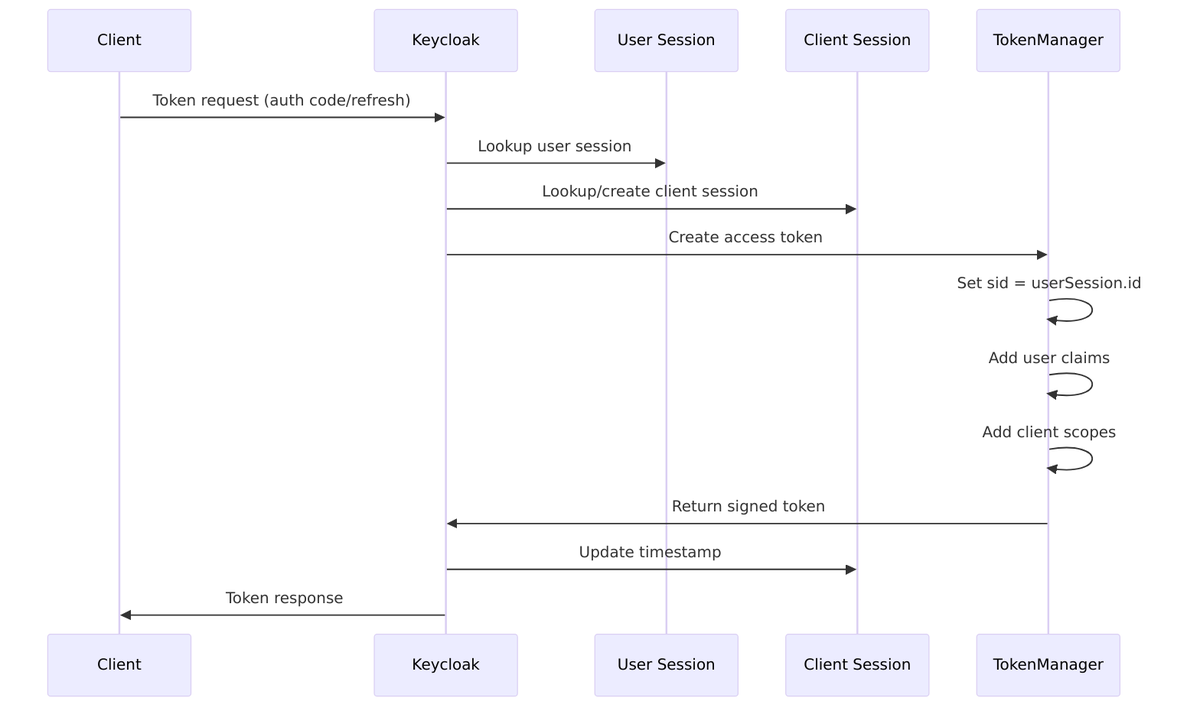
Token Creation Flow
When Keycloak creates a token, it always ties it to the current session context:
Token-Session Binding Points
| Token Type | Session Binding | Source |
|---|---|---|
| Access Token | sid claim = User Session ID |
AccessToken.java |
| ID Token | sid claim = User Session ID |
IDToken.java |
| Refresh Token | Contains user session ID | RefreshToken.java |
| Identity Cookie | sessionState field |
IdentityCookieToken.java |
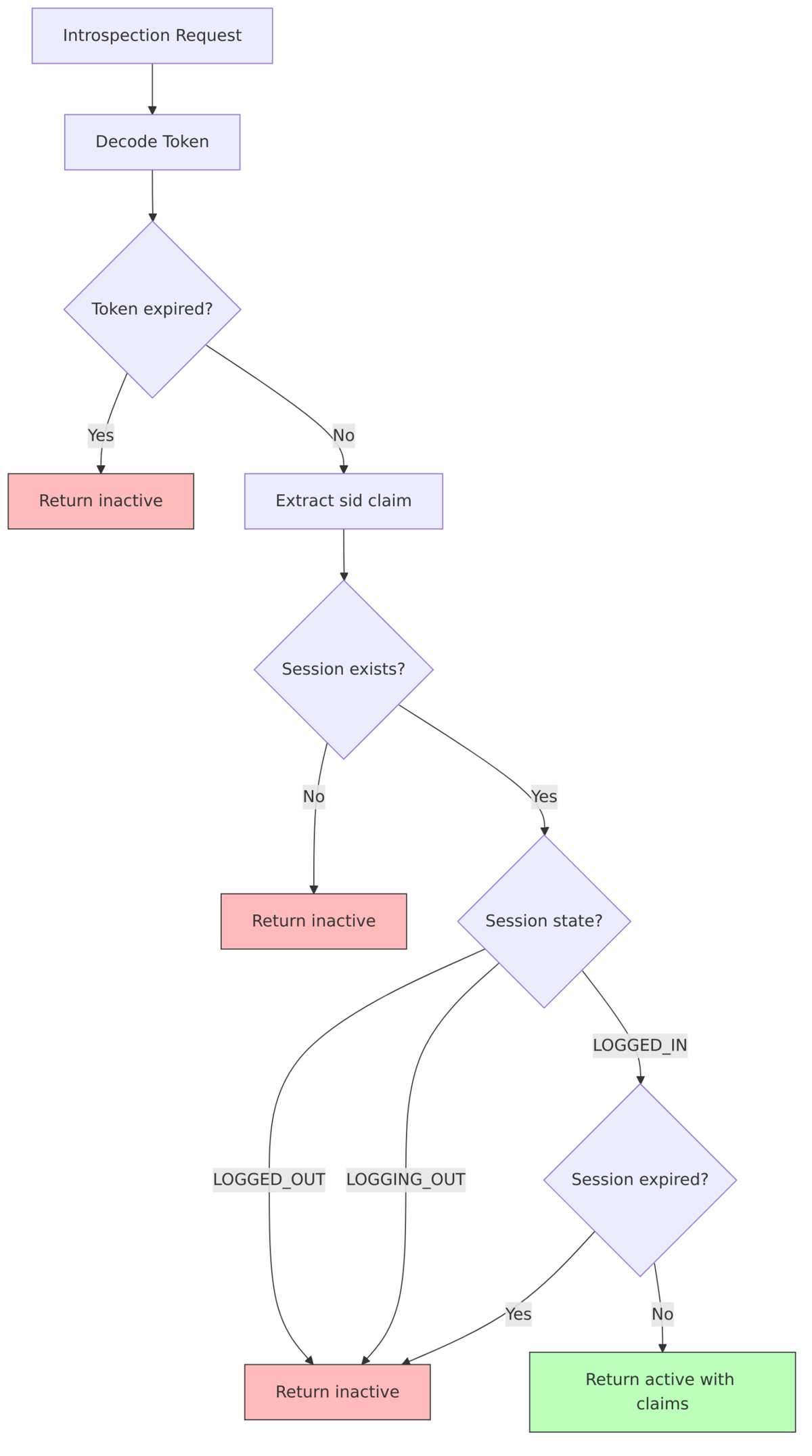
Token Introspection and Session Validation
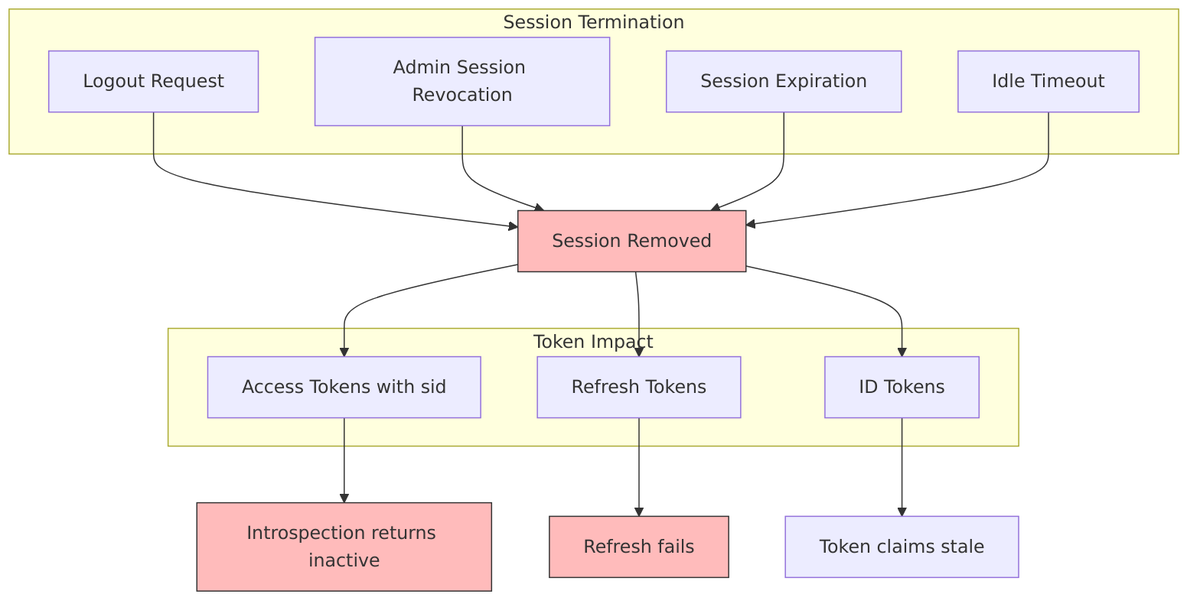
When a resource server introspects a token, Keycloak validates that the bound session is still active. This means tokens become invalid the moment their session expires or is revoked—even if the token’s own expiration time hasn’t been reached.
Implementation: TokenManager.validateToken()
public TokenValidation validateToken(String tokenString) {
    // 1. Decode and verify signature
    AccessToken token = verifyAccessToken(tokenString);

    // 2. Check session binding
    String sessionId = token.getSessionId();
    if (sessionId != null) {
        UserSessionModel session = sessionProvider.getUserSession(realm, sessionId, false);
        if (session == null || session.getState() != State.LOGGED_IN) {
            throw new OAuthErrorException("invalid_token", "Session not active");
        }

        // 3. Check session expiration
        if (isSessionExpired(session)) {
            throw new OAuthErrorException("invalid_token", "Session expired");
        }
    }

    return new TokenValidation(token, session);
}
Refresh Token and Session Updates
Each time you refresh a token, the client session timestamp is updated, keeping the session alive:
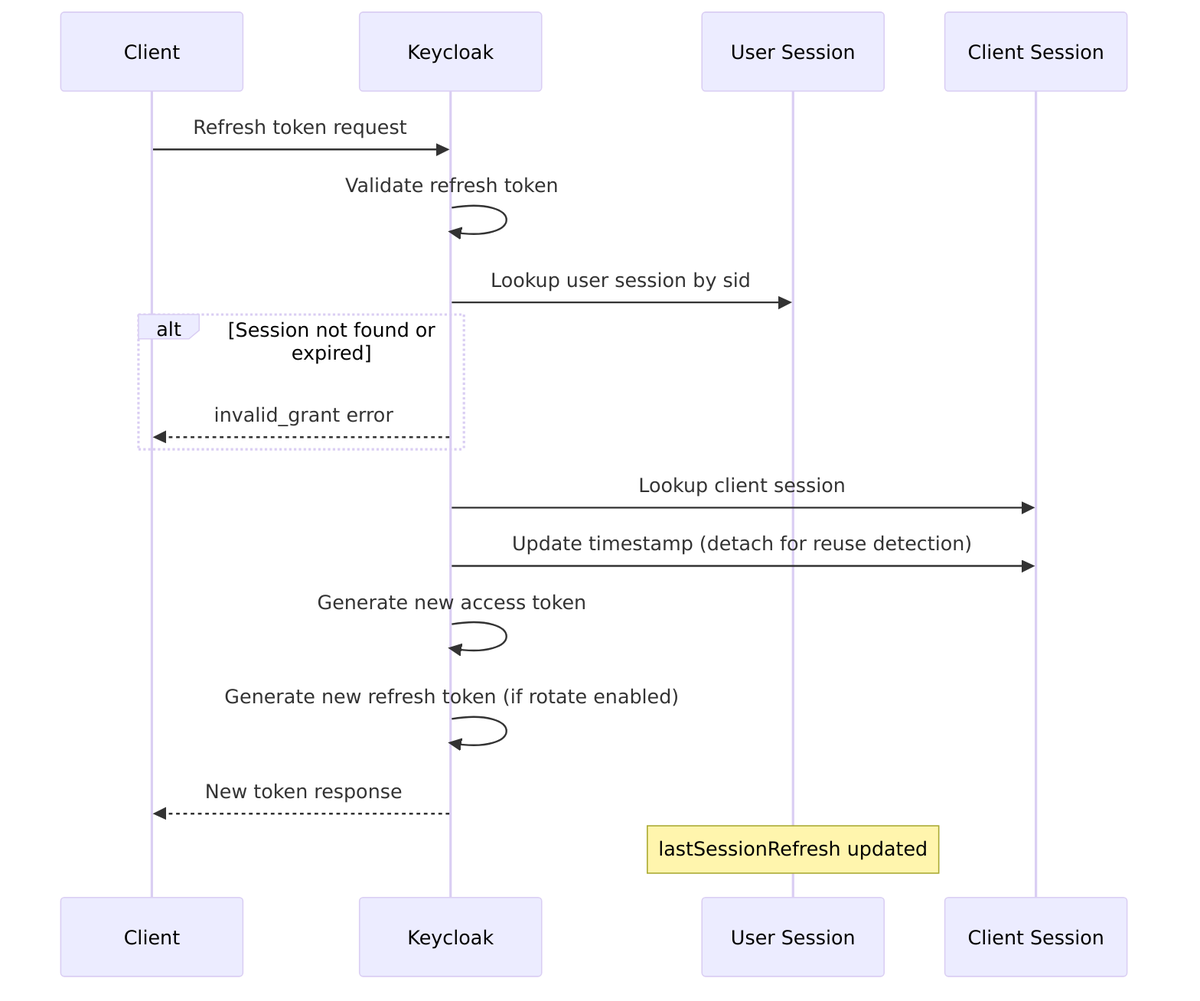
Refresh Token Reuse Detection:
Keycloak tracks refresh token usage to detect potential token theft. If someone tries to reuse an old refresh token after a new one has been issued, it’s a sign that the token may have been stolen.
// From TokenManager.java - refresh token tracking
String currentRefreshToken = clientSession.getCurrentRefreshToken();
int currentRefreshTokenUseCount = clientSession.getCurrentRefreshTokenUseCount();

if (refreshToken.equals(currentRefreshToken)) {
    // Same token being reused - increment counter
    currentRefreshTokenUseCount++;
    if (currentRefreshTokenUseCount > maxReuseCount) {
        // Potential token theft - revoke session
        userSessionProvider.removeUserSession(realm, userSession);
        throw new OAuthErrorException("invalid_grant", "Maximum reuse exceeded");
    }
} else {
    // New refresh cycle
    clientSession.setCurrentRefreshToken(newRefreshToken);
    clientSession.setCurrentRefreshTokenUseCount(0);
}
Token Revocation Impact
When a session is terminated—whether by logout, admin action, or expiration—all bound tokens become invalid:
Transient Sessions (Stateless Tokens)
For scenarios where you don’t want the overhead of session management, Keycloak supports stateless tokens with “transient” sessions. These sessions exist only for the duration of the request and are never persisted.
Configuration: Set client’s “Use Refresh Tokens” to OFF and enable “Transient Sessions”
// From UserSessionModel.SessionPersistenceState
public enum SessionPersistenceState {
    PERSISTENT,     // Normal persistent session
    TRANSIENT       // In-memory only, no database persistence
}
Transient Session Behavior:
- Session exists only in memory during request
- Tokens are fully self-contained (no sid lookup needed)
- Refresh tokens not issued
- Token introspection works without session lookup
Related Source Files
| Component | File |
|---|---|
| Token Manager | TokenManager.java |
| Access Token | AccessToken.java |
| Refresh Token | RefreshToken.java |
| ID Token | IDToken.java |
| Token Introspection | TokenIntrospectionEndpoint.java |
| Token Revocation | TokenRevocationEndpoint.java |
Session Logout & Revocation (Details)
When it’s time to end a session, Keycloak doesn’t just delete some data—it goes through a process to notify all affected parties. Understanding the logout mechanisms is important for implementing applications that properly clean up session state.
Logout Mechanisms Overview
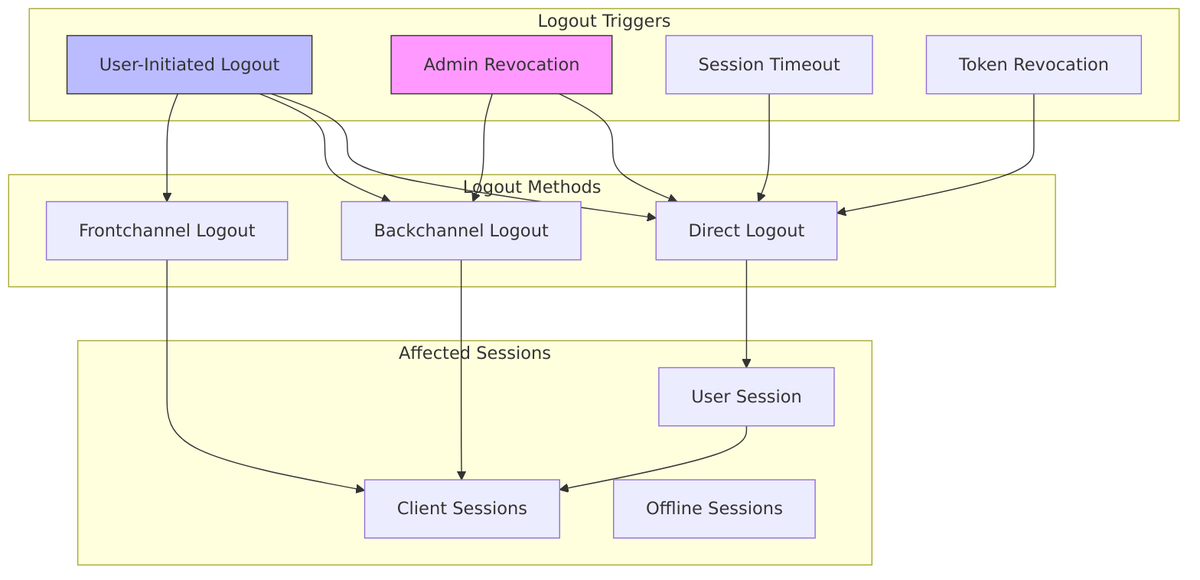
Session State Machine During Logout
The logout process isn’t instantaneous—sessions transition through states as Keycloak notifies all affected clients:
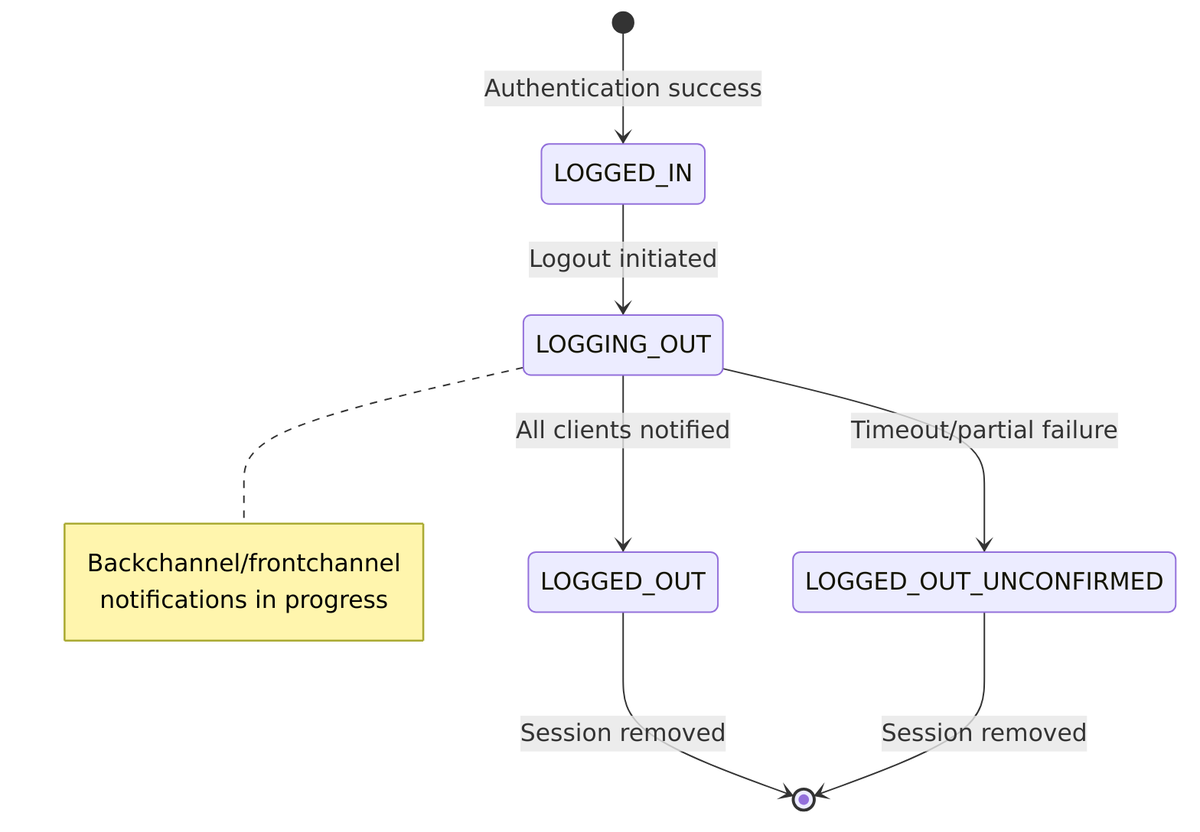
State enum from UserSessionModel.java:42-47:
public enum State {
    LOGGED_IN,              // Active session
    LOGGING_OUT,            // Logout in progress
    LOGGED_OUT,             // Fully logged out
    LOGGED_OUT_UNCONFIRMED  // Logout with unconfirmed clients
}
Direct Logout (RP-Initiated)
The standard OIDC logout flow starts when a user clicks “logout” in an application:
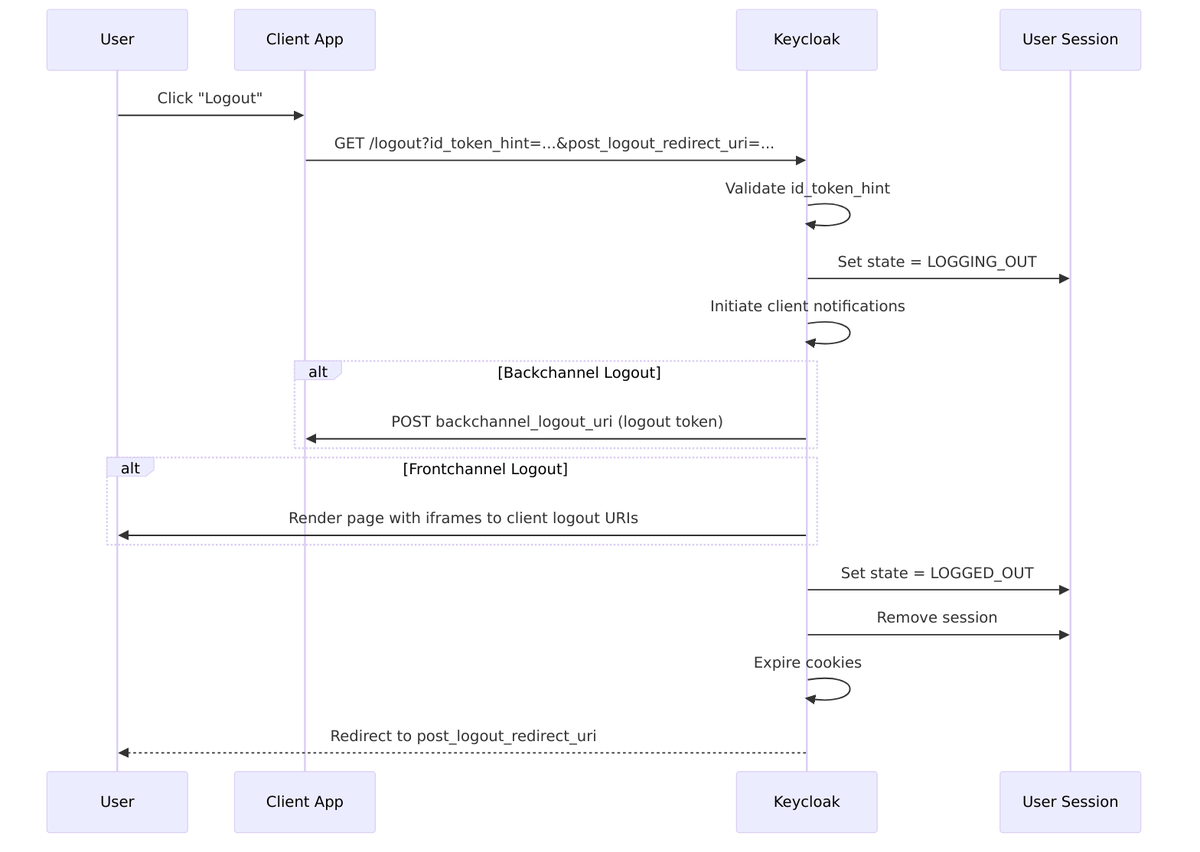
Implementation: LogoutEndpoint.java
Backchannel Logout
Backchannel logout is server-to-server communication—Keycloak directly calls each client’s logout endpoint. This is more reliable than frontchannel because it doesn’t depend on the user’s browser.
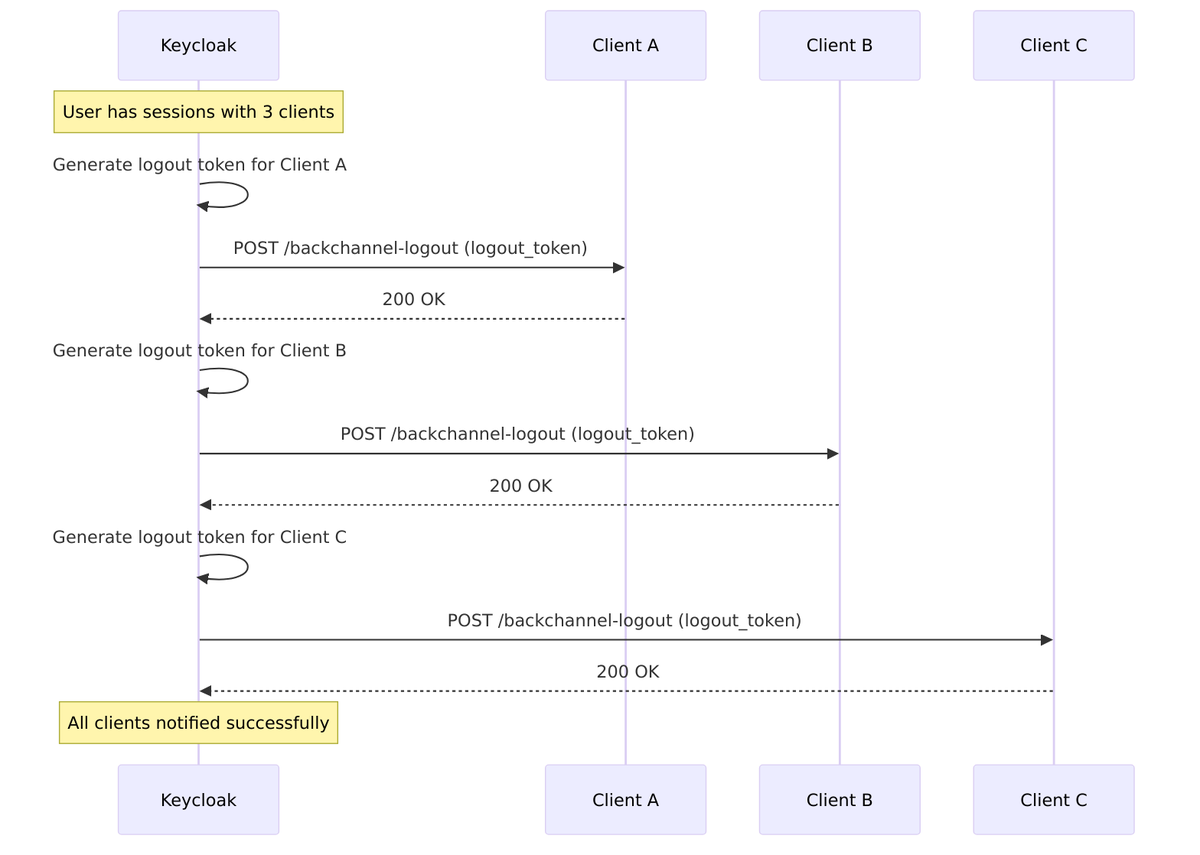
Logout Token Structure:
"iss": "https://keycloak.example.com/realms/myrealm",
"sub": "user-uuid",
"aud": "client-id",
"iat": 1704063600,
"jti": "unique-logout-token-id",
"sid": "user-session-uuid",
"events": {
"http://schemas.openid.net/event/backchannel-logout": {}
}
}
Implementation: BackchannelLogoutAction.java
Frontchannel Logout
Frontchannel logout uses the user’s browser to notify clients via iframes. This works when backchannel isn’t available but is less reliable since it depends on the browser.
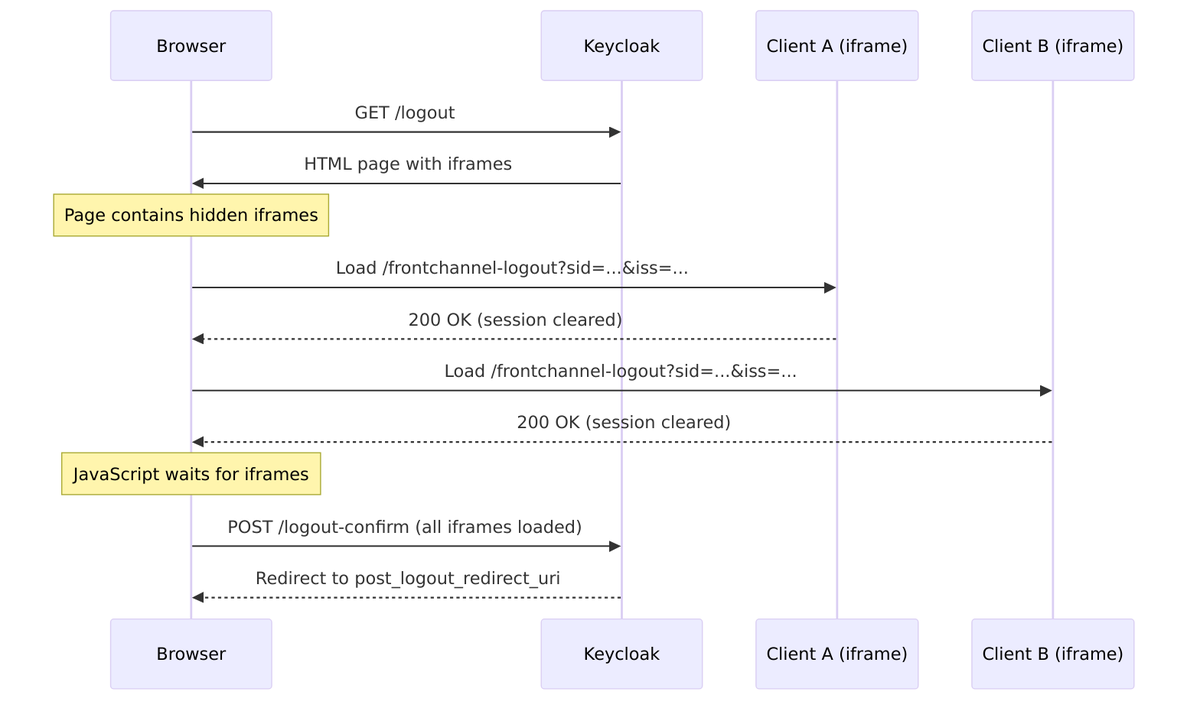
Admin Session Revocation
Administrators can forcibly revoke sessions through the Admin API:
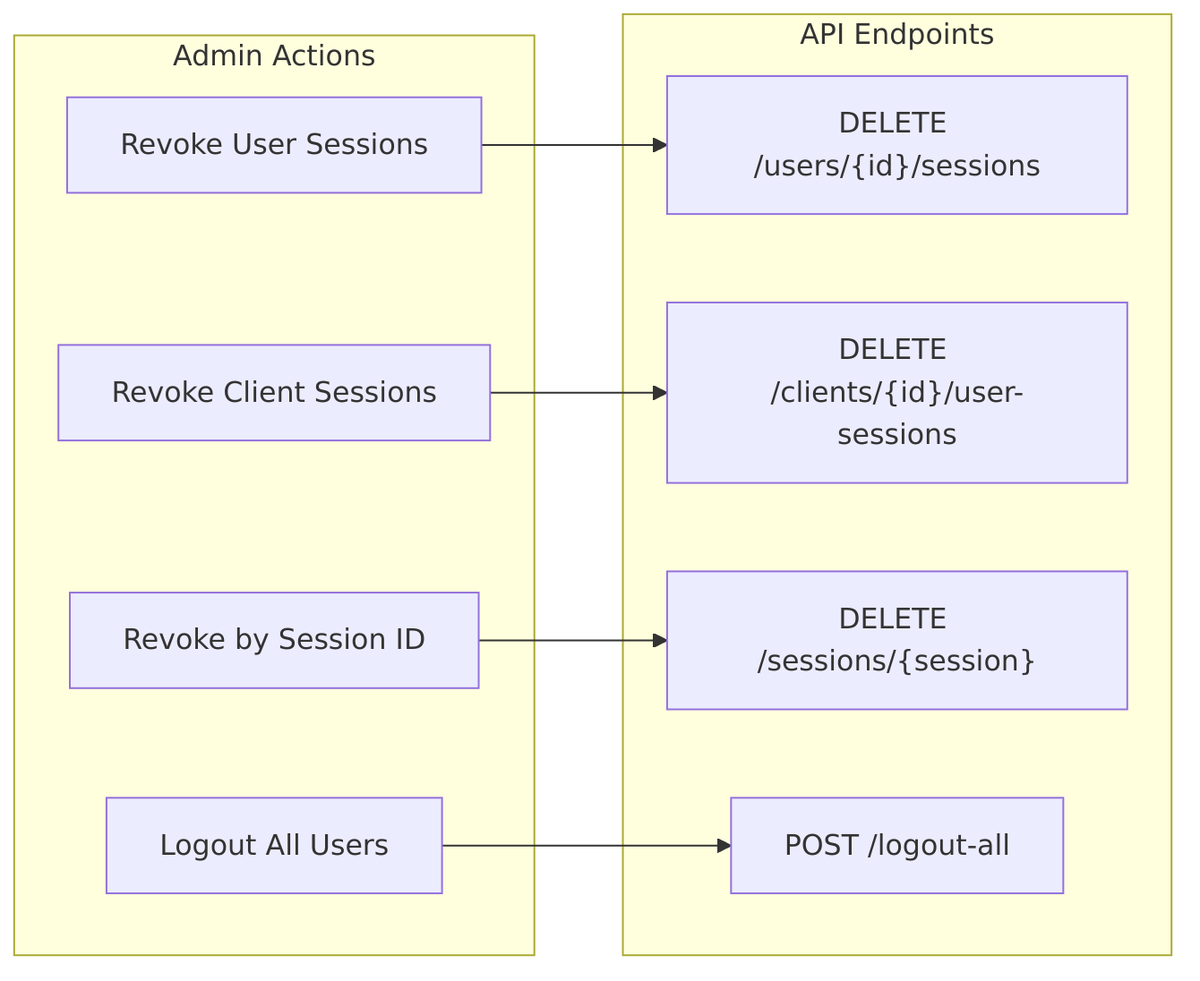
Implementation: UserResource.java
Token Revocation Endpoint
Clients can revoke tokens directly, which terminates the associated session:
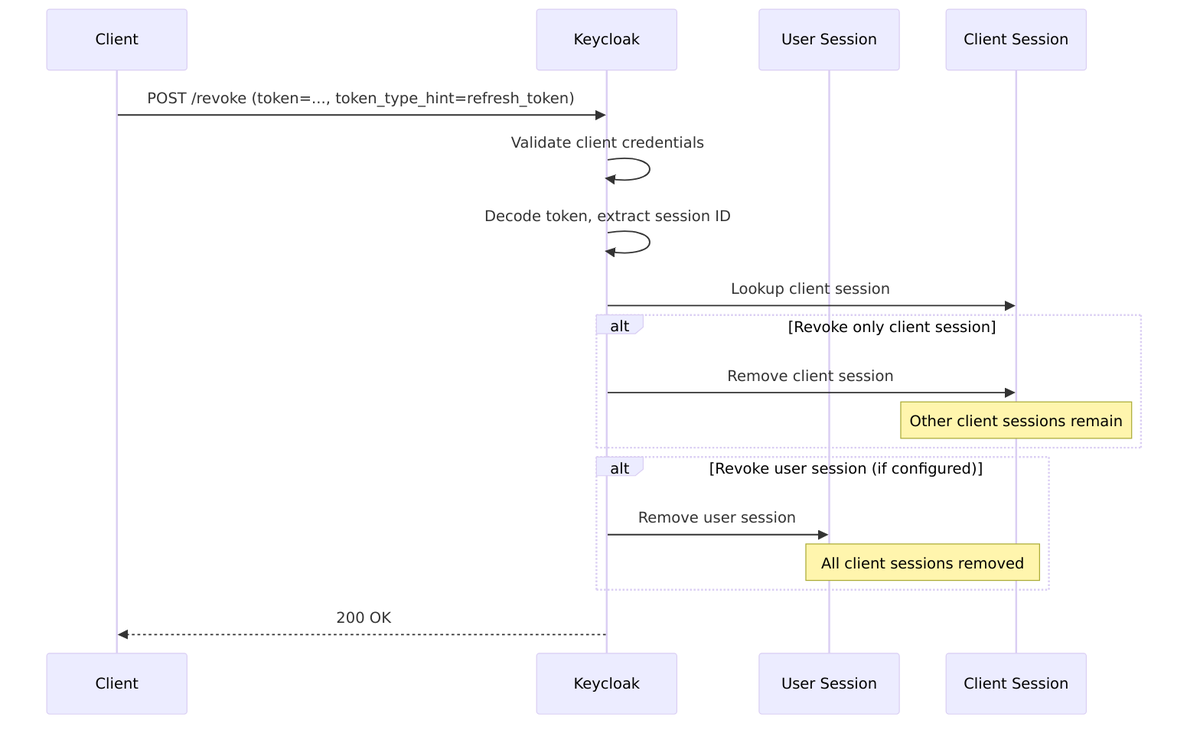
Logout Configuration Options
| Setting | Default | Description |
|---|---|---|
backchannelLogout |
false | Enable backchannel logout for client |
backchannel.logout.url |
– | URL to send logout token |
backchannel.logout.session.required |
true | Include sid in logout token |
backchannel.logout.revoke.offline.tokens |
false | Also revoke offline tokens |
frontchannelLogout |
false | Enable frontchannel logout |
frontchannel.logout.url |
– | URL to load in iframe |
Related Source Files
| Component | File |
|---|---|
| Logout Endpoint | LogoutEndpoint.java |
| Authentication Manager | AuthenticationManager.java |
| Backchannel Logout | BackchannelLogoutAction.java |
| Logout Token | LogoutToken.java |
| Token Revocation | TokenRevocationEndpoint.java |
| Session State | UserSessionModel.java |
Offline Sessions (Details)
This section provides more detail on offline sessions. These long-lived sessions are what make “stay logged in” functionality work for mobile apps and background services.
What are Offline Sessions?
Offline sessions are special sessions created when a client requests the offline_access scope. They’re designed for scenarios where users need persistent access without frequent re-authentication—think mobile apps that sync data in the background or services that run overnight jobs.
Key Characteristics:
- Created alongside regular sessions when
offline_accessscope is requested - Have separate, longer timeout configurations
- Survive regular session logout (unless explicitly revoked)
- Stored in separate cache and database tables
- Each client has its own offline session (can be removed independently)
Offline Session Creation
When a client requests offline_access, Keycloak creates parallel session structures:
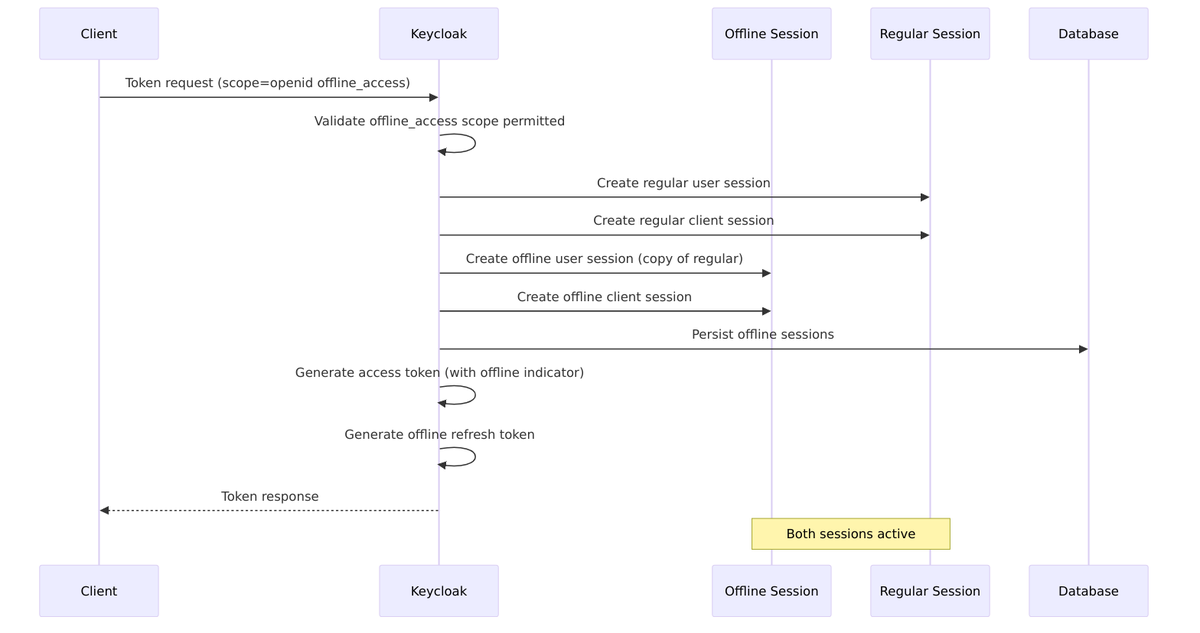
Implementation: TokenManager.java
// Check if offline_access scope requested
if (TokenUtil.hasScope(tokenScopes, OAuth2Constants.OFFLINE_ACCESS)) {
    // Create offline session from online session
    UserSessionModel offlineSession = session.sessions()
        .createOfflineUserSession(userSession);
    session.sessions()
        .createOfflineClientSession(clientSession, offlineSession);
}
Offline vs Online Session Relationship
Online and offline sessions are linked but independent. You can log out of your online session (ending browser-based access) while your mobile app continues working with its offline session.
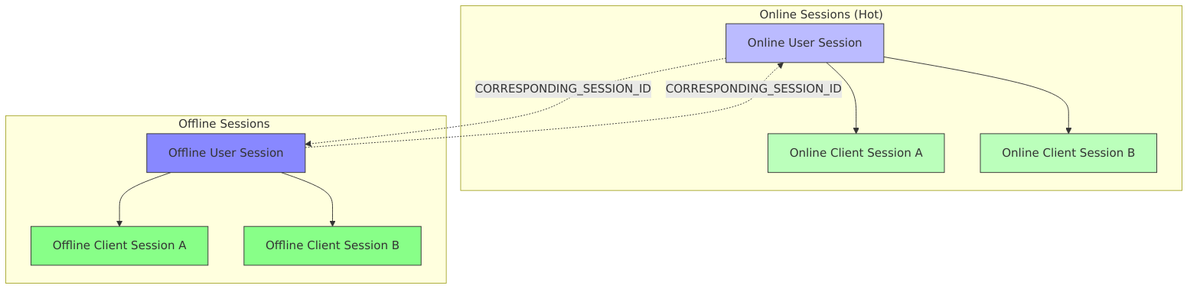
Linking via Notes:
// When creating offline session, link to online session
offlineSession.setNote(
    UserSessionModel.CORRESPONDING_SESSION_ID,
    onlineSession.getId()
);
onlineSession.setNote(
    UserSessionModel.CORRESPONDING_SESSION_ID,
    offlineSession.getId()
);
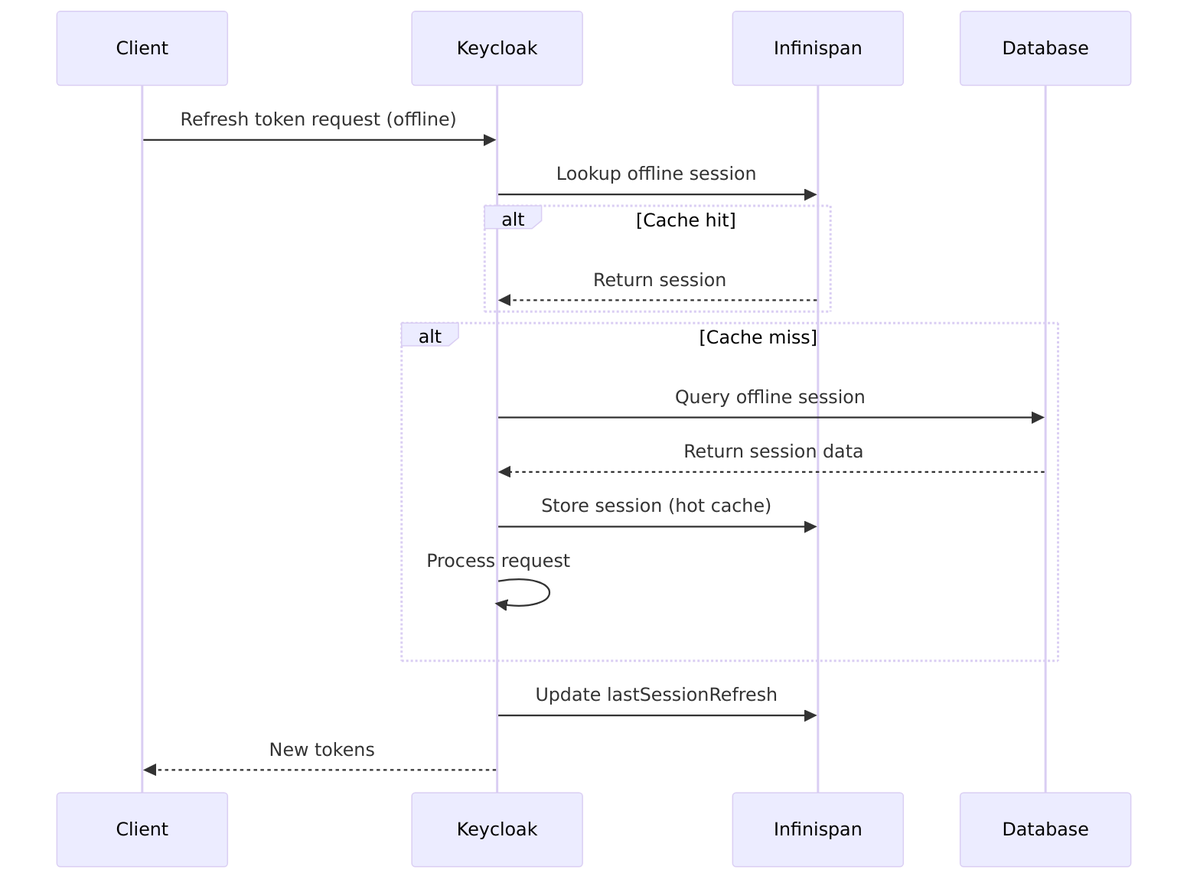
Offline Session Storage
Offline sessions use separate caches and are always persisted to the database for durability:
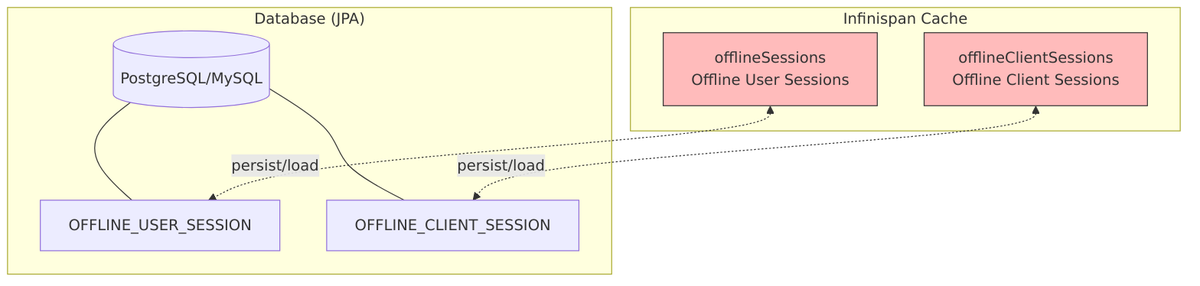
Offline Session Expiration
Offline sessions have their own expiration rules, typically much longer than online sessions:
Timeout Configuration:
| Setting | Default | Description |
|---|---|---|
offlineSessionIdleTimeout |
30 days | Idle timeout for offline sessions |
offlineSessionMaxLifespanEnabled |
false | Enable max lifespan limit |
offlineSessionMaxLifespan |
60 days | Max lifespan (if enabled) |
clientOfflineSessionIdleTimeout |
0 | Client-specific idle timeout (0 = use realm) |
clientOfflineSessionMaxLifespan |
0 | Client-specific max lifespan (0 = use realm) |
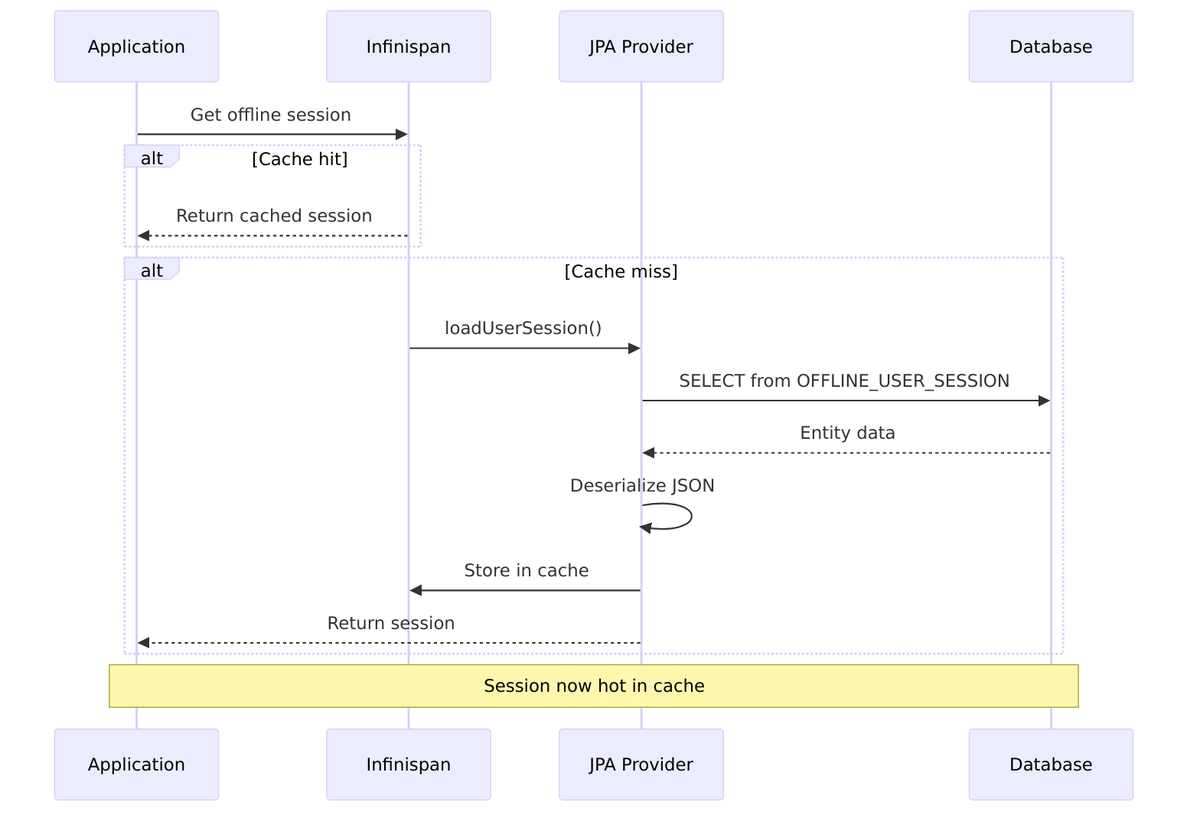
Lazy Loading of Offline Sessions
Offline sessions are loaded lazily from the database—they’re not all kept in memory. This allows Keycloak to handle millions of offline sessions without exhausting memory:
Offline Token vs Regular Refresh Token
| Aspect | Regular Refresh Token | Offline Refresh Token |
|---|---|---|
| Session Type | Online user session | Offline user session |
| Lifespan | Hours (SSO timeout) | Days/months (offline timeout) |
| Survives Logout | No | Yes (unless explicitly revoked) |
| Scope Required | None | offline_access |
| Storage | Cache (+ optional DB) | Always persisted to DB |
| Token Claim | typ: "Refresh" |
typ: "Offline" |
Related Source Files
| Component | File |
|---|---|
| Offline User Session | OfflineUserSessionModel.java |
| Token Manager | TokenManager.java |
| Session Provider | InfinispanUserSessionProvider.java |
| Offline Session Entity | PersistentUserSessionEntity.java |
| Session Persister | JpaUserSessionPersisterProvider.java |
User Sessions (Details)
This section covers the UserSessionModel interface—the core abstraction for representing authenticated users in Keycloak.
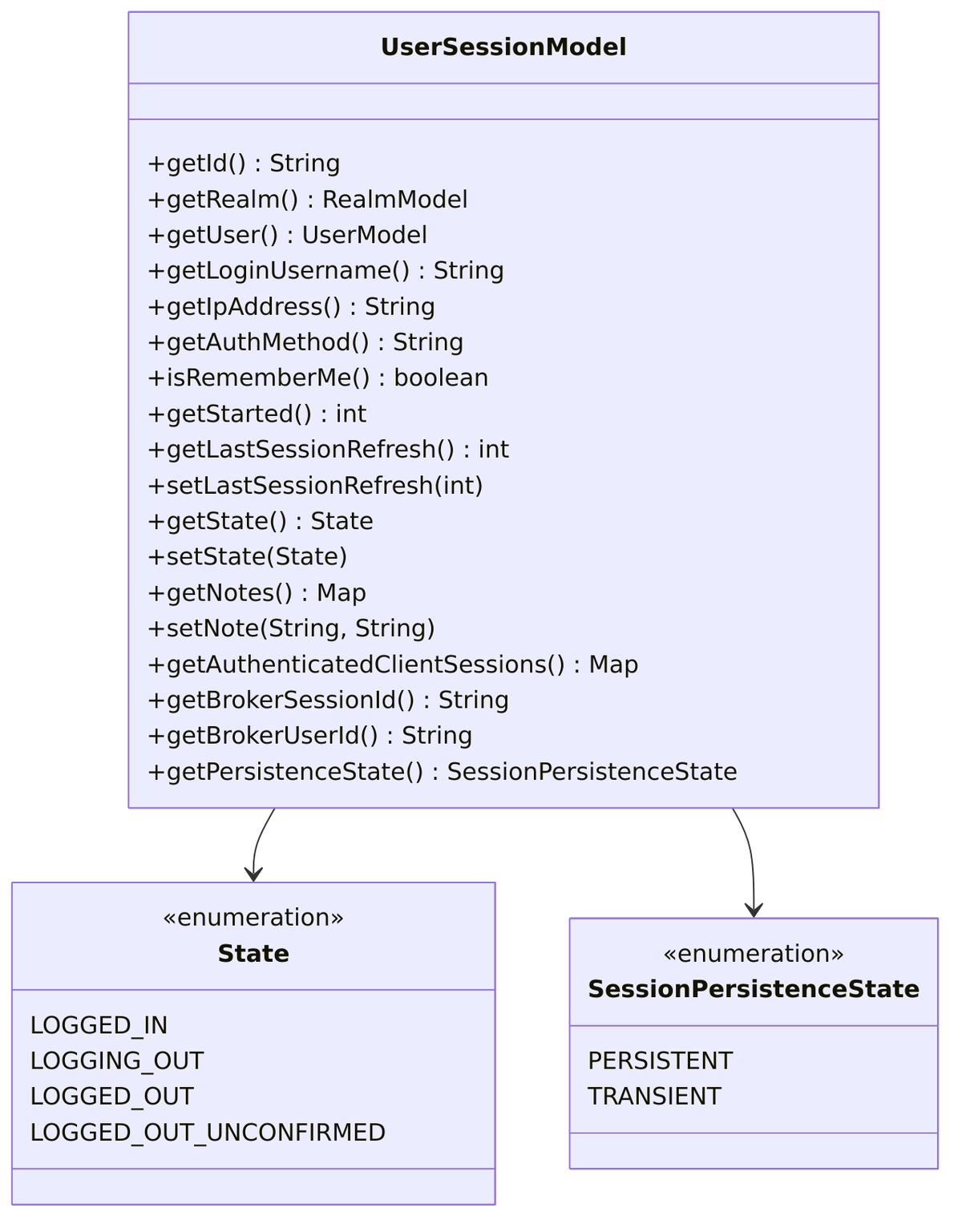
UserSessionModel Interface
The interface is defined in UserSessionModel.java:
User Session Fields
| Field | Type | Description |
|---|---|---|
id |
String | Unique session identifier (UUID) |
realm |
RealmModel | Realm this session belongs to |
user |
UserModel | Authenticated user |
loginUsername |
String | Username used during login |
ipAddress |
String | Client IP address |
authMethod |
String | Authentication method used |
rememberMe |
boolean | Whether “remember me” was checked |
started |
int | Timestamp when session was created |
lastSessionRefresh |
int | Last activity timestamp |
state |
State | Current session state |
notes |
Map |
Session metadata |
brokerSessionId |
String | Federated IdP session ID |
brokerUserId |
String | User ID at federated IdP |
persistenceState |
SessionPersistenceState | PERSISTENT or TRANSIENT |
User Session Creation
Here’s what happens when a new user session is created:
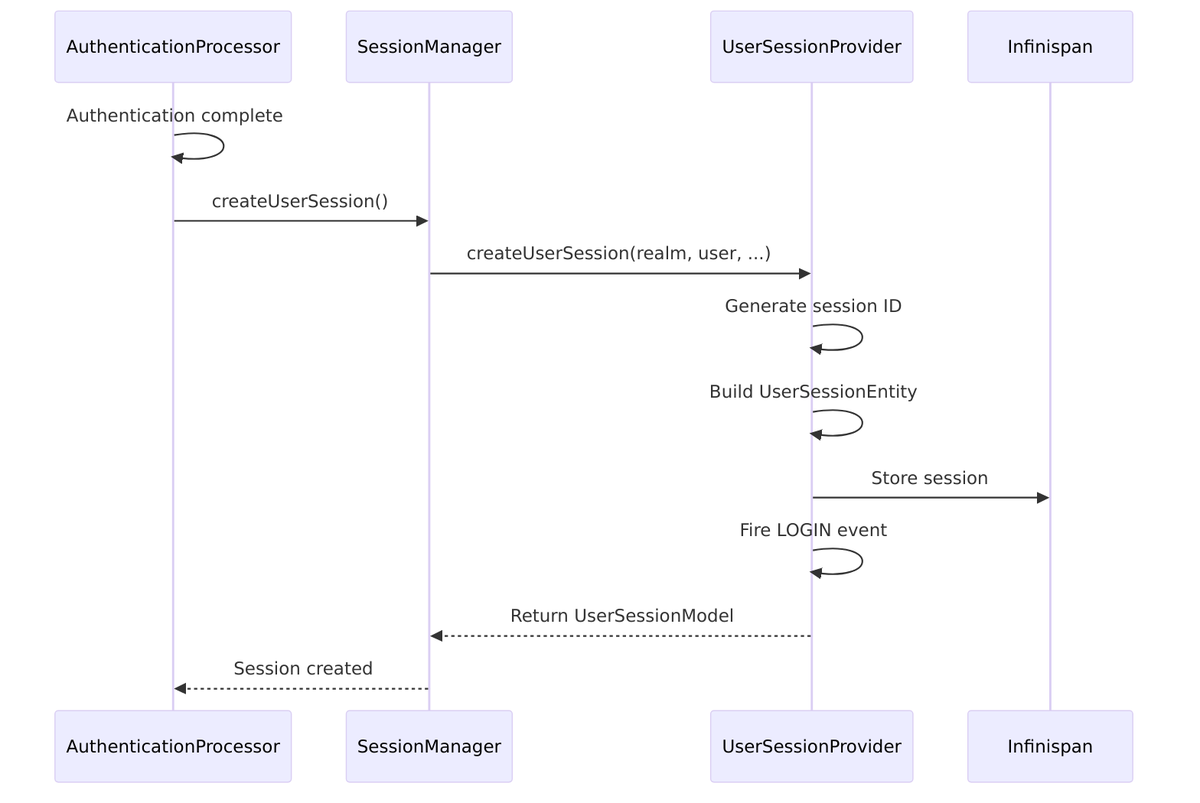
Creation method from InfinispanUserSessionProvider.java:
public UserSessionModel createUserSession(
    RealmModel realm,
    UserModel user,
    String loginUsername,
    String ipAddress,
    String authMethod,
    boolean rememberMe,
    String brokerSessionId,
    String brokerUserId) {

    String id = KeycloakModelUtils.generateId();
    int timestamp = Time.currentTime();

    UserSessionEntity entity = new UserSessionEntity(id);
    entity.setRealmId(realm.getId());
    entity.setUserId(user.getId());
    entity.setLoginUsername(loginUsername);
    entity.setIpAddress(ipAddress);
    entity.setAuthMethod(authMethod);
    entity.setRememberMe(rememberMe);
    entity.setStarted(timestamp);
    entity.setLastSessionRefresh(timestamp);
    entity.setState(State.LOGGED_IN);
    entity.setBrokerSessionId(brokerSessionId);
    entity.setBrokerUserId(brokerUserId);

    // Store in cache
    cache.put(id, entity);

    return wrap(realm, entity, false);
}
User Session Notes
Notes provide a flexible way to attach metadata to sessions:
| Note Key | Purpose | Example Value |
|---|---|---|
AUTH_TIME |
Original authentication time | “1704063600” |
ACR |
Authentication Context Class Reference | “gold”, “silver” |
AMR |
Authentication Methods References | “pwd otp” |
IMPERSONATOR_ID |
ID of admin who impersonated | “admin-uuid” |
IMPERSONATOR_USERNAME |
Username of impersonator | “admin” |
CORRESPONDING_SESSION_ID |
Linked offline/online session | “session-uuid” |
LOCALE |
User’s locale preference | “en-US” |
IDP |
Identity provider used | “google” |
IDP_USER_ID |
User ID at IdP | “12345” |
// Setting notes
userSession.setNote("ACR", "gold");
userSession.setNote("AUTH_TIME", String.valueOf(Time.currentTime()));

// Reading notes
String acr = userSession.getNote("ACR");
Map<string, string=""> allNotes = userSession.getNotes();
Session Refresh Mechanism
Keycloak doesn’t update lastSessionRefresh on every single activity—that would create too much cache/database traffic. Instead, it uses a threshold:
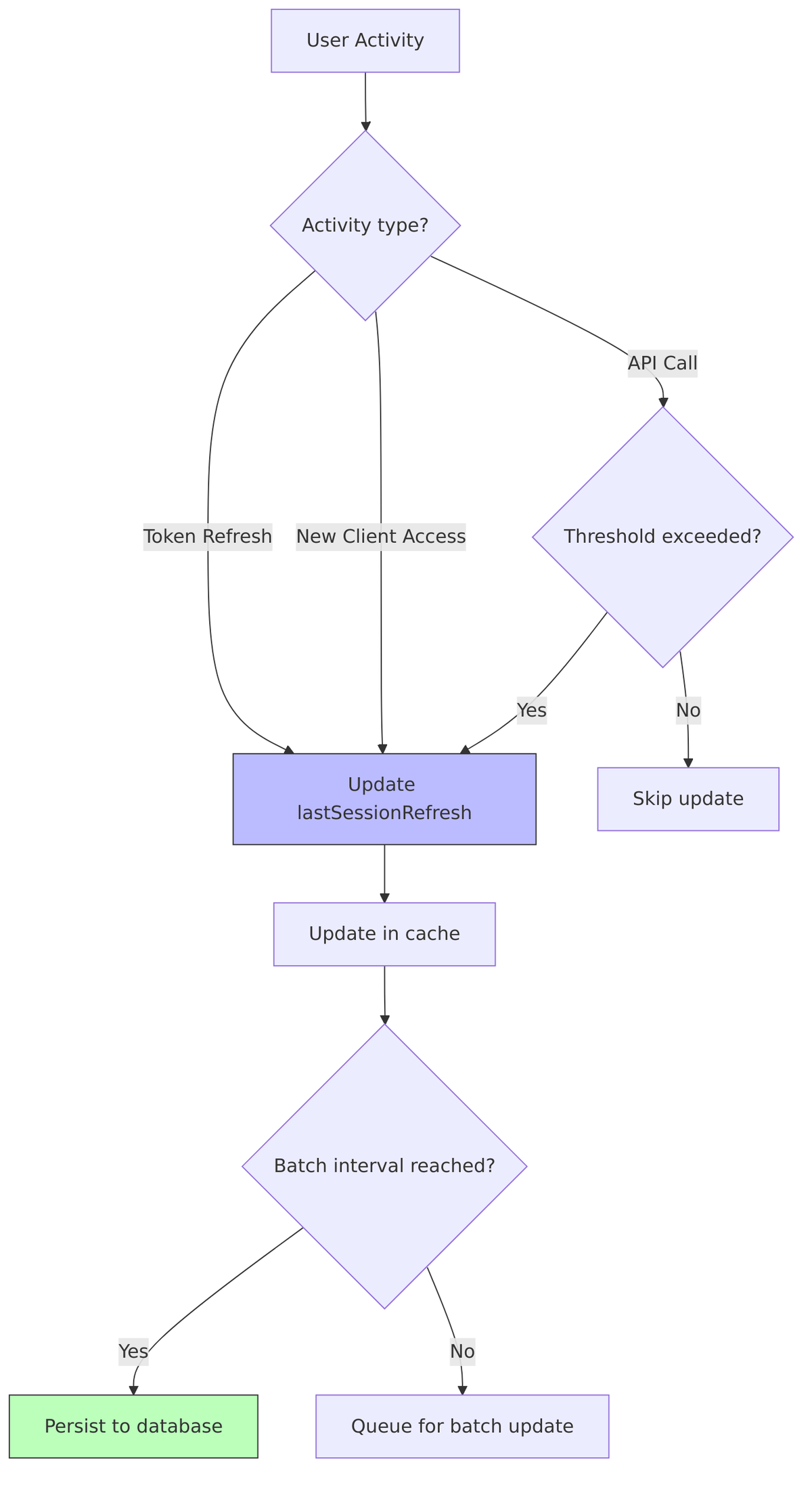
Refresh threshold:
- Updates happen if time since last refresh exceeds
SESSION_REFRESH_INTERVAL(default: 60 seconds) - Prevents excessive updates during rapid activity
User Session Events
| Event | When Fired | Purpose |
|---|---|---|
LOGIN |
Session created | Audit, trigger actions |
LOGOUT |
Session terminated | Cleanup, notify clients |
REFRESH_TOKEN |
Token refreshed | Track activity |
CODE_TO_TOKEN |
Auth code exchanged | Track token issuance |
IMPERSONATE |
Admin impersonation | Security audit |
Related Source Files
| Component | File |
|---|---|
| User Session Model | UserSessionModel.java |
| User Session Provider | UserSessionProvider.java |
| Infinispan Implementation | InfinispanUserSessionProvider.java |
| User Session Entity | UserSessionEntity.java |
| Session Adapter | UserSessionAdapter.java |
Client Sessions (Details)
While user sessions represent the overall authentication, client sessions track the relationship between a user and specific applications. Let’s examine the AuthenticatedClientSessionModel interface in detail.
AuthenticatedClientSessionModel Interface
The interface is defined in AuthenticatedClientSessionModel.java:
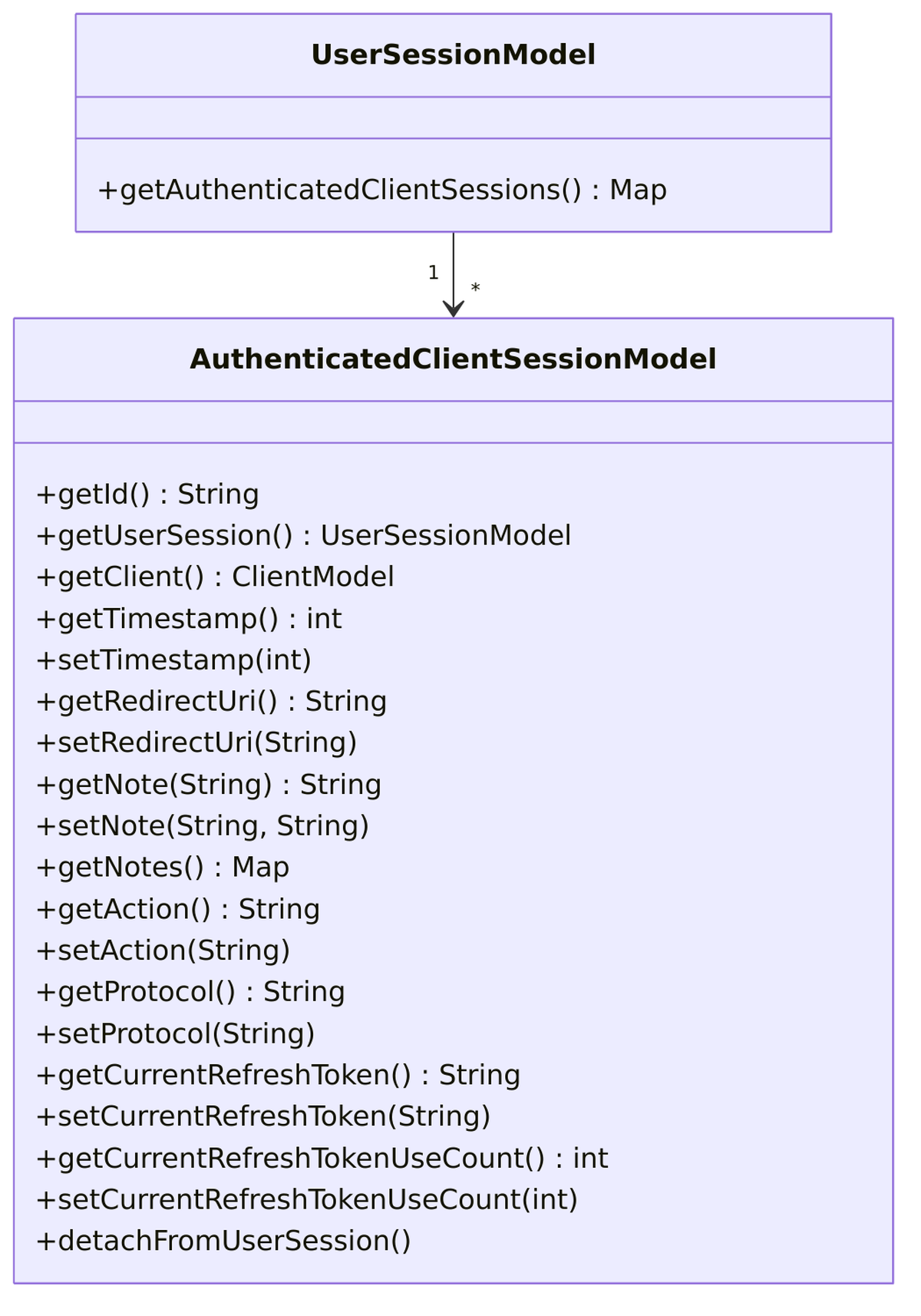
Client Session Fields
| Field | Type | Description |
|---|---|---|
id |
String | Unique client session identifier |
userSession |
UserSessionModel | Parent user session |
client |
ClientModel | The client application |
timestamp |
int | Last activity timestamp |
redirectUri |
String | OAuth redirect URI |
action |
String | Current action (if any) |
protocol |
String | Protocol used (openid-connect, saml) |
notes |
Map |
Client-specific metadata |
currentRefreshToken |
String | Current refresh token ID |
currentRefreshTokenUseCount |
int | Reuse count for detection |
Client Session Creation
Client sessions are created when a user first accesses a client application:
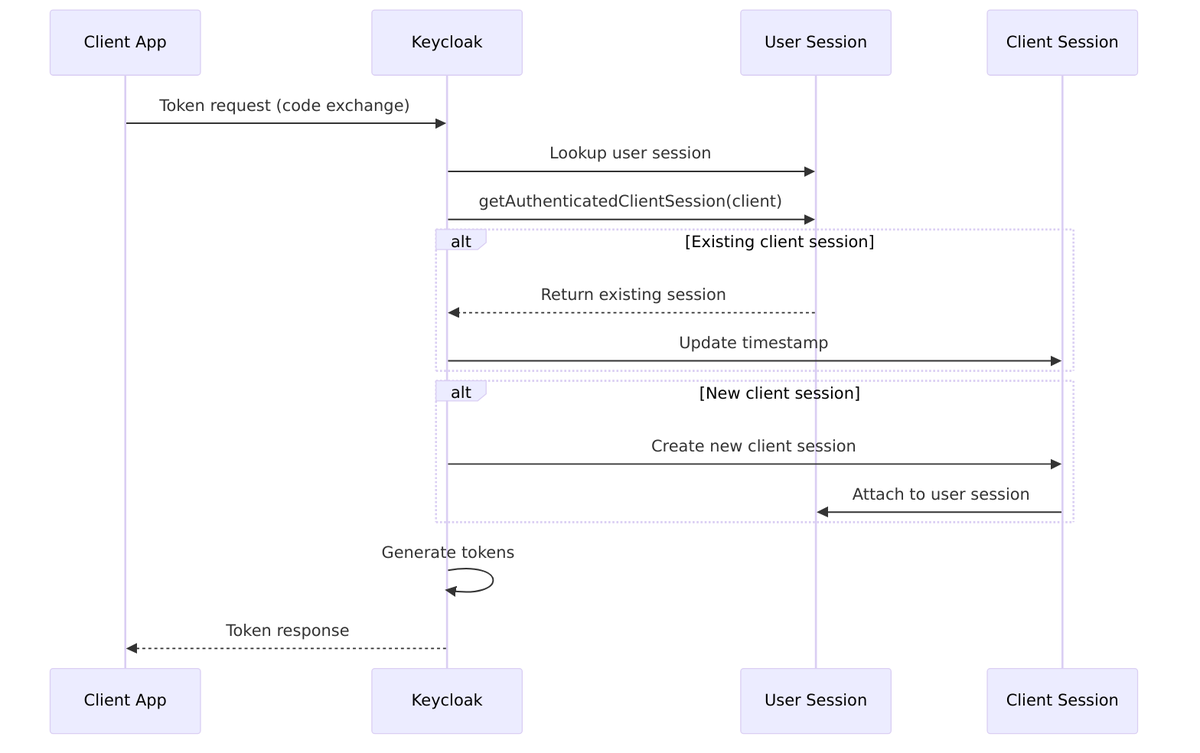
Client Session Notes
| Note Key | Purpose | Example Value |
|---|---|---|
client_session_state |
OIDC session state | “abc123” |
iss |
Token issuer | “https://kc.example.com/realms/test” |
code_challenge |
PKCE challenge | “E9Melhoa2OwvFrEMTJguCHaoeK1t8URWbuGJSstw-cM” |
code_challenge_method |
PKCE method | “S256” |
scope |
Granted scopes | “openid profile email” |
nonce |
OIDC nonce | “xyz789” |
dpop_jkt |
DPoP thumbprint | “Hx3…” |
Refresh Token Tracking
Client sessions track refresh token usage to detect potential token theft:
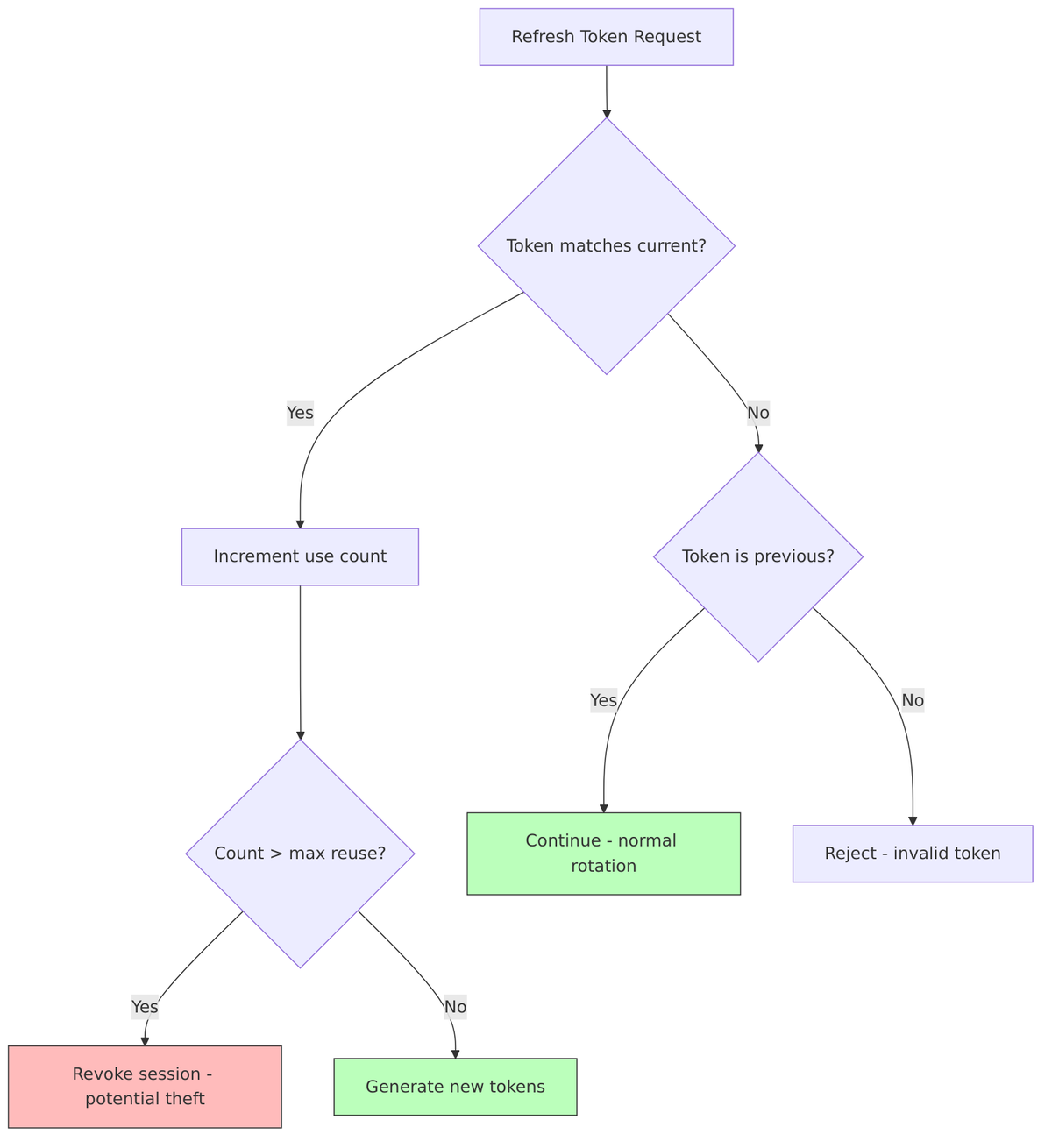
Implementation:
// Tracking current refresh token
clientSession.setCurrentRefreshToken(newRefreshTokenId);
clientSession.setCurrentRefreshTokenUseCount(0);

// On reuse detection
int count = clientSession.getCurrentRefreshTokenUseCount();
if (count > maxCount) {
    // Token theft detected - revoke everything
    sessionProvider.removeUserSession(realm, userSession);
    throw new OAuthErrorException("invalid_grant", "Token reuse detected");
}
Detaching Client Sessions
The detachFromUserSession() method is used during refresh token rotation to create a snapshot for comparison:
// Detach creates a snapshot for comparison
clientSession.detachFromUserSession();

// After generating new tokens, reattach
userSession.getAuthenticatedClientSessions().put(clientId, clientSession);
Client Session Cascade Behavior
Related Source Files
| Component | File |
|---|---|
| Client Session Model | AuthenticatedClientSessionModel.java |
| Client Session Entity | AuthenticatedClientSessionEntity.java |
| Client Session Adapter | AuthenticatedClientSessionAdapter.java |
| Token Manager | TokenManager.java |
Persistent Sessions (Details)
To survive restarts and provide durability, Keycloak persists sessions to the database. This section covers the JPA persistence layer that makes this possible.
Database Schema
Persistent Entities
PersistentUserSessionEntity
From PersistentUserSessionEntity.java:
@Entity
@Table(name = "OFFLINE_USER_SESSION")
@NamedQueries({
    @NamedQuery(name = "findUserSessionById",
        query = "SELECT s FROM PersistentUserSessionEntity s WHERE s.userSessionId = :sessionId"),
    @NamedQuery(name = "findUserSessionsByUser",
        query = "SELECT s FROM PersistentUserSessionEntity s WHERE s.userId = :userId"),
    @NamedQuery(name = "removeUserSessionsByRealm",
        query = "DELETE FROM PersistentUserSessionEntity s WHERE s.realmId = :realmId")
})
public class PersistentUserSessionEntity {
    @Id
    @Column(name = "USER_SESSION_ID")
    private String userSessionId;

    @Column(name = "REALM_ID")
    private String realmId;

    @Column(name = "USER_ID")
    private String userId;

    @Column(name = "LAST_SESSION_REFRESH")
    private int lastSessionRefresh;

    @Column(name = "OFFLINE_FLAG")
    private String offlineFlag;  // "0" = online, "1" = offline

    @Column(name = "DATA")
    private String data;  // JSON serialized session data
}
PersistentClientSessionEntity
From PersistentClientSessionEntity.java:
@Entity
@Table(name = "OFFLINE_CLIENT_SESSION")
@IdClass(PersistentClientSessionKey.class)
public class PersistentClientSessionEntity {
    @Id
    @Column(name = "USER_SESSION_ID")
    private String userSessionId;

    @Id
    @Column(name = "CLIENT_ID")
    private String clientId;

    @Id
    @Column(name = "OFFLINE_FLAG")
    private String offlineFlag;

    @Column(name = "TIMESTAMP")
    private int timestamp;

    @Column(name = "DATA")
    private String data;  // JSON serialized client session data
}
Persistence Provider
The JpaUserSessionPersisterProvider handles all database operations:
public class JpaUserSessionPersisterProvider implements UserSessionPersisterProvider {

    // Create new persistent session
    public void createUserSession(UserSessionModel userSession, boolean offline) {
        PersistentUserSessionEntity entity = new PersistentUserSessionEntity();
        entity.setUserSessionId(userSession.getId());
        entity.setRealmId(userSession.getRealm().getId());
        entity.setUserId(userSession.getUser().getId());
        entity.setLastSessionRefresh(userSession.getLastSessionRefresh());
        entity.setOfflineFlag(offline ? "1" : "0");
        entity.setData(serializeSessionData(userSession));

        em.persist(entity);
    }

    // Load session from database
    public UserSessionModel loadUserSession(
        RealmModel realm, String sessionId, boolean offline) {

        PersistentUserSessionEntity entity = em.find(
            PersistentUserSessionEntity.class, sessionId);

        if (entity == null) return null;

        return deserializeToModel(realm, entity);
    }

    // Batch update lastSessionRefresh
    public void updateLastSessionRefreshes(
        RealmModel realm, int lastSessionRefresh,
        Collection<string> sessionIds, boolean offline) {

        em.createNamedQuery("updateSessionRefreshes")
            .setParameter("lastSessionRefresh", lastSessionRefresh)
            .setParameter("sessionIds", sessionIds)
            .setParameter("offlineFlag", offline ? "1" : "0")
            .executeUpdate();
    }
}
Data Serialization
Session data is stored as JSON in the DATA column, enabling flexible storage of notes and metadata:
"loginUsername": "john.doe",
"ipAddress": "192.168.1.100",
"authMethod": "openid-connect",
"rememberMe": false,
"brokerSessionId": null,
"brokerUserId": null,
"notes": {
"AUTH_TIME": "1704063600",
"ACR": "1"
}
}
Lazy Loading Architecture
Sessions are loaded from the database on-demand to conserve memory:
Cache-Database Synchronization
Configuration for Persistence
| Property | Default | Description |
|---|---|---|
spi-user-sessions-infinispan-offline-session-cache-entry-lifespan-override |
-1 | Override cache TTL |
spi-user-sessions-infinispan-preload-offline-sessions-from-database |
false | Preload on startup |
spi-user-sessions-infinispan-sessions-per-segment |
64 | Sessions per cache segment |
Related Source Files
| Component | File |
|---|---|
| JPA Persister Provider | JpaUserSessionPersisterProvider.java |
| User Session Entity | PersistentUserSessionEntity.java |
| Client Session Entity | PersistentClientSessionEntity.java |
| User Session Adapter | PersistentUserSessionAdapter.java |
| Client Session Adapter | PersistentAuthenticatedClientSessionAdapter.java |
| Persister Provider Interface | UserSessionPersisterProvider.java |
Conclusion
This document covered Keycloak’s session management. From the temporary authentication sessions that track your progress through login, to the long-lived offline sessions that keep mobile apps working for weeks, each component plays a role in providing secure authentication.
Key takeaways:
-
Sessions form a hierarchy: Authentication sessions ? User sessions ? Client sessions, each serving a distinct purpose.
-
Two-tier storage: Infinispan provides fast, distributed caching while the database ensures durability.
-
Cookies are the glue: Multiple cookies with different security profiles tie browser state to server-side sessions.
-
Tokens and sessions are bound: The
sidclaim creates a tight coupling between stateless JWTs and stateful sessions. -
Logout is orchestrated: Backchannel and frontchannel mechanisms ensure all parties are notified when sessions end.
Understanding these internals will help you configure Keycloak correctly, debug authentication issues, and build applications that work harmoniously with Keycloak’s session management. When something goes wrong, you’ll now know exactly where to look—whether it’s cache eviction, cookie misconfiguration, or timeout settings.